Fidelity accounts won't download [Edited]

ilovebatz
ilovebatz Quicken Windows Subscription Member ✭✭

In about mid August I started having problems with Quicken not downloading my credit card transactions. All of my investment account transactions downloaded fine. In late August I contacted support only to end up creating a copy of my file, then deactivating and adding all my accounts. This worked for my credit card transactions, and bank accounts but really messed up my Fidelity Investment accounts. [Edited - Language] I can no longer download transactions, even though it says the accounts are updated. I have tried several of the fixes that I found here on the forum but none of them have worked. I tried using the "zzz-Fidelity…" account fix, I tried deactivating the accounts and removing the identifying information, restarting Quicken, then re-adding the accounts, and a couple other things but nothing has worked. I am sure it is a Quicken problem because it was working until I had to deactivate and readd all my accounts.

Quicke version: R64.23
Windows Version 10.0.19045 Build 19045, desktop PC

Any suggestions. Thank you.

Harry

Comments

  • Quicken Kristina
    Quicken Kristina Quicken Windows Subscription Moderator mod

    Hello @ilovebatz,

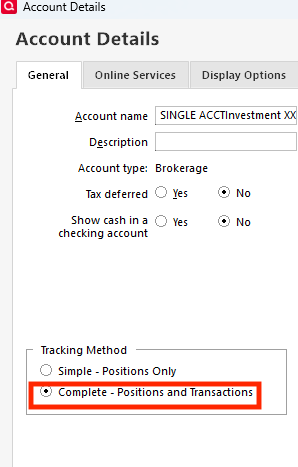
    Thank you for letting us know you're seeing this issue. To clarify, when you say that you can no longer download transactions for your investment accounts, do you mean that it is on Simple Investing (positions only, no transactions), or can you see the register, but new transactions are not downloading?

    If it is on Simple Investing, you should be able to correct the issue by navigating to Tools>Account List, clicking the Edit button next to the problem account, then on the General tab, select Complete and click the OK button.

    Screenshot 2025-09-05 at 4.52.36 PM.png

    I look forward to your response!

    Quicken Kristina

    Make sure to sign up for the email digest to see a round up of your top posts.

  • ilovebatz
    ilovebatz Quicken Windows Subscription Member ✭✭

    It is NOT on simple investing, that was one of the first frustrating things. I opened my investment accounts and couldn't see my transactions, I changed that so that I could see transactions in the account.

  • Quicken Kristina
    Quicken Kristina Quicken Windows Subscription Moderator mod

    Thank you for your reply,

    To troubleshoot the issue, please make sure that your transaction register is sorted by Date (in case the missing transactions downloaded, but are hidden by the sort order).

    WinDateSortGif_support

    Are any of the missing transactions still showing pending on the financial institution side? Are any of the missing transactions from more than 90 days in the past? Were any of the transactions previously downloaded then deleted?

    If the above troubleshooting does not resolve the issue, please be aware that there is a Community Alert for this issue:

    I recommend bookmarking the alert to be notified of any updates, once available, and to know when the issue is resolved.

    Thank you!

    Quicken Kristina

    Make sure to sign up for the email digest to see a round up of your top posts.

This discussion has been closed.