AT&T renaming rule problem

Mike Harris
Mike Harris Quicken Windows Subscription Member ✭✭

I tried to get help with this previously, but it's still not working. I only get a new bill every 6 months, so it's difficult to troubleshoot.

Problem: Downloaded transaction "ATT* BILL PAYMENT 800-331-0500 TX" does not match renaming rule: "If payee contains 'Att' rename to AT&T".
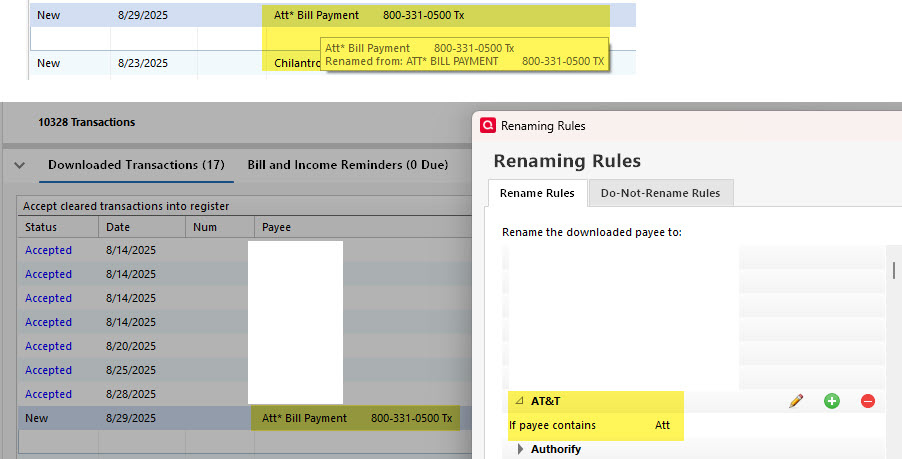
att.jpg

Comments

  • Jim_Harman
    Jim_Harman Quicken Windows Subscription SuperUser ✭✭✭✭✭

    I reviewed my comments from your previous post and I don't know why your rule is not working.

    It appears that the downloaded Payee name starts with Att* Bill Payment, with a space after the *. Have you tried If payee contains Att*

    Per my earlier analysis that should be the same as "If payee contains Att" but there have been changes to the renaming rules dialogs so maybe something has changed about the way the rules are interpreted.

    QWin Premier subscription
  • Rocket J Squirrel
    Rocket J Squirrel Quicken Windows Subscription SuperUser ✭✭✭✭✭

    This is just a guess. It appears that QWin thinks it has already renamed the payee from upper case to mixed case. Perhaps this is superseding your actual renaming rule.

    image.png

    There are various setting scattered through Preferences which might affect this, such as

    • Capitalize payees & categories
    • Capitalize first letter only in downloaded payee names

    Maybe playing with those might help. As I said, just a guess.

    Quicken user since version 2 for DOS, as of 2025 using QWin Premier (US) on Win10 Pro & Win11 Pro on 2 PCs.

  • Mike Harris
    Mike Harris Quicken Windows Subscription Member ✭✭

    The mixed case is because I have checked the box for "Capitalize first letter only in downloaded payee names". It doesn't seem to negatively affect any other rules, though I have always suspected it could cause problems.

  • Mike Harris
    Mike Harris Quicken Windows Subscription Member ✭✭

    Looking through my previous post, I did verify that just "att" matched everything with a hand-crafted QFX file, but it's not working with my credit card download using Express Web Connect+. I've tried just "att*" in the past, and it didn't match all of the ones that it should - like in the example QFX file. However, I just created a new rule to match "att*" to see if that works. Before, I was trying to use the same rule with two matches, and it won't allow both att and att*, as it just ignores the last one added.

  • Rocket J Squirrel
    Rocket J Squirrel Quicken Windows Subscription SuperUser ✭✭✭✭✭

    Quicken user since version 2 for DOS, as of 2025 using QWin Premier (US) on Win10 Pro & Win11 Pro on 2 PCs.

This discussion has been closed.


