CC-800 Error Message Updating Accounts from Schwab
I use windows and automatically download my daily transactions from Schwab. Everything was working perfectly when all of the sudden it would not download. the message said CC- 800 Error Message Updating. I followed the instructions on how to deactivate and reactivate and every time I do it comes up with a message saying I can't reactivate because there is a downloaded transaction that has to be downloaded. I then update and there is no transactions that download. How can I get this fixed. They say it is a Quicken problem and not Schwab!
Answers
-
Hello @Bill40,
Thank you for letting us know you're encountering this issue. Since you're being roadblocked by an error claiming there's a downloaded transaction to accept (which is a known issue), please try the following troubleshooting:
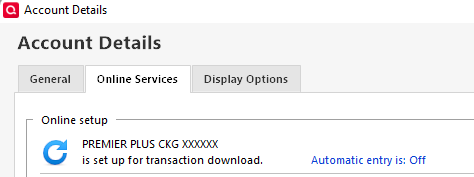
Start by closing and reopening your Quicken. If the issue persists, then please navigate to Tools>Account List and click the Edit button next to the problem account. On the Online Services tab, you should see a blue link that says "Automatic entry is".
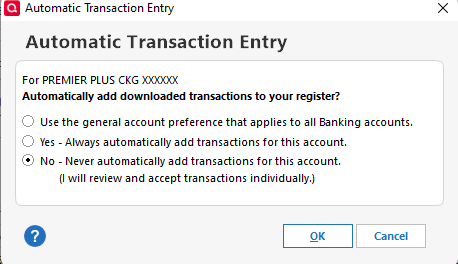
Click that link. If Automatic entry is on, turn it off. If it is off, turn it on.
Once that is done, click OK, read the information window, then close your Quicken program. Wait about 5 seconds, then reopen it. Test to see if the issue is resolved.
Please let me know how it goes!
Quicken Kristina
Make sure to sign up for the email digest to see a round up of your top posts.
0 -
Quicken Kristina
Make sure to sign up for the email digest to see a round up of your top posts.
0
Categories
- All Categories
- 56 Product Ideas
- 36 Announcements
- 224 Alerts, Online Banking & Known Product Issues
- 22 Product Alerts
- 702 Welcome to the Community!
- 671 Before you Buy
- 1.2K Product Ideas
- 53.7K Quicken Classic for Windows
- 16.3K Quicken Classic for Mac
- 1K Quicken Mobile
- 812 Quicken on the Web
- 111 Quicken LifeHub