Retirement Account Transaction Not Showing In Calendar

gary.tynes
gary.tynes Member ✭✭✭

I am starting to do QCDs from a retirement account by using checks on that account written to our church. I have set up a calendar entry for that transaction using the retirement account but it will not allow me to select the retirement account using the 'Select Calendar Accounts', that account is not listed. However, when I look at the 'Bill and Income Reminders' below the calendar or the 'Bills & Income' tab, it does show up. I would like it to show up on the regular calendar because I don't normally look at those other two options.

I am using Quicken Classic Deluxe, R64.23 Build 27.1.64.23. User since 1992.

Comments

  • Quicken Kristina
    Quicken Kristina Quicken Windows Subscription Moderator mod

    Hello @gary.tynes,

    Thank you for letting us know you're encountering this issue. When I check my Quicken, I see that Investment accounts do not show up as options to select for calendar accounts. The only exception to this is if you have a linked cash account.

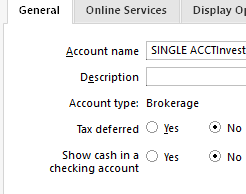
    Depending on what kind of retirement account your account shows as in Quicken, you may be able to use a linked cash account to bypass the issue. To see if that is an option for your account type, navigate to Tools>Account List and click the Edit button next to the account. On the General tab, if the option exists for your account type, you should see it near the upper left.

    Screenshot 2025-09-09 at 5.50.23 PM.png

    I hope this helps!

    Quicken Kristina

    Make sure to sign up for the email digest to see a round up of your top posts.

  • gary.tynes
    gary.tynes Member ✭✭✭

    I don't think the work around about the linked cash will work, this account doesn't have a cash account related to it. I will just use the options explain above with the 'Bill and Income Reminders' below the calendar or the 'Bills & Income' tab.

    Thanks,
    Gary

  • Quicken Kristina
    Quicken Kristina Quicken Windows Subscription Moderator mod
    edited September 12

    Thank you for your reply,

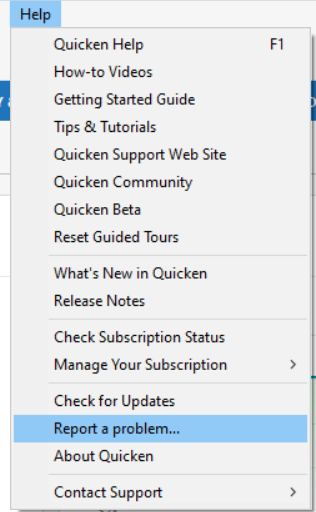
    I forwarded this issue to the proper channels to determine if this is intended behavior or not (and to correct it, if it's not intended behavior). If you would like to contribute to the investigation, please navigate to Help>Report a Problem and send a problem report with log files attached.

    Report a Problem QWin.png

    Thank you!

    (CBT-812)

    Quicken Kristina

    Make sure to sign up for the email digest to see a round up of your top posts.

This discussion has been closed.