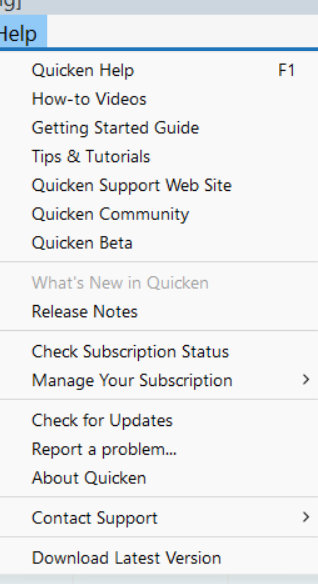
QD just sits with blank screen for ~ 60 seconds
This just began roughly a week ago. Previously a startup on my desktop took about 10 seconds.
On startup, my cpu monitor spikes for the first 2-3 seconds, then drops to nearly zero, and there is over 6 Gb of memory available the entire time. It just sits there for a minute - an empty window, no header bar or anything else. There have been no recent Win 11 updates. There was a Q update that I installed late last week to R64.23 - wonder if that caused this issue? I am pretty sure this is some communication issue with some Quicken server and I do not use any of the Quicken cloud services except for downloading.
Comments
-
Just firing a shot into the dark here …
Try doing a Help / Refresh Sign in and see if that makes future Quicken startups a little faster.0 -
Yes, that seems to have made the difference, thanks for the suggestion. Now I wonder why that was necessary after the R64.23 update?
0 -
Charlie@ I experienced the same thing yesterday, and I'm still on R64.16
0 -
Just firing a shot into the dark here …
Try doing aHelp / Refresh Sign inand see if that makes future Quicken startups a little faster.I don't see Help/Refresh Sign in as an option
Are you referring to a different Help located somewhere else ?
0 -
Help > "Refresh Sign in…" is a new option in R64.XX.
It would be nice if they had mentioned that in the Release Notes.
QWin Premier subscription0 -
Thanks Jim,
Mystery solved… I was looking everywhere, even under the couch, where I did find an old sock 😄
0 -
Well, the "fix" didn't last long. This morning the startup delay is back. It is actually a little over a minute delay. Any other ideas? Anyone?
0
Categories
- All Categories
- 56 Product Ideas
- 36 Announcements
- 225 Alerts, Online Banking & Known Product Issues
- 22 Product Alerts
- 702 Welcome to the Community!
- 671 Before you Buy
- 1.2K Product Ideas
- 53.7K Quicken Classic for Windows
- 16.3K Quicken Classic for Mac
- 1K Quicken Mobile
- 812 Quicken on the Web
- 111 Quicken LifeHub