Why am I getting real-time quotes and have no way to turn it off?

JRJR
JRJR Member ✭✭

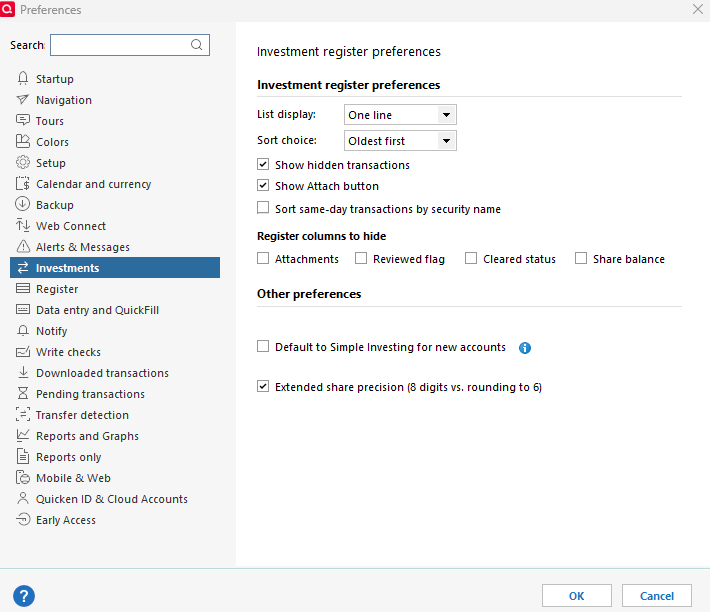
I am running Quicken Classic / Deluxe R64.23 Build 27.1.64.23 on Windows 11. After hours, if I update quotes multiple times I see that I am getting changing values. So it looks like Real-Time Quotes are enabled. Instructions say to disable real-time quotes under Edit / Preferences / Investing. But Quicken Classic Deluxe does not have such an option. There is no checkbox labelled Disable Real Time quotes in the dialog. How can I stop real-time quotes after hours?


Tagged:

Answers

  • UKR
    UKR Quicken Windows Subscription SuperUser ✭✭✭✭✭

    In Edit / Preferences / Investing, the setting you're looking for is just simply called Real-time quotes
    If it has a checkmark in the box to its left, click to remove the checkmark, then click OK.

  • Jim_Harman
    Jim_Harman Quicken Windows Subscription SuperUser ✭✭✭✭✭
    edited September 11

    I think the Real Time Quotes option and the box to enable it are only available for the Premier and higher editions of Quicken.

    @JRJR did you previously have Premier with Real Time Quotes enabled and then downgraded to Deluxe? That might explain why it is stuck on. I am not sure how you would work around that though.

    QWin Premier subscription
  • BK
    BK Quicken Windows Subscription Member ✭✭✭✭
    edited September 11

    @UKR , The Deluxe edition unfortunately does not have the Real-time quotes option!

    image.png

    So I think one way to disable it is in the Tools > Security List and temporarily uncheck the box "Download Quotes" for every security, which is of course a major pain.

    - Q Win Deluxe user since 2010, US Subscription
    - I don't use Cloud Sync, Mobile & Web, Bill Pay/Mgr

  • UKR
    UKR Quicken Windows Subscription SuperUser ✭✭✭✭✭

    The Deluxe edition unfortunately does not have the Real-time quotes option!

    Now isn't that a shame?

    And why don't the programmers fix that, so that it's consistent across feature levels:
    Starter and Deluxe: always turned off
    Premier, B&P: turned on or off based on Preferences
    After downgrade to Deluxe or Starter: forced off.

This discussion has been closed.