2 Windows computers connected to Fidelity, one more accurate than the other [Edited]
I loan out my stocks in my fidelity account and get paid interest for doing it. I use to get the transaction to not do anything to the balances; it would just say added or removed. Now they say bought or sold, and it still doesn't affect any balances.
I still have the same issues with money market balances being off.
Also, I have a second laptop with my program on it. On that computer, I didn't need had to reauthorize my account on 7/29/2025, and it still shows the zzz in front of the Fidelity name on one step update. That computer's balances are more accurate than my main one.
I am on windows computers. How can I update and sync the account on my 2nd computer and have that be the correct balances on my main computer. Would I have to get the cloud update you offer now to do that?
[Edited - Readability]
Comments
-
Hello @traderbrian,
Thank you for sharing your experience. Based on your description, it sounds like your main computer is connected to Fidelity using the Express Web Connect + (EWC+) connection and your second computer is connected using the Direct Connect connection (which Fidelity will no longer support in the near future).
The difference in connection method is the most likely reason for the differences you see in the data.
Cloud sync would not do what you're wanting because, based on your description, these are two completely separate data files. Syncing your file with the Quicken Cloud would allow you to view and edit that file on the Quicken Companion Apps (Quicken on the Web and Quicken Mobile). Please note that the companion apps do not support all the features that the desktop app does.
You mentioned that in your main file, your money market balances are incorrect. Are you able to spot the reason why? It sounds like you looked at the shares that you loan out, and determined that they aren't the culprit, since, even though they show as buy/sell transactions, they are not impacting your balances.
I look forward to your reply!
Quicken Kristina
Make sure to sign up for the email digest to see a round up of your top posts.
0 -
For my fidelity individual account it keeps turning my fidelity money market fund to a cash balance. I buy fzdxx the money market fund and the next day it reports it as a cash balance. It does not do that in my IRA account for the same fund. How do i get that to stop? So if i buy you online backup and i back up my main computer it wont have any effect on the second computer to keep them both in sync or will it?
0 -
Thank you for your reply @traderbrian,
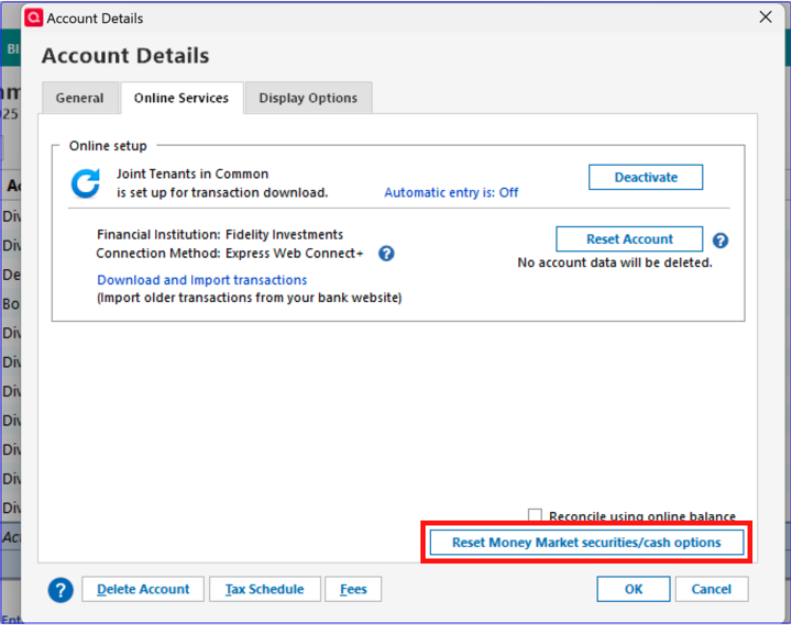
Not all account types offer the option, but if you haven't already done so, I recommend that you navigate to Tools>Account List, click the Edit button next to the problem account, then choose the Online Services tab and check to see if there's an option to reset money market securities/cash.
To answer your second question, Quicken Online Backup is intended as a backup service that allows you to have up to 10 backups per Quicken file saved on Quicken-controlled servers. This gives you a way to restore backup files even if something renders your on site files inaccessible (such as a computer crash or an external hard drive failing).
It is not intended to be used as a way to sync between two computers. Additionally, since the Direct Connect option with Fidelity will be going away in the near future, it makes more sense to try to track down what is making your balances less correct in your main file.
Thank you!
Quicken Kristina
Make sure to sign up for the email digest to see a round up of your top posts.
0
Categories
- All Categories
- 56 Product Ideas
- 36 Announcements
- 224 Alerts, Online Banking & Known Product Issues
- 22 Product Alerts
- 702 Welcome to the Community!
- 671 Before you Buy
- 1.2K Product Ideas
- 53.7K Quicken Classic for Windows
- 16.3K Quicken Classic for Mac
- 1K Quicken Mobile
- 812 Quicken on the Web
- 111 Quicken LifeHub