Issues with One Step Update
I'm using classic, starting this weekend, none of my accounts will update properly. One Step Update starts, spins for a min, then exits with no error and nothing is updated. I've tried:
Checking hidden accounts to ensure all are active, none are
Re-activating one account to see if it fixed it for that one, but it didn't change the behavior
It seems to have started with: B64.25 — 27.1.64.25
Has anyone seen this or have any additional suggestions on fixing it?
Answers
-
"Classic" is a generic marketing term that doesn't tell us which specific Q product you're running. So, which?
Next, let's start with a single account to see if we can gain some insight re: your issue.
SO, pick an account and tell us:
what type it is,
what's the financial institution (as known in Q),
what download method you're using (TOOLS, Account List and look at "Transactions Download" column) and, what's the last successful download (as shown in the account, immediately below the account name).Also note that since today's Monday, it's possible that nothing posted over the weekend, which would explain nothing to download.
Q user since February, 1990. DOS Version 4
Now running Quicken Windows Subscription, Business & Personal
Retired "Certified Information Systems Auditor" & Bank Audit VP-1 -
Hello @dheeks,
Thank you for the information regarding the issues you are seeing. I do have some followup questions for you.
Have you rebooted your computer recently? Are there pending Windows updates, or has your computer updated recently? Do you have a VPN, antivirus, or other software that could be interfering with Quickens ability to connect to the internet? Where is your Quicken file located? Is your file being synced with or stored on any cloud services, such as One Drive, Dropbox, etc?
Look forward to hearing back from you.Quicken Alyssa
Make sure to sign up for the email digest to see a round up of your top posts.
-1 -
It could be an install issue when the program got updated. Try reinstalling it with these simple steps:
- log out of your data file: Edit > Preferences> Quicken ID & Cloud > Sign in as a different user > Yes
- Download the manual update patch from here:
- Install the patch. This will override your prior install.
- Open your data file, log in and try On Step Update again.
Please post back with your result.
- Q Win Deluxe user since 2010, US Subscription
- I don't use Cloud Sync, Mobile & Web, Bill Pay/Mgr0 -
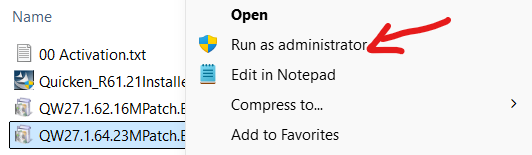
This is the 2nd upgrade I have had to DL manually. It tells me to run as admin - but I am the admin user.
0 -
It is possible that your Antivirus is blocking part of the installation process based on some users' reports. So temporarily disable your Antivirus before installing.
Re: This is the 2nd upgrade I have had to DL manually. It tells me to run as admin - but I am the admin user.
Then Right click on the DL file and select "Run as administrator".
- Q Win Deluxe user since 2010, US Subscription
- I don't use Cloud Sync, Mobile & Web, Bill Pay/Mgr-1 -
I am having the same problem and it's getting very frustrating for me. Also had this problem on a friend's laptop so problem is with Qucken and I think started with the B64.24 — 27.1.64.24 and has not been solved with the patch after that one. Fix the problem please.
0 -
I have never seen a release called B64.24 - perhaps a typo? or Beta? The last two releases were R64.23 & R64.25. We are all users like you helping each other out. I am sorry you are having issues and if you tried the steps mentioned above and didn't help, I suggest that you contact Quicken Support.
Please convey this message to your friend as well.
- Q Win Deluxe user since 2010, US Subscription
- I don't use Cloud Sync, Mobile & Web, Bill Pay/Mgr0 -
I have a related issue where one of my many banks related to One Step Update. But if I go to a single account from that institution (there are 10+ accounts for that bank), it will then update all the accounts on the second time. That bank has two accounts thaty are required to access the various accounts, sometime it works only with one and some times niether. To redo/link ever account seems annoying so I re-submit to get past the error condition.
0 -
Thank you both for chiming in on the discussion.
Have either of you tried the steps mentioned above? If so, can you answer the questions asked previously, please? This will help us determine what troubleshooting steps will be appropriate for each issue.
Thank you!
Quicken Alyssa
Make sure to sign up for the email digest to see a round up of your top posts.
0 -
Yesterday I was requested that my Fidelity accounts needed a re-authorization, which I did, relinked the accounts and they updated. Today, one step is not updating those accounts and I am seeing a little security key icon in the one step update about having new sign in to access??? When I go into Fidelity, it says I am ok with the quicken authorization. Can you please tell me how to get this to work?
Never mind. After a dozen tries over a few hours it did work?
0 -
Hello @loantaka,
Thank you for contributing to this discussion. Sharing your experience can help others having similar issues in the future.
Thank you.
Quicken Alyssa
Make sure to sign up for the email digest to see a round up of your top posts.
0
Categories
- All Categories
- 56 Product Ideas
- 36 Announcements
- 223 Alerts, Online Banking & Known Product Issues
- 22 Product Alerts
- 701 Welcome to the Community!
- 671 Before you Buy
- 1.2K Product Ideas
- 53.7K Quicken Classic for Windows
- 16.3K Quicken Classic for Mac
- 1K Quicken Mobile
- 813 Quicken on the Web
- 111 Quicken LifeHub