Accounts being removed from Mobile
Over the past 3 weeks I have had the accounts that I selected to synch to the mobile app disappear from the mobile app which is frustrating as I like to enter transactions as I make purchases on the go. When I go into desktop they have been deselected.
I have tried resetting my cloud file several time to no avail.
_________________________________________________Using Quicken Deluxe R50.8 Build 27.1.50.8 USA
Comments
-
@boomer_1970 You stated on your post that you are using Version R.50.8. That’s from way back on June of 2023.
You might want to update, there have been many fixes since then.
_________________________________________________Using Quicken Deluxe R50.8 Build 27.1.50.8 USA0 -
Thanks. I keep updating just not my signature line. I am on R64.23
_________________________________________________Using Quicken Deluxe R50.8 Build 27.1.50.8 USA
0 -
Hello @boomer_1970,
Thank you for reaching out. Have you checked the app store on your device to make sure you're running the most current version of the Quicken app?
If the app is up to date, and the issue persists, then I recommend that you try uninstalling the app, restarting your mobile device, then reinstalling the app.
Let me know how it goes!
Quicken Kristina
Make sure to sign up for the email digest to see a round up of your top posts.
0 -
Thank you. I am. it does not look to be an app issue but on the desktop version where they keep getting unchecked.
_________________________________________________Using Quicken Deluxe R50.8 Build 27.1.50.8 USA
0 -
Thank you for your reply,
Have you noticed anything in the desktop version that seems to be triggering this behavior? For example, does it always happen after running One Step Update or syncing with the cloud?
Since you mentioned this started happening about 3 weeks ago, did this unwanted behavior coincide with anything else, such as a program/computer update or unexpected program/computer shut down?
To start troubleshooting this issue, I suggest that you try validating your data file. Please save a backup file prior to performing these steps.
Validate:
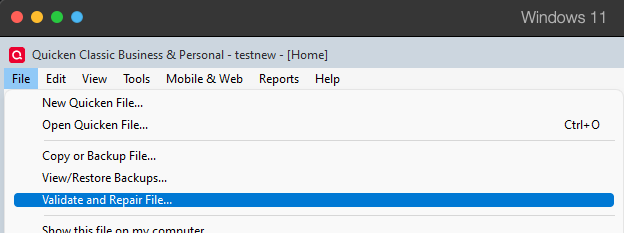
- File
- Validate and Repair File...
- Validate File
- Click OK
- Close the Data Log
- Close Quicken (leave it closed for at least 5 secs)
- Reopen Quicken and see if the issue persists.
Please let me know how it goes!
Quicken Kristina
Make sure to sign up for the email digest to see a round up of your top posts.
0 -
I have done the validate and repair however the same issue keeps occurring. My one step update when the accounts are turned on will take many hours and will often require me to use Windows task manager to shut down Quicken.
_________________________________________________Using Quicken Deluxe R50.8 Build 27.1.50.8 USA
0 -
Thank you for your reply,
Is the program actually freezing, forcing you to use task manager to shut it down, or is it just taking so long that you end up force closing the program? Does this issue happen if you run the cloud sync separately from One Step Update?
If you haven't already done so, please try restoring a backup from before the issue started and test to see if the issue is resolved in that newly restored file.
Thank you!
Quicken Kristina
Make sure to sign up for the email digest to see a round up of your top posts.
0 -
I believe it is freezing
_________________________________________________Using Quicken Deluxe R50.8 Build 27.1.50.8 USA
0 -
Thank you for your reply,
Did restoring a backup help at all?
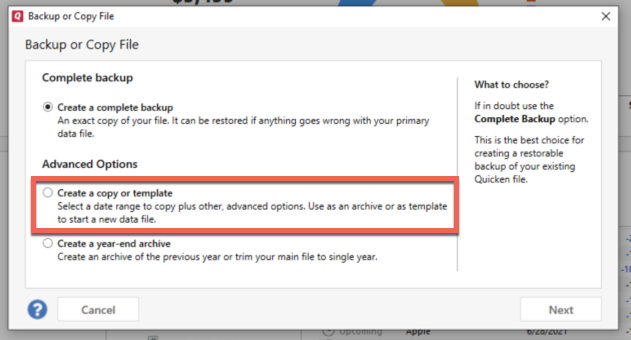
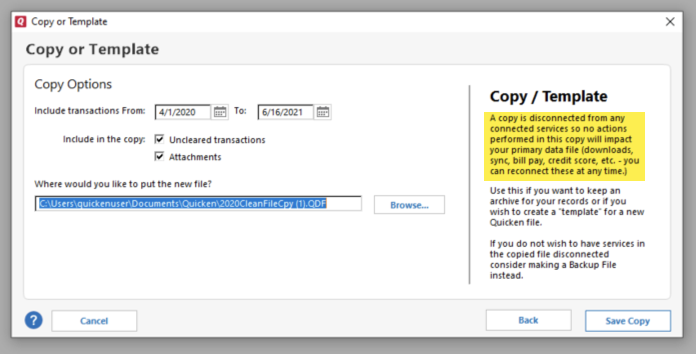
If it didn't, or if it isn't a viable option, I suggest that you try creating a copy of your data file, which will rebuild all of the internal lists and database tables. If successful, you would then move forward with the copied file. To create a copy, please navigate to File > Copy or Backup File... > Create a copy or template (see examples below), which will also allow you to select a date range to move forward with.
If you wish to move forward with your entire data file, please check the full date range of your entire data file before copying so you can enter the correct date range if you do not wish to "shrink" your file by eliminating certain dates. Note - Unless you believe older data is causing the problem, there is no need to "shrink" your file.
It's important to know that all online services will be disconnected in the copied file, and you will need to sign back in with your Quicken ID and reconnect all of your online accounts, online billers, Quicken Bill Manager services, etc if you plan to use that copied file going forward. The reason for this is that the new copy also creates a new and separate dataset ID.
Please connect only what is necessary to test if the problem is resolved at first. If the issue is resolved, then you would want to reconnect all your accounts and use the copied file as your new main file.
If the issue is not resolved in the copied file either, then feel free to switch back to your original file (For instructions on switching between Quicken files, please click here).
Thank you!
Quicken Kristina
Make sure to sign up for the email digest to see a round up of your top posts.
0
Categories
- All Categories
- 56 Product Ideas
- 36 Announcements
- 223 Alerts, Online Banking & Known Product Issues
- 22 Product Alerts
- 701 Welcome to the Community!
- 671 Before you Buy
- 1.2K Product Ideas
- 53.7K Quicken Classic for Windows
- 16.3K Quicken Classic for Mac
- 1K Quicken Mobile
- 813 Quicken on the Web
- 111 Quicken LifeHub