Downloaded transaction errors after Fidelity reauthorize
After going through the reauthorize procedure for the new method of downloading Fidelity transactions, the transaction payee names come in as ALL CAPS, matching transactions are not being identified, and my renaming rules are being ignored. My preference is mixed case payee names in the register and all my renaming rules are set up to be mixed case. This is happening with a Fidelity cash management account set up in Quicken as Brokerage with linked checking account and also happening with a Credit Card account.
Comments
-
Hello @John McCoy,
Thank you for letting us know you're seeing this issue. To clarify, the correct information is downloading, but it's not matching correctly and your renaming rules are not automatically changing the payees from all caps to mixed case?
It is possible that the change in connection method also changed the formatting of the transactions enough that Quicken is having a harder time matching to existing transactions/reminders. Aside from being all caps, did anything else in the payee name change? Have you tried deleting and recreating the renaming rules?
I look forward to your reply!
Quicken Kristina
Make sure to sign up for the email digest to see a round up of your top posts.
0 -
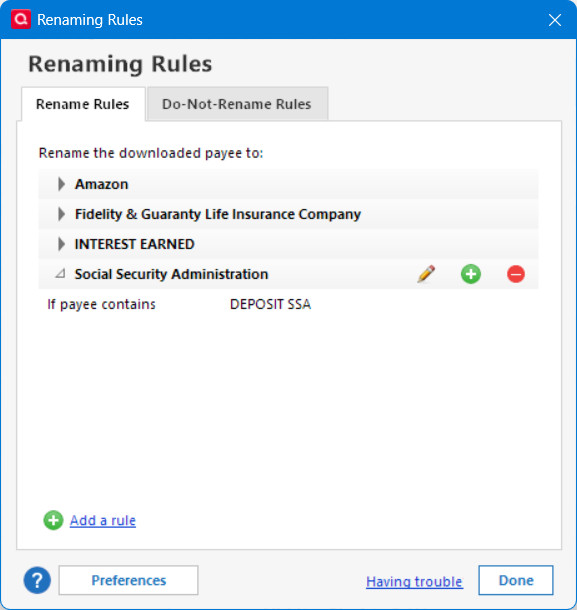
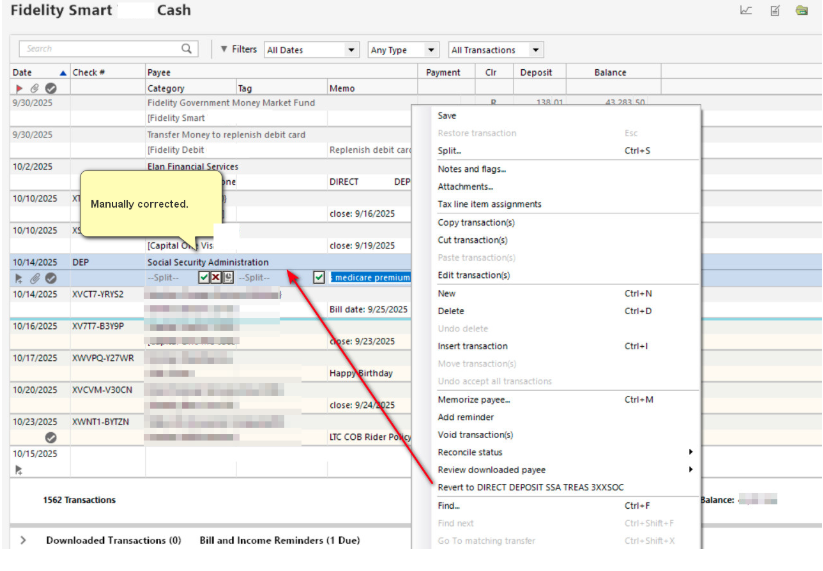
Likewise, the renaming rules for Fidelity downloaded transactions seem to be ignored for the EWC+ connection. I submitted a problem report with logs today, 10/15/2025. I had to manually correct the transaction. When I typed a part of the correct payee name, the entire transaction correctly populated with the category and description. So the payee was recognized as a memorized transaction. The DC version of the datafile processed the same renaming rule correctly for the same downloaded transaction. The EWC+ datafile was created weeks ago from a template of the working DC datafile. This is the first month where the SSA transaction occurred since using EWC+.
[Edited - Removed partial account numbers]
Deluxe R64.30, Windows 11 Pro
0 -
[Removed - Rant]
0 -
Thank you for your reply @leishirsute,
Thank you for letting me know that you're also seeing this issue, and thank you for providing screenshots and a problem report with log files attached.
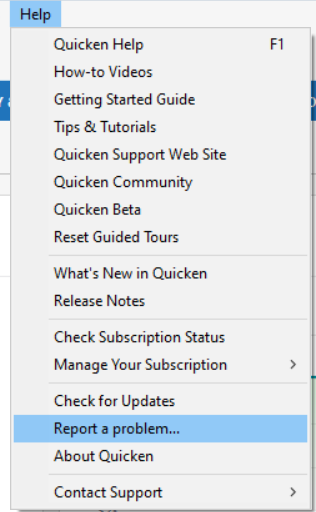
I forwarded this issue to the proper channels for further investigation and resolution. For anyone else encountering this issue, please contribute to the investigation by navigating to Help>Report a Problem and sending a problem report with log files attached. Please also provide screenshots showing the renaming rule and how it's downloading into your linked cash account. Note - Problem reports are limited to 10 attachments. If you need to send more than 10 attachments, please use a second problem report for the additional attachments.
Thank you!
(CBT-874)
Quicken Kristina
Make sure to sign up for the email digest to see a round up of your top posts.
0
Categories
- All Categories
- 56 Product Ideas
- 36 Announcements
- 223 Alerts, Online Banking & Known Product Issues
- 22 Product Alerts
- 701 Welcome to the Community!
- 671 Before you Buy
- 1.2K Product Ideas
- 53.7K Quicken Classic for Windows
- 16.3K Quicken Classic for Mac
- 1K Quicken Mobile
- 813 Quicken on the Web
- 111 Quicken LifeHub