Fidelity Reauthorization

Lasleyma
Lasleyma Quicken Windows Subscription Member ✭✭

I've fixed Fidelity downloads, but I still keep getting a request from Quicken to reauthorize an account. I've done it 20 times and it still comes up asking again the next time.

Please tell me how to stop the request to reauthorize and delete it. I think I get what I need already. This Fidelity change has been a mess. It always worked the best of all downloads and now is a mess, Shame.

on MAC with Parallels Windows 11.

Comments

  • Jim_Harman
    Jim_Harman Quicken Windows Subscription SuperUser ✭✭✭✭✭
    edited September 20

    Go to the Account List and check the Show hidden accounts box at the bottom. Are there any old Fidelity accounts that are still marked Yes in the Transaction Download column, but not Express Web Connect +?

    These would be the accounts that Fidelity still wants you to reauthorize.

    If you don't want to download transactions for these accounts, click on Edit and on the Online Services tab, click on Deactivate.

    Does that fix it for you?

    QWin Premier subscription
  • Lasleyma
    Lasleyma Quicken Windows Subscription Member ✭✭

    This sounded like a good approach. I looked and closed several old account and I think I got them all. BUT the request to reauthorize still appeared. It did not get rid of it. Any other ideas?

  • MarcColety
    MarcColety Quicken Windows Subscription Member ✭✭

    IF the accounts looking for reauthorization are Fidelity accounts, I just keep hitting the lower left corner button to skip it for now until all issues are showing as resolved. It is a pain, but it is quick so I am not letting it bother me at this point. I don't think there is anyway to turn it off from asking at this point.

  • Kevin Lee
    Kevin Lee I do not have Quicken yet Member ✭✭

    When it asks you again, is it trying to use direct connect or that new express web connect+ thing?

  • Lasleyma
    Lasleyma Quicken Windows Subscription Member ✭✭

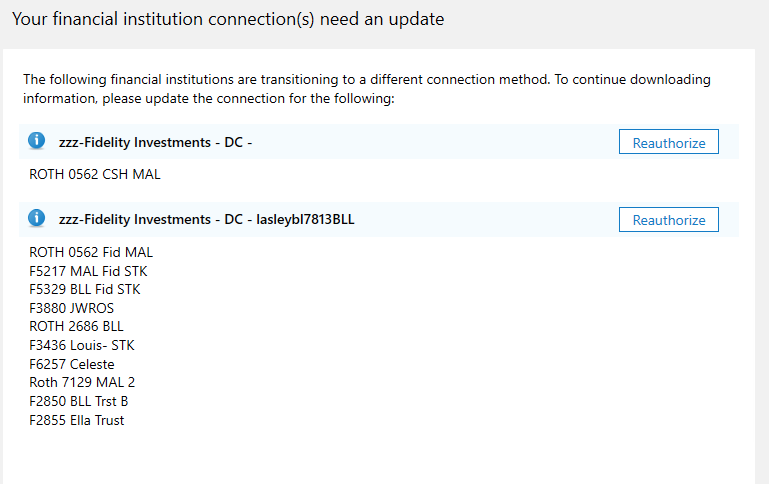
    It just asks for me to authorize it. Every time. There were first 2 and one disappeared when I reauthorized it. The top one with one account is the one that keeps appearing. The account is repeated in the bottom one which has be authorized and completed.

    This time I went to the closed files and deleted the reference to the ZZZ-Fidelity name in all of the files. It still apppeared. I then tried again to reauthorize it with all the accounts set to 'do not download.' It still appeared, There seems no way to get rid of it and to download I have to chose the path to ignore it for this download. I get the downloads I need but when they don;t allow the work around I fear that the downloads will stop.

    image.png
  • ampeg66
    ampeg66 Quicken Mac Other Member ✭✭✭
    edited September 23

    Same here. I have 6 accounts, none are hidden, I did the update on the first prompt but it still prompts every time I launch. If I try Change Connection in Account Settings, Quicken Connect is the only option. Quicken Version 8.3.1 (Build 803.58866.100) on macOS 15.4.1.

    Edit: Just walked through the whole process again, it recognized all 6 accounts, let me link everything and showed all connections were good. I closed and reopened the app and 2 accounts are still saying I need to update.

  • Lasleyma
    Lasleyma Quicken Windows Subscription Member ✭✭

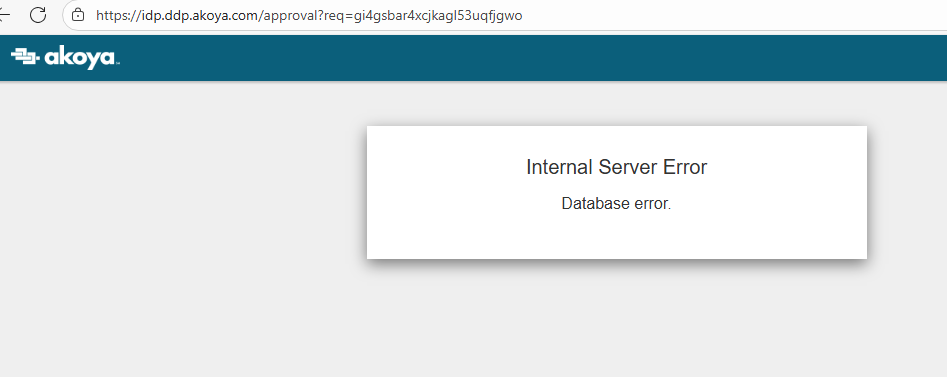
    Yesterday the request disappeared and today it came back after the download so I did the reauthorization again. It got halfway through and gave a database error. Please quicken get it together before you ruin your product.

    Screenshot 2025-09-27 at 1.35.34 PM.png
  • Quicken Alyssa
    Quicken Alyssa Quicken Windows Subscription Moderator mod

    Hello All,

    Thank you for sharing your experiences and concerns.

    Please try these steps:

    1. Save a Backup. Steps can be found in this article if needed.

    2. Disconnect ALL Fidelity accounts in Quicken. Here are the steps on how to do that.

    3. It's also a good idea to check for hidden accounts and make sure there are none that are still connected.

    3. Revoke Quickens Third-Party Access from the Fidelity website.

    4. Add accounts back into Quicken

    Once back in Quicken, you will want to make sure you choose the "LINK to existing" option for any of the accounts that were already in Quicken.

    I do hope it goes smoothly for you.

    Quicken Alyssa

    Make sure to sign up for the email digest to see a round up of your top posts.

  • Bob@45
    Bob@45 Member ✭✭✭✭

    @quicken Alyssa,

    Thank you for this list of steps. I'm hoping it will help those who've been struggling with this migration to dig out from under the ongoing download problems.

    For those of us who have not yet attempted the migration, would you recommend we do these steps also, or do you think in another week or so we'll be able to just reauthorize and have it work?

    Bob

  • Quicken Alyssa
    Quicken Alyssa Quicken Windows Subscription Moderator mod

    Hello @Bob@45,

    Thank you for adding your thoughts to the discussion — we appreciate you taking the time to share your perspective.

    We understand that changes like this migration can feel a bit daunting, and it's completely normal to have some hesitation. We do, however, encourage everyone to go through the migration sooner rather than later to help avoid any potential disruptions in service.

    That being said, the migration is still optional at this time. If you'd prefer to wait it out a bit longer, that's totally okay, too. We're here to support you whenever you're ready to make the switch.

    Thanks again for being part of the conversation!

    Quicken Alyssa

    Make sure to sign up for the email digest to see a round up of your top posts.

  • mrzookie
    mrzookie Member ✭✭✭✭

    @Bob@45

    I migrated 10 days ago bc I wanted to deal with any problems on my terms rather than having everything thrust on me on the then forced migration date of 9/25 but if I knew they were going to postpone the date, I'd have waited. I had a couple of small problems and things seem to be working now, but I've only had a few transactions come through. The real test will be the next few days when EOM dividends and reinvestments are downloaded in multiple accounts, and I haven't done any buys/sells yet. I'm cautiously optimistic, but if you have the time to deal with the transition whenever Fidelity pushes it on you - wait. The longer you put it off, the better the chances that more problems will be solved. There's no harm in remaining on DC until its not available anymore. Just make sure to back up EVERY DAY so you can retry if things go awry. Good Luck!

  • Quicken Alyssa
    Quicken Alyssa Quicken Windows Subscription Moderator mod

    Hello @mrzookie,

    Thank you for adding to this discussion and providing your experience and opinion for other users.

    If you run into any issues later, reach out!

    Thank you!

    Quicken Alyssa

    Make sure to sign up for the email digest to see a round up of your top posts.

  • gseebohm
    gseebohm Quicken Windows Subscription Member

    Dear Quicken Alyssa,

    Your step 3.

    3. Revoke Quickens Third-Party Access  from the Fidelity website.

    This is not something that exists. I just spent time with a fidelity representive. Quicken's connection to Fidelity doesn't go through their third party app access.

  • nmestanas
    nmestanas Member ✭✭✭✭

    @gseebohm Did you convert from DC to EWC+ for Fidelity? If you did, it certainly does go through Fidelity.

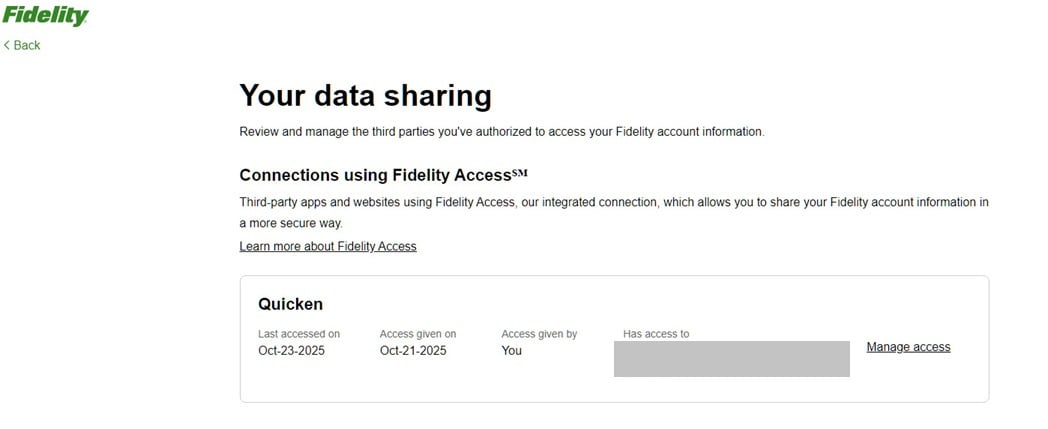
    Go to your Fidelity profile and under Security, you should find "External Data Sharing". Click on the arrow and you should see something line this.

    qaccess.jpg

    You would then click on Manage Access. From there you can delete Quicken access authorization for selected or all accounts.

  • briankelly
    briankelly Quicken Windows Subscription Member ✭✭

    For anyone who finds this post… The various suggestions provided above may or may not work. None worked for me, but I finally found something that does.

    1. Export the problem account to a QIF.
    2. Delete the account—you will be warned about the dangers; accept them. This will remove the "Xfer Acct" on the other side of the transaction. Do not worry about it!
    3. Recreate the account using the same name with a 0 balance.
    4. Import the QIF into that account—it will relink the transfers and the reauthorization problem goes away.

    I hope that this helps others.

This discussion has been closed.