Release 64.29, Windows 11
I was working with Quicken Support in early Aug on this issue (Ticket ID 11888091). Agent logged on to my computer and could clearly see this issue. The Hover boxes on all charts do not appear in correct position on my Display. I sent the following diagnostic steps to Quicken on 8/6/25:
- Disconnected HDMI cable of 2nd Monitor from Video Card.
2. Started Quicken, same issue of miss located pop ups
3. Leaving only 1 HDMI cable connected to the video card, I Closed all programs, Shutdown computer, Booted Computer
4. Then started Quicken and pop ups appeared where they should be at ! ! ! (GREAT)
5. Reattached 2nd monitor, closed Quicken, started Quicken, all pop ups appeared where they should be. (Great)
6. Closed all applications, restarted computer with both monitors connected.
7. Upon reboot, started Quicken and the problem of pop us being offset far to left of the monitor reoccurred. (BAD)
While working with one monitor is not an option I want to live with, I thought/hope this helps your team in diagnosing a permanent solution.
Since this interaction, I just looked at the Forum and found a few (Closed) postings (https://community.quicken.com/discussion/comment/20458272/#Comment_20458272) and (https://community.quicken.com/discussion/7957613/issue-after-windows-11-update-edit-using-a-system-with-two-monitors) from other users reporting the same behavior with no clear remedy. Best anyone could offer was to boot with only on Monitor attached, then reattach other monitor or monitors and try not to reboot too often (basically my steps 3 - 5 mentioned above). I think this problem appeared on my system between March and July (I had surgery in late March and was using my laptop (single attached display) for a few months and only noticed this when I returned to my Desktop dual monitor setup.
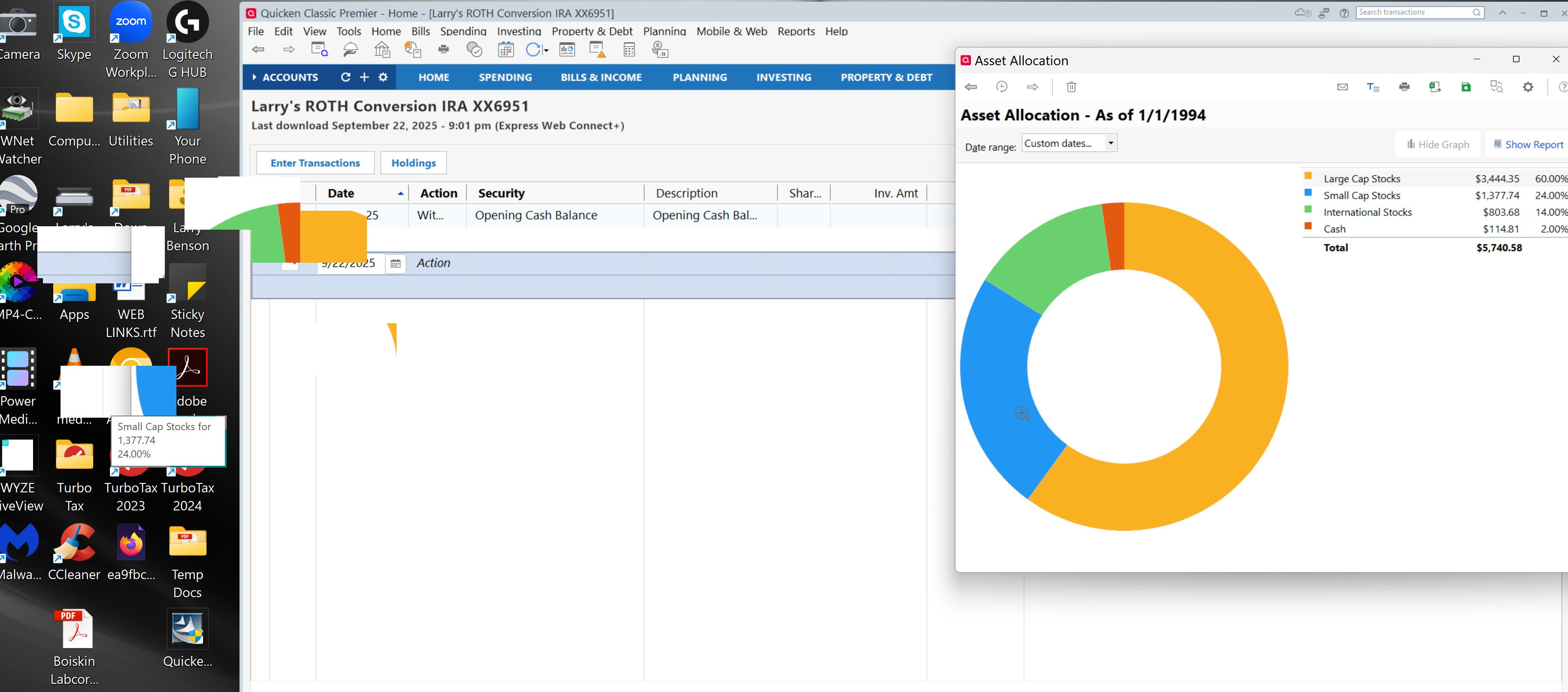
My first question, is has anyone found a satisfactory fix for this? If so i would love to hear it.
Next, why are these other posts on this issue being closed without any resolution, or at least a recognition by Quicken of posting an Alert so we could follow that for a resolution. I know many of the developers are probably working on the Fidelity EWC+ problem, but I would think this would fall into a different group of developers.

