Ability to Resize the Customize Reports and Graphs Dialog Box

Mike409
Mike409 Member ✭✭✭
edited November 11 in Reports

It would be nice to be able to drag and enlarge/resize the Customize Reports and Graphs dialog box.

The dialog box I'm referring to is the one that's presented after clicking on the Customize button when selecting a report or graph.
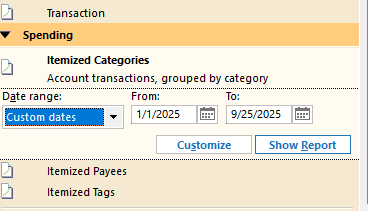
image.png

Thanks for your consideration.

4
4 votes

Reviewed · Last Updated

Comments

  • Jim_Harman
    Jim_Harman Quicken Windows Subscription SuperUser ✭✭✭✭✭

    There is a newer version of the report customization dialog that you can enable by going to Edit > Preferences > Early Access and checking the Customize Reports box. It is still not resizable, but at least there is more room to display Categories.

    Is that still not big enough?

    QWin Premier subscription
  • Mike409
    Mike409 Member ✭✭✭

    Hi Jim and thanks for the reply. I have worked a bit with the Early Access features. For this one, the Search function doesn't work properly. I know it's in development. Hopefully the final release will correct that. I was just hoping that the ability to drag to resize would be helpful.

    Thanks again!!

  • JustQuick
    JustQuick Quicken Windows Subscription Member ✭✭
    edited October 23

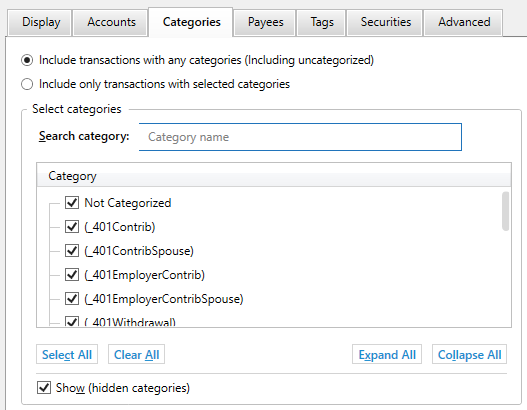
    Wanted to add to this. I have Early Access features enabled as well, but not seeing any difference in the ability to resize the Customize Reports box. To be clear, I'm referring to the pop up received when click on the Customize button within a report. That box seems to still be a fixed width, and the sub-boxes such as in the Category tab are also fixed width.

    Screenshot 2025-10-22 085239.png

    It's the sub-boxes, such as Category, that are so difficult to use. Even on my 24 inch monitor with a 1920x1080 resolution I can only see 6 categories out of the dozens that are available. Using the scroll bar is near impossible, and the search functionality only finds the first instance of a string and there's no ability to even narrow down to expense vs. deposit, or top level category vs. sub category. Without improved search, just being able to maximize the Customize box and have the associated sub-boxes also expand would be a huge help.

    I'm on Quicken Classic Deluxe version R64.30 running on Windows.

    Hope this helps. Thanks.