Quicken doesn't recognize that a check was voided
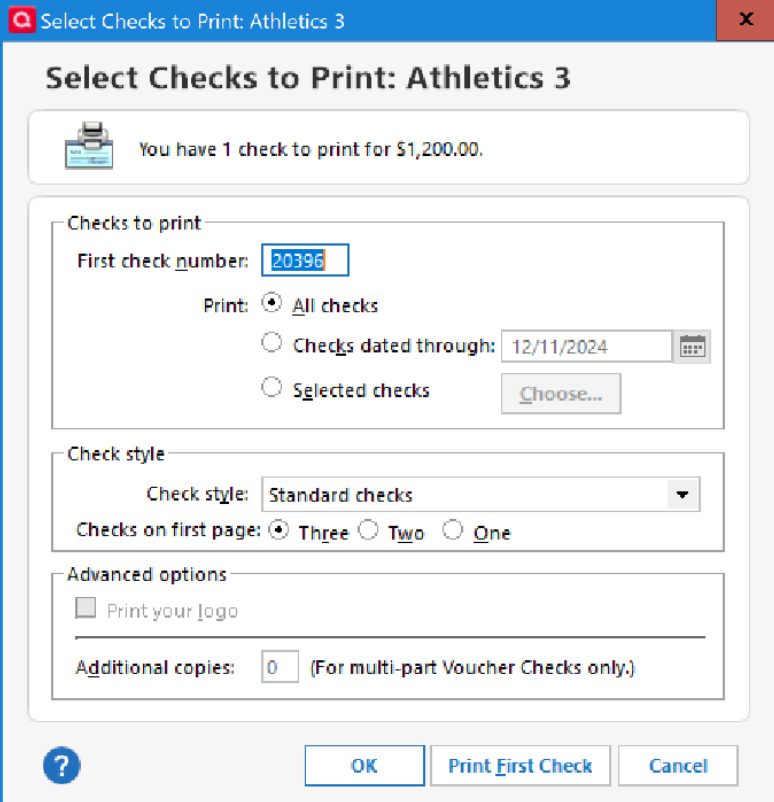
When I void a check, Quicken doesn't recognize that it has happened. In the screenshot, I've voided check #20396. When I then begin to write another check, Quicken suggests 20396 for the check number. It doesn't see that that number has already been used. I'm using Classic version R64.25.
[Edited Screenshot for Privacy]
Comments
-
Did you mard the check as cleared and reconciled? Just a thought…
Windows 11 (2 separate computers)..... Quicken Premier.. HAVE USED QUICKEN CONTINUOUSLY SINCE 1985.
0 -
How did you "void" the original check? Did you use Q's "Void Transaction" function, or somehow do it yourself?
Because last month when I voided check 2673, Q properly used 2674 as the next check number.
Q user since February, 1990. DOS Version 4
Now running Quicken Windows Subscription, Business & Personal
Retired "Certified Information Systems Auditor" & Bank Audit VP0 -
Has the check in question, 20396, actually been printed thru Quicken? If it wasn't or if it was a misfeed or misprint then the "First check number" field will never have been updated to include 20396.
The First check number field can easily be incremented by 1 by using the "+" key (or decremented by using "-")
0
Categories
- All Categories
- 114 Product Ideas
- 35 Announcements
- 216 Alerts, Online Banking & Known Product Issues
- 21 Product Alerts
- 693 Welcome to the Community!
- 664 Before you Buy
- 1.1K Product Ideas
- 53.4K Quicken Classic for Windows
- 16.3K Quicken Classic for Mac
- 1K Quicken Mobile
- 808 Quicken on the Web
- 109 Quicken LifeHub