Fidelity Updates Still Broken after Update
Comments
-
After all the confusion and finally getting everything to agree, I am left with numerous placeholders in my Fidelity accounts that appear uncategorized when I run a 2025 Income/Expense report. What is the best way to handle these?
0 -
@Bob@45, thank you so much for all of those details!
The restore process you describe is one which I followed, once, but forgot to do that this time and foolishly followed the Quicken instructions. I refer to the instructions at:
Now, it's plausible that the overwriting that they state in step 5 ("Select Restore Backup. This will overwrite your current file.") is what happens if what you picked was "Restore from automatic backups". I would never restore from their automatic backups unless that somehow happened to be the most recent backup before things went wrong. I've never done that, though. The few times I've restored, it's always been from a backup I had deliberately made. And when I do that - it never, ever overwrites the current file. And you also have never restored from automatic backups. We're both careful enough to make frequent manual backups
As for the rest of your amazing details - it sounds like you are describing the process of converting from Direct Connect to EWC+ and dealing with duplicates. Am I right about that? I converted to EWC+ months ago, and have been downloading several times a week since then.
The only remaining issue is getting Quicken to treat FDRXX MMF shares as cash, and I don't see anything that you have described that would address that or give me any other outcome than the one I am currently presented with - which is that Quicken wants to delete every MMF transaction in my history, going back to the beginning of all time. My history includes plenty of Buy and Sell MMF transactions - periodically I'd notice that the shares and cash didn't match what I expected, and I would do a Share and a Cash adjustment to bring the shares back to 0, and put the cash at the right amount. If in the process of fixing the "Cash Representation" feature Quicken will delete virtually all MMF Buy and Sell transactions back to the preshistoric age, that would leave all the adjustments in place and create years of running balances that are way off - which is exactly the problem I am having and why I have been asking about all this. I need Quicken to keep its hands off my history, and there is no way to tell it do so. It's trying to be too smart and making assumptions about what I want. They haven't thought through all the scenarios.
I think maybe Kristina wants me to:
- Deactivate the account
- (I would then rename the account with the word "old" in it)
- Set up a new account with my preferred name, and link it to Fidelity
- Download whatever transactions Fidelity has (which will be the last 1 to 3 months I guess)
- At some stage, perhaps at this first download, I will be asked how I want to handle the core fund. If I am not asked, I will manually set that to represent it as cash, and let Quicken take whatever steps it wants to regarding the 1 to 3 months of data it downloaded
- It will also have inserted some kind of placeholder opening balance transaction
- When I am sure that Quicken is truly treating my MMF core as cash, the danger will have past, and I can then safely move in all historical transactions from the original Quicken account. Kind of behind Quicken's back!
- Finally, I would delete the placeholder opening balance transaction
0 -
Hi,
Shouldn't your and other similar comments here be under a different topic? What do they have to do with "Fidelity Updates Still Broken after Update"?
Your comments, while useful, could be lost in the maze of information on this site. I would reroute them, if possible, for benefit of other Quicken users.
0 -
Sure, there are many discussions that touch on the cash representation of core MMF. In this discussion it starts to appear on pages 2, 3 and 4. There may well be a better place for the topic though. It's hard to always find the best place but if Kristina wants to move this somewhere more suitable I'm all for it!
0 -
Understood. Thank you. May be I was too quick in my judgement while scanning through your message.
Hope you will straighten out your issue.
0 -
Add me to the unhappy Fidelity trackers. Haven't had a One Step Update work in weeks. Have also reported One Step Update issues with Janus (see another multi-page comments thread with many unhappy customers). Why can't Quicken revert back to a One Step Update version for investments that works? Why did Quicken roll out a new investment connection that wasn't fully tested?
[Edited - Added Link/Readablity]
0 -
Just spoke to two customer service reps at Quicken. Andy is aware of the Fidelity and the Janus issues and hung up on me. Juan told me there would be no adjustment to the subscription fee even though the services I'm paying for do not function.
I've disabled my autorenew. Looking forward to Quicken resolving these issues and providing some kind of compensation for selling a service that doesn't function.
1 -
A fair demand, but there isn't an alternative, for years. That doesn't stimulate the company to do a better job and in a timely matter.
I wish there was a direct communication channel to its leadership. However how good and knowledgeable, most of the time, are their associates in South America (Columbia?).
0 -
Welp, I swapped filenames back to a normal state of affairs, as a result of which Quicken had to resync with the online Quicken and then I had to reauthorize every single one of my accounts (which is verrrry slow), and delete a dozen or more duplicate transactions.
Quicken is back in order, and is treating my core accounts as MMFs - which is better than deleting old data and completely destroying my history.
Now if Kristina can clarify exactly what she had in mind when she gave me instructions above on how to gracefully and permanently switch to MMF-as-cash without losing of transaction history (which is key), that would be great!
0 -
@qudtp - Throwing darts, hoping something might hit,
Looking at an IRA account, under Account Details, What if you were to create a manual transaction that bought some cash-like MMF that you don't actually have in your account, and then use the Account Edit functionality to say "use this new (fake) security as my cash". If you then download (into a TEST data file of course), it might ignore all of your actual MMF transactions and just do what it wants with your single fake transaction. That will get you loaded and updated without modifying your history, IF it works.
In the IRA account I'm looking at, if I pull up the security list, I have FDRXX listed twice, Fidelity Cash Reserves, and then also Fidelity Government Cash Reserves. FGCR has a CUSPID but FCR does not. Looking at my transactions, it seems that FCR are the old transactions, and FGCR new transactions, the change happening in May 2018. If you have something similar, maybe a global edit of all FGCR transactions to FCR would "hide" them from the Quicken process that wants to delete FDRXX transactions.
Under the gear at the top right of the investment account register, one of the options is Archive Transactions. Clicking that brings up:
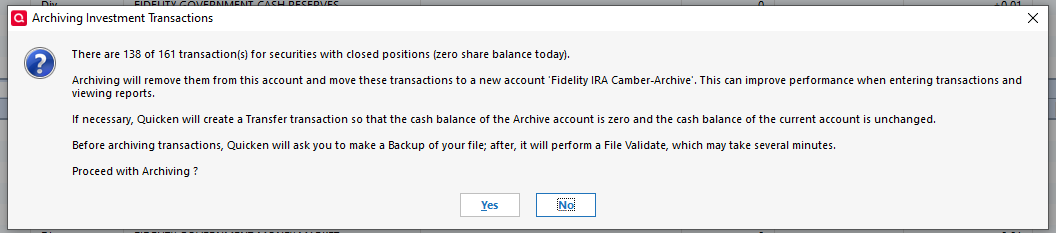
Since your MMF has a zero share balance, if you use this function it might move all your MMF history to a xxx-archive account, hiding them from the authorization and download process. You can then set up the MMF as cash, without losing your history, if this works as the pop-up suggests.
Good luck.
Bob
0 -
@ZQkn I agree with you. There are many partial alternatives to Quicken, depending on what you want to do, but none of them that I've looked at are as good as Quicken is, despite all the problems I have with Quicken.
If I were younger I'd put together a team of a dozen programmers and build that alternative, but that's not how I want to spend my retirement.
Bob
0 -
An interesting suggestion. I'm thinking of Move rather than archive -
That menu also has a Move option - it brings up all transactions in the account, which can then be sorted by Action or Security. Using one sort, or the other, I can select the buy/sell/add/remove transactions for the core fund, move them to a dummy account. This will leave my account balance and decades of running totals temporarily out of touch with anything even slightly resembling reality.
Then I'd need to create a single fake Buy for the core fund, so I can select that fund to represent cash. On the first download, Quicken will remove that Buy transaction and insert a placeholder/adjustment to match Fidelity's reported cash.
At that point, I would move all those transactions back and delete the placeholder. Unless Quicken does something else unpredictable, this very well might work!
The trick will be making sure I find all the transactions to move. I guess I can sort by security, and then also sort by Action in a second pass, or vice versa, to make sure I spot them all.
0 -
@qudtp Don't forget you can also use the Find search box at the top of the screen to look for records (very simple and very fast) and the Edit > Find/Replace function (very powerful, very slow - I suggest once you have your search parameters, drag the bottom corner up to make the window as small as possible before hitting the Find button) to see if you've missed anything.
0 -
Thanks for the suggestions. I think I've managed to get it all set up now, but the real test will be when I have new transactions, like dividends at the end of the month, to see if they really increase my cash balance or turn into purchases of MMF shares. I could hasten the test by buying and selling small numbers of mutual fund shares right away.
0
