Cannot Add Back One of My Fidelty IRA's to Quicken after Transition

Bione
Bione Quicken Windows Subscription Member ✭✭✭
edited November 3 in Investing (Windows)

One of my Fidelity IRA accounts had the problem recently discussed with the Cash Account issue. I read the comments was to reset the account and the question of Cash Account/Fund would come back. What ended up was the particular account was online deactivated in Quicken. I have not been able to restore it. Here is the sequence of what happens.

  1. I go to just this one inactive Fidelity accounts and do Online Setup.
  2. Quicken has me log in to my Fidelity account where I get the screen to authorize what accounts are to be accessed. This one is included.
  3. Quicken then gives me the screen where there is a choice to Add, Link to Existing, or Do not Add.
  4. For the account I am trying to restore, I do not get a choice and it states "Do Not Add".

How can I restore this specific account. I have not tried deactivating all of them and trying it because I am afraid, they will all get messed up balances as happened with the transition.

Screenshot 2025-09-30 at 5.39.57 PM.png

[Edited - Removed Partial account number]

Best Answer

  • Quicken Kristina
    Quicken Kristina Quicken Windows Subscription Moderator mod
    Answer ✓

    Thank you for the follow-up,

    I'm glad to hear that deactivating and re-adding the accounts corrected the issue.

    If you need further assistance, please feel free to reach out!

    Quicken Kristina

    Make sure to sign up for the email digest to see a round up of your top posts.

Answers

  • Quicken Kristina
    Quicken Kristina Quicken Windows Subscription Moderator mod

    Hello @Bione,

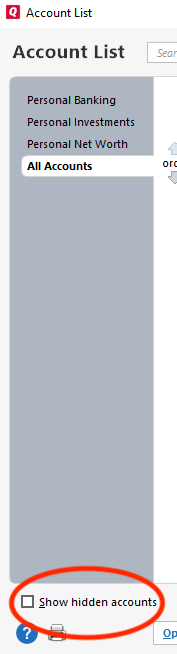
    Thank you for letting us know you're seeing this issue. Typically, when Quicken says "Don't add to Quicken", it is because the program thinks the account is already connected. Please navigate to Tools>Account List. If you have hidden accounts, there will be a checkbox near the lower left to make them visible. Make sure that checkbox is selected, then review your account list to see if there are any extra/duplicate Fidelity accounts.

    show hidden accounts win.png

    If you find an extra/duplicate account, backup your Quicken file, deactivate that account, then test to see if the issue is resolved.

    Please let me know how it goes!

    Quicken Kristina

    Make sure to sign up for the email digest to see a round up of your top posts.

  • Bione
    Bione Quicken Windows Subscription Member ✭✭✭

    I took care of the issue by deactivating all of the Fidelity accounts. When I added them back it worked OK. Thanks

  • Quicken Kristina
    Quicken Kristina Quicken Windows Subscription Moderator mod
    Answer ✓

    Thank you for the follow-up,

    I'm glad to hear that deactivating and re-adding the accounts corrected the issue.

    If you need further assistance, please feel free to reach out!

    Quicken Kristina

    Make sure to sign up for the email digest to see a round up of your top posts.

This discussion has been closed.