Fidelity NetBenefits and Reinvest Dividends
File this as a bug with the new QC connection:
I recently had two dividend reinvests, and the transactions were downloaded, but as Dividend Income with no subsequent buy.
I went to change to Type: Reinvest Dividend. The second I changed that field, the correct amount of shares for the reinvest appeared, so Quicken is receiving the correct share amount for the reinvest, but not showing the correct transx type.

Comments
-
Hello @John_in_NC,
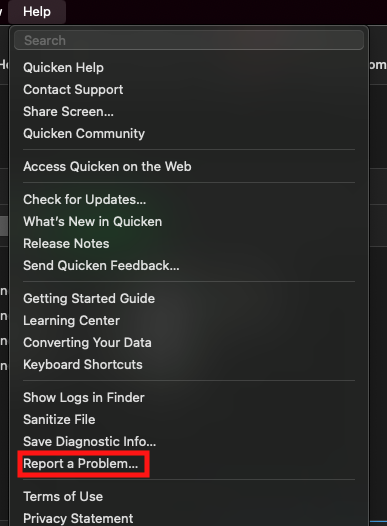
Thank you for letting us know about this issue! I forwarded it to the proper channels for further investigation and resolution. Please navigate the Help>Report a Problem and send a problem report with log files attached to help with the investigation.
Thank you!
(CTP-14859)
Quicken Kristina
Make sure to sign up for the email digest to see a round up of your top posts.
0 -
I have exactly the same problem. But I am unable to fix it by changing the dividend to reinvest dividend. I need to change it manually.
0 -
Hello @proflaw,
Thank you for letting us know you're seeing a similar issue, and thank you for submitting a problem report with logs attached. I added you to the ticket.
Please provide a bit more information. What manual change are you needing to do in order to get the transactions to show correctly in your Quicken?
Thank you!
Quicken Kristina
Make sure to sign up for the email digest to see a round up of your top posts.
0 -
I see similar for regular Fidelity accounts ( not NetBenefits).
Quicken reports downloaded reinvested dividends as a deposit with no security assigned and just the description "DIVIDEND RECEIVED…" followed by a BOUGHTX transaction for the security. Therefore the taxable DIV event is not tracked.
With the DC connection, Quicken correctly tracks the reinvested dividend with an Action=ReinvDiv
Deluxe R64.30, Windows 11 Pro
0 -
- In the Fidelity investment account, reinvested dividends are being downloaded to Quicken as Deposits. One needs to return to the Fidelity Investments account to retrieve the number of shares, price, and total value, in order to manually enter a reinvested dividend transaction and then delete the downloaded Deposit transaction. If you don't manually enter the reinvested dividend transaction, Quicken prompts you to enter a placeholder transaction for the shares not accounted for as reinvested dividends.
- In the Fidelity Net Benefits account, there are periodic charges for fees. Only the total of the fees is shown in the download as "Fee." The Fidelity Retirement account shows the amount of the fee "charged" to each mutual fund held and paid for by the sale of that fund's shares. So if one holds, say, four mutual funds in the retirement account, there is a sale of shares of each fund that one needs to enter manually. Again, the number of shares, price, and total are shown on the Fidelity website, but are not downloaded to Quicken.
- Before the recent move back to Express Web Connect from the direct connection (zzFidelity), these downloads worked flawless for decades.
1 -
Hello @leishirsute,
Thank you for letting us know you're also seeing this issue, and thank you for sending logs. I added you to the ticket.
Thank you for the additional information. I added it to the ticket to give our teams a better idea of the exact issue you're seeing.
Thank you!
Quicken Kristina
Make sure to sign up for the email digest to see a round up of your top posts.
0 -
@Quicken Kristina Please let me know if you need additional information. Thanks.
Deluxe R64.30, Windows 11 Pro
1 -
I created a discussion for this issue under Quicken for Windows, which is what I use. However, I am experiencing the same issue.
Deluxe R64.30, Windows 11 Pro
0 -
Hello @leishirsute,
Thank you for letting me know about the new discussion you created!
Quicken Kristina
Make sure to sign up for the email digest to see a round up of your top posts.
0 -
Plus 1 for this problem when I attempted to convert a NetBenefits 403(b) account from Direct Connect (DC) to Express Web Connect+ (EWC+). I also reported a problem and uploaded the log files. I will roll back to the Backup I made before starting this adventure and wait for a fix before trying again.
0 -
Hello @Michael Sayre,
Thank you for letting us know you're also impacted by this issue, and thanks for sending the problem report with log files!
Quicken Kristina
Make sure to sign up for the email digest to see a round up of your top posts.
0 -
Is there any update to this problem?
0 -
Thank you for the follow-up @proflaw,
The ticket is open and our team is investigating the issue. I'm not seeing any new updates yet.
Thank you!
Quicken Kristina
Make sure to sign up for the email digest to see a round up of your top posts.
0 -
This problem is still happening. I sent in a bug report as Kristina suggested above. This problem is a major inconvenience because us users have to manually correct the transactions in our retirement accounts whenever these wrong transactions are downloaded. I hope the Quicken/Fidelity teams are working on it!
0 -
Hello @chendricks,
Thank you for letting us know this issue is still happening. I added you to the ticket.
Thank you!
Quicken Kristina
Make sure to sign up for the email digest to see a round up of your top posts.
0 -
Hello All,
Are you still seeing this issue? Please let me know!
Thank you!
Quicken Kristina
Make sure to sign up for the email digest to see a round up of your top posts.
0 -
Hi Kristina, thanks for checking in. Yes, this is still happening for me. I have 3 Fidelity Netbenefits retirement accounts. For two of them, the monthly transactions are still downloading as dividend reinvestments without the security, the share count, or the share price. The transactions are for 4 different mutual funds. It's strange because it doesn't make any sense to send a dividend reinvestment transaction with no security. Obviously, that's a bug.
In my 3rd Fidelity Netbenefit account, I'm getting correct downloads. That also surprises me as I would expect all the transactions from one vendor to work the same, but they don't.
I've tried redoing the logins/connections each month to see if that would fix it, but that has no effect.
Hope you or Fidelity are having a look at this! Please let me know if I can provide any more details that would help in debugging the problem.
0
Categories
- All Categories
- 56 Product Ideas
- 36 Announcements
- 223 Alerts, Online Banking & Known Product Issues
- 22 Product Alerts
- 701 Welcome to the Community!
- 671 Before you Buy
- 1.2K Product Ideas
- 53.7K Quicken Classic for Windows
- 16.3K Quicken Classic for Mac
- 1K Quicken Mobile
- 813 Quicken on the Web
- 111 Quicken LifeHub