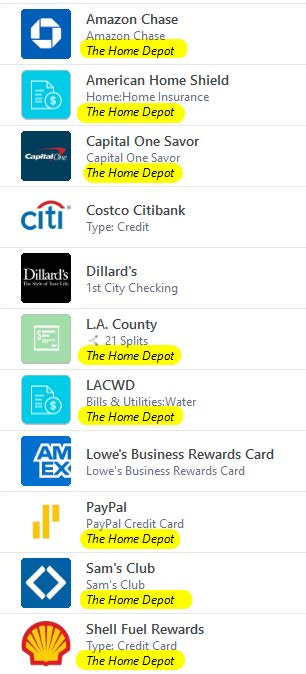
Why do the memo lines show the same thing on all the bills? I removed them by editing each biller, but the next day they're all back again. What gives?
Hello @Robert Armani,
Thanks for reporting this. To better understand what’s happening, could you please provide a screenshot showing the memo lines on your bills? If needed, please refer to this Community FAQ for instructions on how to attach screenshots. Alternatively, you can also drag and drop screenshots to your response if you are not given the option to add attachments.
Additionally, please provide the following details:
Check back and let us know!
Thank you for your response, Quicken Anja,
Here's the screenshot:
I also have the same exact issue.
I remove the memo when I make the payments, but it appears again for next month. So just gotta keep removing until a fix is available.
Removing the bad memo from the already recorded register transaction does not have any influence on the Scheduled Reminder. You need to also edit the reminder, "This and all future instances" to remove the memo from the future reminder transactions.
Thank you for following up, though I apologize for the delay—@Robert Armani & @pjconti!
If you haven't already, I suggest you try to Review and Repair Online billers. However, I do recommend that you save a backup of your data file first (just in case). After that, please navigate to the Bills & Income tab and click on the gear icon on the top-right. Then, click on Review and Repair > Review and Repair Online Billers in the dropdown menu.
Let us know how it goes!
Thanks UKR for your suggestion, however, I've tried that and it's not working. It comes right back. Not only that, all the weblinks I had set for each individual biller defaulted to Home Depot (in my case).
Thank you, Quicken Anja, for your advice. The Review & Repair says it's in sync with the server.
@Robert Armani Thanks for following up and for trying the steps suggested so far. Since the memo line continues to repopulate even after editing the reminder and running Review & Repair Online Billers, this will need a deeper look.
At this point, the best next step is to contact Quicken Support directly so they can review your billers and data file in a one-on-one session. They’ll be able to check the logs and escalate further if needed.
Thank you!
Thanks Anja for the advice. I will contact them in the near future.
You're welcome!
Thanks, Anja for the follow-up. I will also contact Quicken support. For the time being, I just turned off the "Show Memos For Bills" option.