Option Prices Not Updating/downloading

BRETTB
BRETTB Member ✭✭✭✭

Note - I always have the latest updates installed.

I have notice for awhile that Quicken is not updating option prices. I have multiple brokerages - Wells Fargo, Charles Schwab and Fidelity. None of them update options.

Note: I have done the super validate and Validate - same issue.

Comments

  • Quicken Anja
    Quicken Anja Moderator mod

    Hello @BRETTB,

    Thank you for reaching out and telling us about your issue.

    To better assist you, could you please provide the following details?

    • Where is your Quicken data file stored? Is it on your local hard drive (C: Drive) or a cloud-based/external drive (e.g.: OneDrive, DropBox, USB, etc.)?
    • Are you using a VPN while updating your accounts? If so, does disabling it make any difference?
    • Do you have any antivirus or malware protection software running that may be interfering with Quicken? If so, have you tried temporarily disabling it to see if the issue persists?
    • When did this issue first start occurring?

    Also, if you haven't already, I suggest you try signing out of your data file completely and then signing back in to refresh the registration token for your Online Connected Services. However, I do recommend that you first please save a backup file prior to performing these steps.

    1. Navigate to Edit
    2. Preferences...
    3. Quicken ID & Cloud accounts
    4. Click Sign in as a different user (or it might say Sign in using a different Quicken ID) image.png
    5. Follow the prompts to Sign Out
    6. Sign back in using your Quicken ID (email) and password (this screen is not a pop-up box)

    Let us know how it goes!

    -Quicken Anja
    Make sure to sign up for the email digest to see a round up of your top posts.

  • BRETTB
    BRETTB Member ✭✭✭✭

    Update. Followed your instructions. The deactivating the antivirus did not do anything. I do have my data file on external nas (I prefer data on my nas which I automatically backup).

    Now did the quicken ID log out as you suggested. Now i did not do a checkup right before this so I'm not 100% sure if something else cause the results.

    Update:

    1. On Wells Fargo account - seems like all options that have a CUSIP are able to get updated pricing history.
      1. Issue- Options that don't have a CUSIP are not updated - How can I fix this??
    2. On Charles Schwab - Just started buying Call Options and have a few. Every single one that was downloaded said something like "unindentified security" (note this is listed as a security on my security list with CUSIP=000000000) at which time after I accept downloaded transaction I have to manually add using my own naming template. In this case it has no CUSIP and not getting updated automatically. What can I do to fix this???
  • BRETTB
    BRETTB Member ✭✭✭✭

    Forgot to Add to my list of issues above.

    3. Fidelity Investments - has same issue as Charles Schawab above "unindentified security" have to add. What do I do to fix???

    Also within Quicken when there are NO lookups for Options??

    Screenshot 2025-10-09 102817.png
  • BRETTB
    BRETTB Member ✭✭✭✭

    More update as of 10/12/25
    This has to do with my Well Fargo Acct that I do covered calls.

    So I rename my call options so they will be listed next to my stocks.

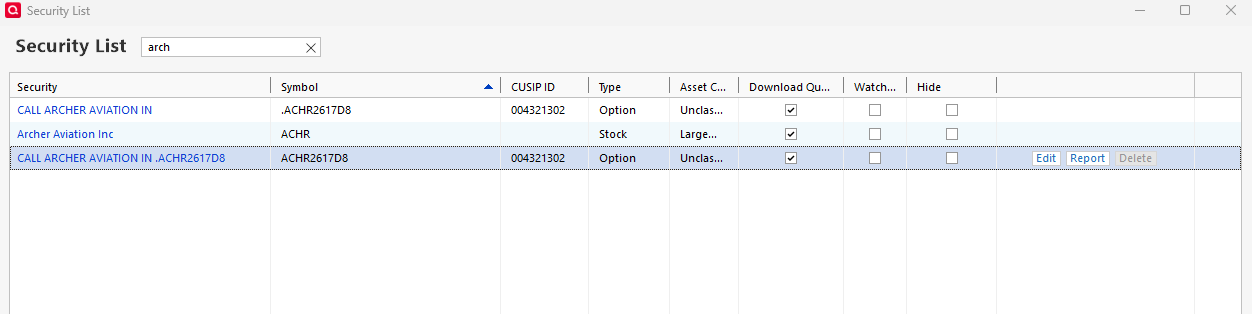
    Screenshot 2025-10-12 103406 Security List 2- Call Archer.png

    Note the call option with the "." is how quicken adds it and looks like the price gets updated. But I have been renaming the options without the "." and adding a better description. I take the period off so it can be sorted and listed next to the stock (so I can analyze).

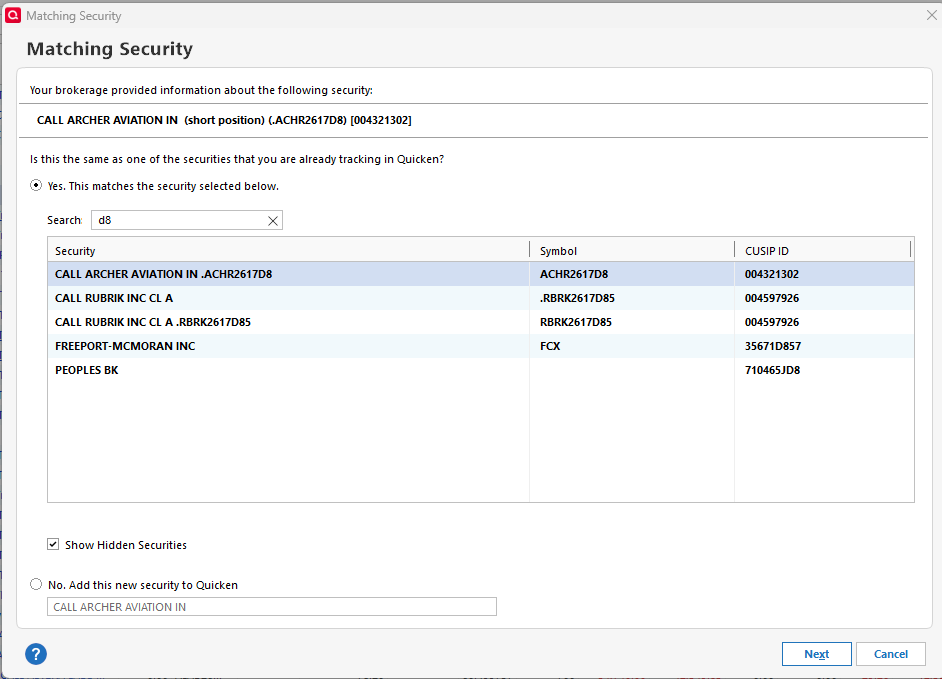
    PROBLEM - I clean up my security list and get rid of symbols with the "." because they are duplicates and I put my transaction for these call option on the one without the "." for symbol. BUT ON NEXT UPDATE, Quicken will act like I don't have symbol and which time I will search existing securities and match up with the call option without the "." in it. BUT after all done, quicken still adds that security back into the security list with the "." which I notice has the updated pricing??? The existing call without the "." does not get updated pricing.

    Screenshot 2025-10-12 102653 Matching Security Call Archer.png

    at which time if I go back to security list the one with the "." is added back in and it has the updated pricing.

    Screenshot 2025-10-12 103406 Security List 2- Call Archer.png
  • Quicken Anja
    Quicken Anja Moderator mod

    @BRETTB Thank you so much for the detailed follow-up and screenshots!

    For the first issue (unidentified securities), we currently have an active Community Alert for this behavior, which also provides instructions to fix. Our teams are investigating, and updates will be posted there as soon as they become available.

    As for the second issue—where renamed options without the period aren’t updating prices—this is likely happening because Quicken no longer recognizes the original version of the security as the one linked to the quote/download feed.

    To correct this:
    You’ll need to change all transactions for that security to use the new version that is downloading/updating (the one with the period), then delete the old one and rename the new one to remove the period (so it displays as you prefer).

    If needed, you can also group all those transactions together and reassign them at once. Please refer to this Help Article for guidance.

    Hope this helps!

    -Quicken Anja
    Make sure to sign up for the email digest to see a round up of your top posts.

  • BRETTB
    BRETTB Member ✭✭✭✭

    Ok I will look at these, implement and get back to you with results.

  • Quicken Anja
    Quicken Anja Moderator mod

    Thanks, @BRETTB! Sounds good—please do, and let us know how it goes once you’ve had a chance to test.

    -Quicken Anja
    Make sure to sign up for the email digest to see a round up of your top posts.

  • BRETTB
    BRETTB Member ✭✭✭✭

    Update and I did as instructed. First I did another super validate.

    1. Assign shares to new downloaded security with the "."
    2. On the old call security that did not have the period, I added the "." to it so the pricing history would carry over to the new call using the merge/delete and since it no longer have any shares, I deleted this call security.
    3. The new call has a "." automatically and now has the shares on it. I took the "." off the symbol so it will sort next to the stock symbol.
    4. On the next update, I get a new security added with the "."

    Not sure what else, I think there is a bug.

  • BRETTB
    BRETTB Member ✭✭✭✭

    The above was on Wells Fargo and I did delete prior to the steps above the quicken "Unidentified Security" BUT after done and the next update, it was added back in.

    On the two investment sites below the options are always downloaded as "Unidentified Security" which I correct but there are some issues on that too.

    On Charles Schwab activity page on their site when looking at trades, there is no cusip listed for options that I have purchased (5-6).

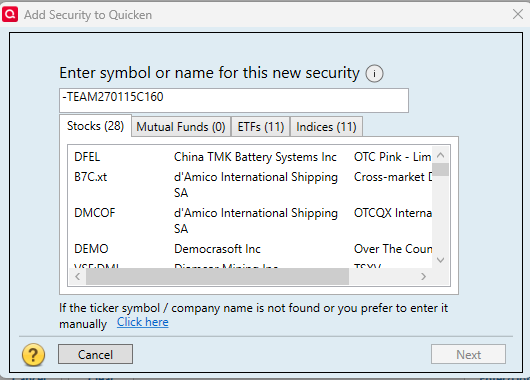
    On Fidelity it always downloads the option as "Unidentified Security" but on their option security there format has a "-" . Here is a sample cusip "-TEAM270115C160" which is for "CALL (TEAM) ATLASSIAN JAN 15 27 $160"

    Hope this helps to get this fix.

  • BRETTB
    BRETTB Member ✭✭✭✭
    edited October 18

    Another Note on Fidelity -
    When I use fidelities cusip "-TEAM270115C160" and put that into quicken and then use the Online Center to Compare to Quicken Portfolio, it will show I'm off on that option.

    I removed "-" on the symbol and then do the Online Center to Compare to Quicken Portfolio then it agrees with that option.

    But Note - when I say update the historic prices or do down loads quotes, transactions, or historic prices of the option, it does not update the price. - so this seems like a bug.

This discussion has been closed.