FirstTech FCU stopped downloading transactions on 9/3/2025
Comments
-
I am having the same issue. Just rolled back to 64.19 and it started working again. Can someone please find this bug and fix it quickly?
1 -
I am using Quicken Classic Premier. version: R64.30 Build: 27.1.64.30
When I update my accounts, it comes back on the summary showing everything updated fine. However, when I go into the accounts, it show the last update being Oct 3 via direct connect. I have tried resetting the account and the message comes back saying everything updated fine…but it won't update the accounts (there are many transactions on the credit union site that aren't downloading).
Wondering what to do. Thanks.
[Merged Post]
0 -
Same problem since early Sept. For the account I've tried Online Services (1) Reset and (2) Deactivate/Set Up Now to reactivate downloads - neither attempts worked. Still no new downloaded transactions. It's worth noting, there's no error from Quicken either - it just completes the download and reports the download was successful. I also used "Report a Problem" in Quicken to inform support of this issue. Mostly adding my note to get notified here as updates occur. Hopefully some progress soon. I have not regressed to an earlier version and for now would prefer not to.
0 -
How do you roll back?
0 -
I recommend calling support … if only to make sure they aware its impacting more and more people and they still have no clue ….
This issue is discussed here:FirstTech FCU stopped downloading transactions on 9/3/2025 — Quicken
[Merged Post]
0 -
Hello @r-e-l,
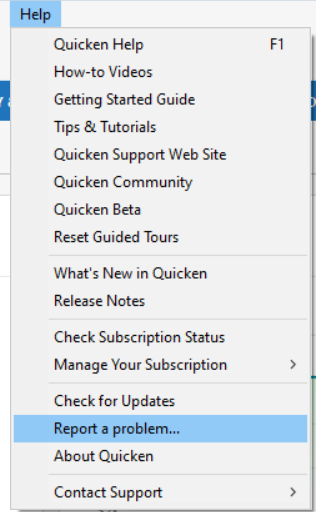
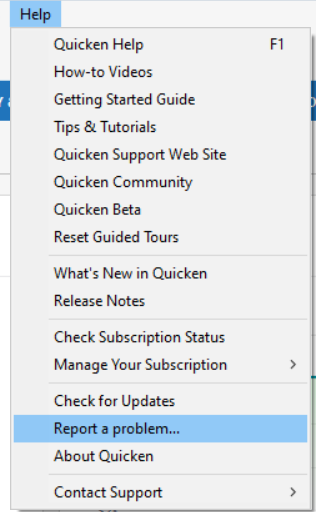
To help with the investigation of this issue, before rolling back, please navigate to Help>Report a Problem and send a problem report with log files attached. Please also include 3 transactions that are posted on the financial institution side, but are not in your Quicken, not even manually entered, and a screenshot from the financial institution website showing those missing transactions.
Please note that problem reports allow a maximum of 10 attachments. If you need to send more than 10 attachments, please send a 2nd problem report with those additional attachments.
If you want to roll back to a previous version of Quicken, please backup your Quicken file and follow the instructions in the article linked below:
Please let me know how it goes!
Quicken Kristina
Make sure to sign up for the email digest to see a round up of your top posts.
0 -
Hey folks, can you try this on your end and see if this "fixes" things for you?
Context: I went through the thread here and saw the "report a problem" and reverse version tips, but one thing stood out to me. How can this be an app issue when even my mobile app doesn't download transactions? I think it should work even if the desktop app is closed.
With that hunch, I disabled mobile sync in the desktop app and tried downloading transactions again. They all showed up/downloaded to the desktop app.
Is this the issue, or did they fix it, and it’s just a coincidence? I don’t know...
Give it a shot, disable mobile sync if you have it enabled, try again, and let us know how it works for you.
1 -
@r-e-l Don't use mobile app and the sync option is turned off. Yesterday I was able to get First Tech to sync after 4-5 tries, today I'm on try #6 with nothing coming down. So frustrating.
1 -
I was actually able to get transactions to download without reverting to a previous version about a week ago but no luck since, seems it was a lucky one off, broken since then as before.
0 -
Turning off the mobile sync worked for me and I was finally able to download a bunch of transactions.
1 -
Hello @saintjarna,
Thank you for sharing!
I'm glad to hear that turning off mobile sync corrected the issue!
Quicken Kristina
Make sure to sign up for the email digest to see a round up of your top posts.
0 -
it stop working again …. Believe since the last update.
0 -
Thank you for the follow-up @r-e-l,
I'm sorry to hear it stopped working again. Are you seeing any error messages/codes, or is it acting like everything is good, but no new transactions download?
Thank you!
Quicken Kristina
Make sure to sign up for the email digest to see a round up of your top posts.
0 -
As before, there are no errors being reported, and the "online balance" as shown at the bottom of the account page is accurate and up-to-date. However, no new transactions are being downloaded, and the summary page shows "0 new transactions,"(am referring to the update summary). This issue occurs both during the initial tech update and for all account updates.es.
0 -
Thank you for your reply,
If you're willing to provide the necessary information, I can update the ticket so that our teams will know you're encountering this issue again. The information we need is:
- Log files (Help>Report a Problem, make sure the log files are selected).
- At least 3 sample transactions (date/payee/amount) that are posted on the financial institution website, but are not in your Quicken, not even manually entered.
- A screenshot from the financial institution website, showing the posted transactions.
- A screenshot from your Quicken, showing the transactions are not there.
Thank you!
Quicken Kristina
Make sure to sign up for the email digest to see a round up of your top posts.
0 -
Hey folks, I was seeing this same thing and I think I found at least a temporary workaround (at least, it's worked three times when transaction downloads fail).
Go into Quicken with your file open.
Tools/Online Center/Control-click on the "Contact info" menu item.
Choose your FirstTech account in the Accounts dropdown, check "Statement Download"; click <Refresh>.
Click <Update/Send>.This has worked for me the last 3 times First Tech stuff stopped downloading.
Also, FWIW, my symptom is that even if I create a new Quicken Data file and try to download transactions, it says it will only bring down 1 day and I got no history at all, so there's something definitely wonky still.
h/t to this Reddit thread for finding the secret menu: How to change account last download date? : r/quicken
[Edited - Readability]
0 -
Hello @XanthFrogknocker,
Thank you for sharing your experience!
Hopefully this will help others encountering this issue!
Quicken Kristina
Make sure to sign up for the email digest to see a round up of your top posts.
0
Categories
- All Categories
- 56 Product Ideas
- 36 Announcements
- 224 Alerts, Online Banking & Known Product Issues
- 22 Product Alerts
- 702 Welcome to the Community!
- 671 Before you Buy
- 1.2K Product Ideas
- 53.7K Quicken Classic for Windows
- 16.3K Quicken Classic for Mac
- 1K Quicken Mobile
- 812 Quicken on the Web
- 111 Quicken LifeHub