Chase Visa transactions stopped downloading for 1 card only

rhinodad
rhinodad Quicken Windows Subscription Member ✭✭

Quicken for Windows release R64.30 build 27.1.64.30.

I have 2 Chase Visa cards linked, a Southwest Visa and a Sapphire Preferred Visa. The Southwest Visa stopped downloading transactions after 9/24 which the Sapphire continues to download all transactions. No error messages in

I've tried both resetting the account and deactivating/reactiviating transaction download with no impact. At a loss on how to proceed next. TIA for any advice.

Screenshot 2025-10-10 at 4.50.49 PM.png

[Edited - Removed partial account numbers]

Comments

  • rhinodad
    rhinodad Quicken Windows Subscription Member ✭✭

    UPDATE: It appears that Quicken created a new account with the missing transactions (likely user error 🙄). So I'm wondering if I can somehow merge the 2 accounts keeping the new one which appears to be downloading correctly.

  • Quicken Kristina
    Quicken Kristina Quicken Windows Subscription Moderator mod

    Hello @rhinodad,

    Thank you for reaching out! There are a couple options to merge the accounts. First, backup your Quicken file. Then:

    Option 1 -

    Copy your historical transactions from the original account into the newly added one. Verify that all your historical information copied over and there are no duplicate transactions. Once you've verified everything is good in the new account, backup your file again and delete the original account.

    Option 2 -

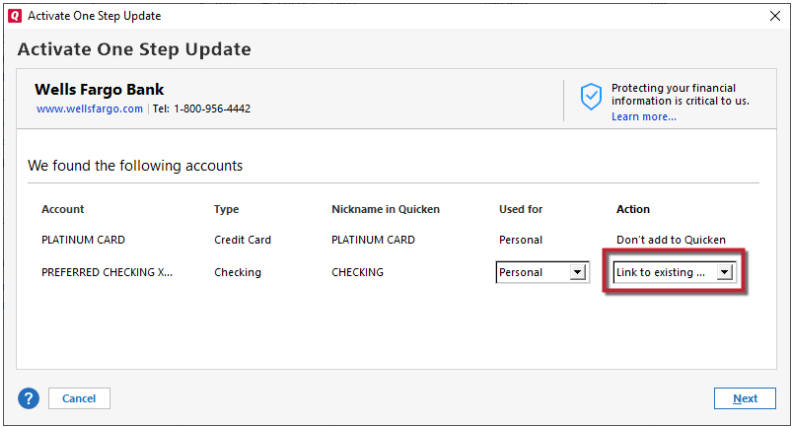
    If you prefer to keep the original account and get rid of the accidentally created duplicate account, then deactivate the newly created account. Navigate to Tools>Add Account and follow the prompts. Once you get to the Add/Link screen, make sure to carefully link the account to the correct nickname in Quicken.

    Link to Existing.png

    Verify that the original account is updating properly and has all the correct information, then backup your file again and delete the new/duplicate account.

    I hope this helps!

    Quicken Kristina

    Make sure to sign up for the email digest to see a round up of your top posts.

  • rhinodad
    rhinodad Quicken Windows Subscription Member ✭✭

    Thanks Kristina, I appreciate the quick reply! Moving 40,000+transactions from the original account seemed painful so I simply deactivated and closed that account to keep the detailed history and will just use the newly created account going forward.

  • Quicken Kristina
    Quicken Kristina Quicken Windows Subscription Moderator mod

    Thank you for the follow-up,

    I'm glad to hear you were able to resolve the issue!

    If you need further assistance, please feel free to reach out!

    Quicken Kristina

    Make sure to sign up for the email digest to see a round up of your top posts.

This discussion has been closed.