Fidelity Changes to your connected services in Quicken
During the reauthorization process, you'll get a pop-up window from Quicken regarding SPAXX (Fidelity Gov't Money Mkt Fund). Prior to the reauthorization, Quicken classified SPAXX as a security. The window recommends you remove the security classification because Fidelity considers SPAXX to be core cash. I followed the recommendation and all my reinvestment transactions since my prior Quicken update were eliminated which has created share count and cost basis reconciliation errors in the transaction register within Quicken. Times series of transactions were deleted for each reinvestment security.
Does anyone know how to return SPAXX to security classification, so my future reinvestment transactions return to automatic processing and will maintain the correct share count and cost basis balance? I've had to manually add each deleted reinvestment transaction and will need to do so from this date forward.
Thanks.
Comments
-
Forced to change to EWC+ today. My Cash management account in Fidelity is massively messed up. [Edited - Language] It matched to the penny with DC connect. I checked boxes to have the core positions as cash. I tried the fix above and it changed nothing. Multiple duplicate transactions with no way to check how far back they go. In addition, my equity accounts have hundreds of security mis-matches. This is a bleeping nightmare!
0 -
@Ethan1991 @es114 Well, my suggestion is to simply select the "treat core MM as security" instead of as Cash, this works perfectly for us in a similar situation. Initiate EWC+ migration from a back up file if you must. Best of luck and success!
0 -
es114, my cash management account in Fidelity is similarly massively messed up. [Edited - Language] The Cash "Held in Money Market" amount shown in the Fidelity account on Fidelity's webpage doesn't match the Cash amount line shown in Quicken's Account Overview, Holdings, Cash line item and both don't match the linked CMA cash line on the Accounts, All Transactions, Banking, left hand panel. There is no way to identify, reconcile and change differences to make these amounts balance because Quicken has embedded amounts in their underlying code.
0 -
Hello @Ethan1991 & @es114,
Thank you for reaching out! As @HKB recommended, if tracking as cash is causing problems, then you would want to switch to tracking as a security.
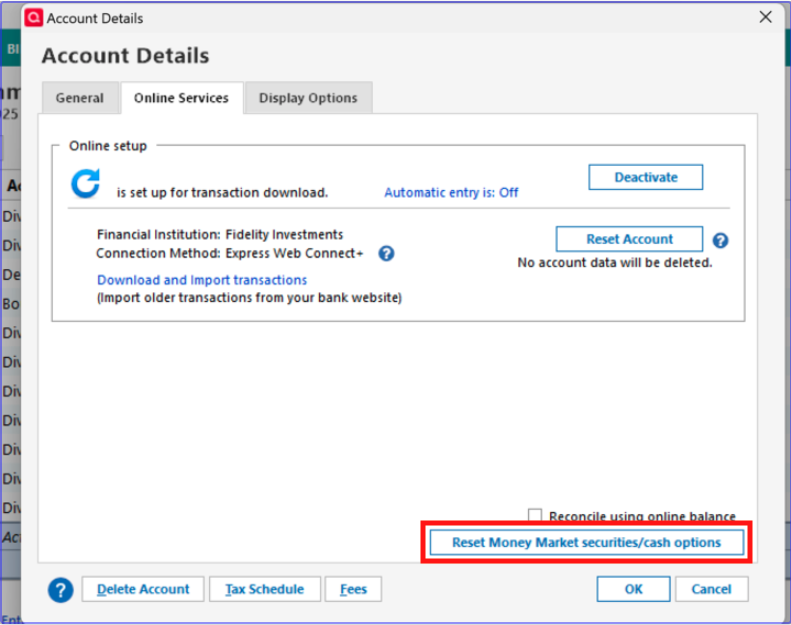
To do that, navigate to Tools>Account List and click the Edit button next to the problem account. In the Account Details window that comes up, navigate to the Online Services tab. Near the lower right, there should be a Reset Money Market securities/cash options button.
If you do not see that button for the impacted accounts, then restore a backup from before the accounts were migrated to the new connection method, and go through the reauthorization process again, making sure to select to track as a security instead of as cash.
I hope this helps!
Quicken Kristina
Make sure to sign up for the email digest to see a round up of your top posts.
0
Categories
- All Categories
- 56 Product Ideas
- 36 Announcements
- 223 Alerts, Online Banking & Known Product Issues
- 22 Product Alerts
- 702 Welcome to the Community!
- 671 Before you Buy
- 1.2K Product Ideas
- 53.7K Quicken Classic for Windows
- 16.3K Quicken Classic for Mac
- 1K Quicken Mobile
- 813 Quicken on the Web
- 111 Quicken LifeHub