This discussion was created from comments split from:
Fidelity NetBenefits and Reinvest Dividends
.
Since upgrading to new Fidelity connection, I am not getting seeing any "transactions" being downloaded into Quicken from both my IRA account an brokerage account. Specifically I am missing all reinvest dividends, Capital Gains are incorrectly showing as Deposit with the Security field saying: short term capital gain or long term capital gain. Withdrawals for RMDs are not appearing either. HELP!
Hello @Ron AVL,
Thank you for reaching out. To help troubleshoot, please clarify, you mentioned that no transactions are downloading, but then you also mentioned that some transactions are downloading incorrectly. Are you having different issues in different accounts?
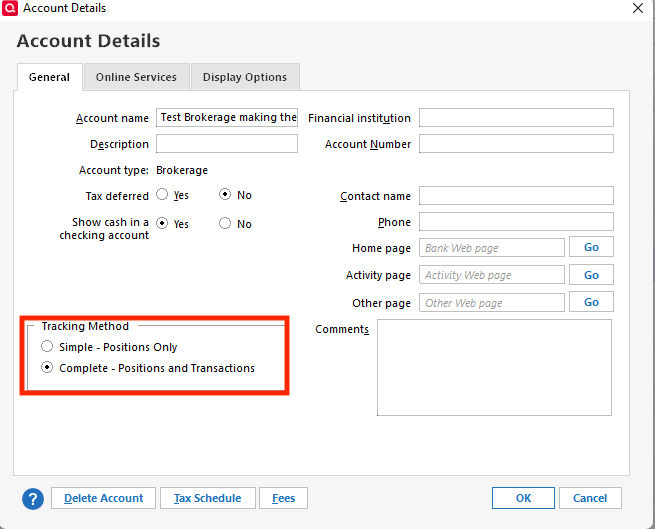
For accounts where no transactions are downloading, is the transactions section visible at all? If it is not, then the problem is likely that the account is on Simple investment tracking. To correct that, navigate to Tools>Account List, click the Edit button next to the problem account, and on the General tab, select Complete for the investment tracking method.
If the transactions section is visible, but no new transactions are downloading, then I recommend following these troubleshooting steps from our article on missing transactions/transactions not downloading:
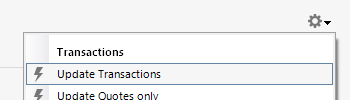
Refresh your online account information by clicking the Actions Gear Icon on the upper right of the register, and select Update Now. Follow the on-screen instructions to complete the update.
Confirm that the Sort Order in your account is by Date; just click the top of the Date column in your account register. It's possible the transactions are in your register, but not where you thought they'd be.
Go to Tools > Account List and check Show Hidden Accounts at the bottom left. Confirm the missing transactions haven't been added to a hidden account by clicking on the name of any account that appears with a check mark in the Hidden column.
I look forward to your response!