Schwab cc-800

jtawil777
jtawil777 Quicken Windows Subscription Member ✭✭

Quicken Classic for Windows started showing a Schwab cc-800 a few days ago. The usual troubleshooting does not work:

  1. Go to each account that you are having an issue downloading, click on the account and "Edit Account Details", and click on the "Online Services" and click on the "Deactivate" button. Do this for each account.
  2. After all accounts have been deactivated from online services, run a validate and repair file process: File > Validate and Repair File... > Check Validate File > Click OK
  3. Most important: Next, log your account out of Quicken: Edit > Preferences > Quicken ID & Cloud Accounts > click on: Sign in as a Different User > type "YES" in the box and sign out
  4. Close Quicken completely.
  5. There is some problem with the services running between your file and the Quicken servers. That's why logging out completely resets the connection keys between you and their services.
  6. After Quicken has shut down, open quicken again, and log in. Set any of your accounts back up that you deactivated by using the Add account function "+" (not by clicking on the account, then edit account details). Search for the financial institution (like Chase), and log into the financial institution, and link to existing account, and you should be good to go. Once the transactions have downloaded, before you accept any, be sure they are not duplicated, and delete any duplicates first.

Sometimes the "last download" date will update to the current date/time. Other times it will not.


Comments

  • Quicken Kristina
    Quicken Kristina Quicken Windows Subscription Moderator mod

    Hello @jtawil777,

    Thank you for letting us know you're seeing this issue. When you go through the steps you listed in your post, does it temporarily correct the issue? Is there anything that seems to trigger the error to reappear? Is this error impacting all of your Schwab accounts? Are all of your Schwab accounts under the same login credentials with Schwab?

    I look forward to your reply!

    Quicken Kristina

    Make sure to sign up for the email digest to see a round up of your top posts.

  • jtawil777
    jtawil777 Quicken Windows Subscription Member ✭✭
    edited October 18

    Going through the steps allows the transactions to update once but still results in CC-800 during the update. Then if I quit Quicken, restart it, even waiting a day, running the One Step Update fails with a CC-800 and no transactions are downloaded. This impacts multiple Schwab accounts and they are all under the same credential. The only other oddity, is that after going through the full reset, downloading updates, the checking balance is off by thousands of dollars. I need to go in and manually fix the opening balance. I have already gone through and looked for errant transactions or voided transactions and there are none.

  • Quicken Kristina
    Quicken Kristina Quicken Windows Subscription Moderator mod

    Thank you for your reply,

    There is a known issue with the opening balance sometimes changing when reconnecting/resetting an account connected by Express Web Connect+. That may be the reason that you're encountering the issue with the balance being off and fixing the opening balance being the fix. See this article for more information: https://www.quicken.com/support/why-did-my-opening-balance-change-after-changing-ewc-quicken-windows/ .

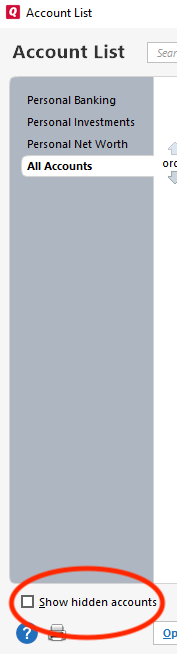
    When you deactivate your Schwab accounts, are you making sure that you're deactivating all of them, including any that may be hidden? If you have hidden accounts, there will be a Show hidden accounts option near the lower left of the Account List window (Tools>Account List).

    show hidden accounts win.png

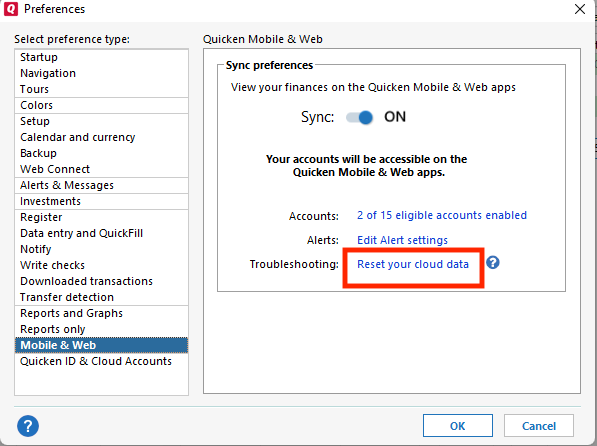
    If you are, and the issue is still persisting, then the issue may be due to old/invalid information still being stuck in the Quicken Cloud. To troubleshoot that, backup your Quicken file, deactivate all of your Schwab accounts, including any hidden ones, then navigate to Edit>Preferences>Mobile & Web. Click the Reset your cloud data link.

    Reset Cloud QWin.png

    Note - If you have Sync off, you will not see this option. To reset the cloud, turn Sync on, click OK, then navigate back to Edit>Preferences>Mobile & Web and click the Reset your cloud data link. When the cloud reset finishes, you can turn Sync back off again.

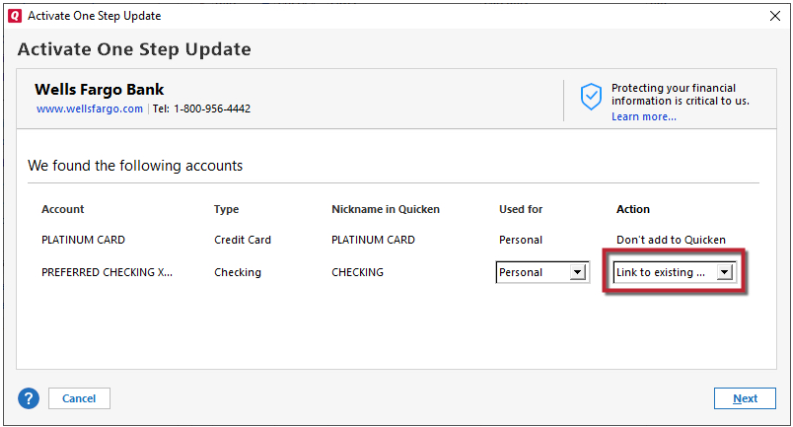
    Once the cloud reset finishes, close the Quicken program, wait 5 seconds, then reopen the Quicken program. Reconnect your Schwab accounts by navigating to Tools>Add Account and following the prompts. When you get to the Add/Link screen, carefully link your accounts to the correct nickname in Quicken.

    Link to Existing.png

    Once that is done, test to see if the issue is resolved.

    Please let me know how it goes!

    Quicken Kristina

    Make sure to sign up for the email digest to see a round up of your top posts.

  • jtawil777
    jtawil777 Quicken Windows Subscription Member ✭✭

    Thank you for the additional suggestions. I did all that you suggested which didn't remove the CC-800. Then I did all of the above and logged out of my Quicken desktop account (closed the current file). Re-opened, logged into Quicken, setup the accounts and it worked. Hard to know if my troubleshooting fixed this or if Quicken's Express Web Connect+ fixed itself.

  • Quicken Kristina
    Quicken Kristina Quicken Windows Subscription Moderator mod

    Thank you for the follow-up,

    I'm glad to hear you were able to resolve the issue!

    If you need further assistance, please feel free to reach out!

    Quicken Kristina

    Make sure to sign up for the email digest to see a round up of your top posts.

  • Mike.Grills
    Mike.Grills Quicken Windows Subscription Member ✭✭

    I have been having the same issues with Schwab accounts.

  • Quicken Kristina
    Quicken Kristina Quicken Windows Subscription Moderator mod

    Hello @Mike.Grills,

    Thank you for letting us know you've been having the same issues. Have you tried the troubleshooting steps in this discussion? Did you try doing what the original poster did to resolve the issue?

    I look forward to your reply!

    Quicken Kristina

    Make sure to sign up for the email digest to see a round up of your top posts.

  • Mike.Grills
    Mike.Grills Quicken Windows Subscription Member ✭✭
    edited November 3

    I've tried everything. Its beyond frustrating that this started with the last "upgrade". (Earlier today it was Discover Card. Then that started working.) Right now, all I get with Schwab is that it cannot connect to Schwab due to timeout or connection issus. Why am I paying for a product that doesn't work?

  • Quicken Kristina
    Quicken Kristina Quicken Windows Subscription Moderator mod

    Thank you for your reply,

    To clarify, are you seeing CC-800 errors, or are you seeing different errors? If these are not CC-800 errors, then please provide more details. What is the exact error message/code you are seeing? Does it happen when trying to update accounts or when trying to add/reconnect accounts? Are you seeing the error in Quicken, or on the financial institution website while authorizing?

    Thank you!

    Quicken Kristina

    Make sure to sign up for the email digest to see a round up of your top posts.

  • Mike.Grills
    Mike.Grills Quicken Windows Subscription Member ✭✭

    I was seeing CC-800. I have deactivated and many other methods of trying to get it to work. When trying to use Add Account, Quicken won't even connect to Schwab. QUICKEN shows: "Sign in to Charles Schwab & Co., Inc. bank failed. Try again. Sorry, the sign in failed due to time out or a connection error. Select Sign In to authenticate via your web browser," I can authorize the connection and then it fails. I have check with Schwab and they show both of my accounts as authorized to link to Quicken. Quicken just won't connect. This started along with update to R64.35 build 27.1.64.35. As I said, I don't have an issue with other programs such as Boldin Retirement connecting to my Schwab accounts.

  • Mike.Grills
    Mike.Grills Quicken Windows Subscription Member ✭✭

    No thoughts on my post above?

  • Quicken Kristina
    Quicken Kristina Quicken Windows Subscription Moderator mod

    Thank you for your reply,

    The error messages you describe usually happen if something is interfering with the connection between Schwab and Quicken during the authorization process. When authorizing your accounts, please make sure to pause any browser extensions, such as ad blockers and pop up blockers. If that does not resolve the issue, try temporarily setting a different internet browser as your default (do not use Brave or DuckDuckGo, since they are known to not work with Quicken).

    Please let me know how it goes!

    Quicken Kristina

    Make sure to sign up for the email digest to see a round up of your top posts.