Quicken does not download transactions from Fidelity

Smokey7422
Smokey7422 Quicken Windows Other Member ✭✭✭

For nearly a month, I have not been able to download transactions from Fidelity. I have spent hours on a call with Quicken support and they still have no solution. The only way I can get a download is to deauthorize and then reauthorize each and every account of which there is nearly a dozen.

When that downloads, it matches new transactions to older transactions that have already cleared. But, once that happens and is cleared up, Quicken stops downloading transactions that occur afterwards. No error is given but Fidelity's page shows transactions that have cleared and Quicken will not download them.

The Online Center shows that Fidelity and Quicken are in sync but they are not.

I am on Quicken Windows, version R64.30 build 27.1.64.30

Comments

  • Quicken Alyssa
    Quicken Alyssa Quicken Windows Subscription Moderator mod

    Hello @Smokey7422,

    Thank you for sharing your experience. I am happy to help.

    Given that you have already contacted support and deauthorized/reauthorized multiple times, maybe we should look outside of the box on this one.

    • Where is your data file located?
    • Is your file being synced or backed up by any third-party services like Dropbox, Carbonite, or OneDrive?
    • Do you have any pending Windows updates?

    Looking forward to your response.

    Quicken Alyssa

    Make sure to sign up for the email digest to see a round up of your top posts.

  • Smokey7422
    Smokey7422 Quicken Windows Other Member ✭✭✭

    Hi Alyssa,

    I have another call with support in a few minutes but to answer your question, it says the file is located in OneDrive on my computer. A folder. The whole OneDrive thing has become a pain for me but didn't think anything of it when I first got it. Anyway, it's been there for years.

    I do not have my file being synced anywhere else. I manually do backups from time to time on a portable drive and have been doing that for years.

    My system says I'm up to date but that there is a Windows 11, version 25H2 is available.

  • Boatnmaniac
    Boatnmaniac Quicken Windows Subscription SuperUser, Windows Beta ✭✭✭✭✭

    You might want to move that data file to another folder on your hard drive…or at least pause that One Drive folder from syncing with with the your system while you are running Quicken. One Drive has been observed by some (many?) Quicken users to be very problematic for Quicken because it continues to sync with the data file while the data file is in use.

    Quicken Classic Premier (US) Subscription: R65.15 on Windows 11 Home

  • Smokey7422
    Smokey7422 Quicken Windows Other Member ✭✭✭

    Now that is over my head. It's been like this for years and suddenly it's a problem?

    You'll have to explain to me how to move that file and whatever else is needed for Quicken to work properly.

  • Smokey7422
    Smokey7422 Quicken Windows Other Member ✭✭✭

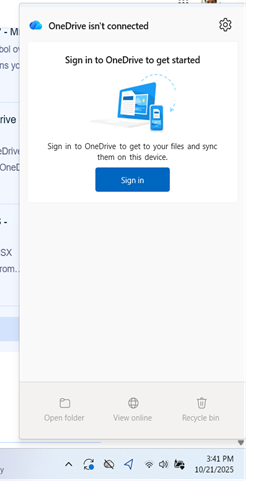
    I'm not sure how well you can see this but my OneDrive is not connected.

    image.png
  • Boatnmaniac
    Boatnmaniac Quicken Windows Subscription SuperUser, Windows Beta ✭✭✭✭✭

    Ah. I have disabled my OneDrive folder as well because it caused me no end of grief when it was enabled.

    I had assumed that your OneDrive folder was enabled and active. Provided that it is disabled then that is not likely a contributing factor to the download issue you are experiencing.

    Quicken Classic Premier (US) Subscription: R65.15 on Windows 11 Home

  • Smokey7422
    Smokey7422 Quicken Windows Other Member ✭✭✭

    I have local files on the PC that are in a folder called OneDrive.

    I just spent two more hours with Quicken support. Supplied them a half a dozen screen shots to prove that my Quicken register doesn't match what Fidelity shows for activity. That's the third time I've done this. They are escalating, again. Still no answer.

  • Quicken Alyssa
    Quicken Alyssa Quicken Windows Subscription Moderator mod

    @Smokey7422,

    Thank you for letting us know that you have contacted Quicken Support, and I am glad they were able to get the issue escalated.

    I do hope they can find a resolution for you soon.

    Thanks again!

    [CTP-14940]

    Quicken Alyssa

    Make sure to sign up for the email digest to see a round up of your top posts.

  • stade
    stade Quicken Windows Subscription Member ✭✭

    I am having the same kind of problems with Fidelity activity download to Quicken. Transactions are just not downloaded. Then a few days ago I noticed that the problem was also with downloads from a Master Card. Then several days of transactions, about 20 over a two-week period all downloaded at once. I think there is a bug in the Quicken download process. (One drive is not involved)