Salary splits all screwed up
About two months ago, my salary splits were all wrong (after having adding a reminder with the correct splits). Last month I had to correct the splits again, so I deleted my salary reminders and added a monthly reminder based on correct splits.
So my paycheck today is all wrong again.
Quicken seems to lose the splits in my saved reminders.
How can I fix this?😣

Answers
-
Additionally, Quicken keeps changing the order of the splits (which I copy from my paystub).
After I fix this, I delete all salary reminders in the future and save the corrected salary with splits for all future deposits.
But Quicken keeps changing not only the order of the splits, but also the amount of the splits.
Very frustrating. This wasn't how Quicken worked in the past. Something changed a few months ago.
1 -
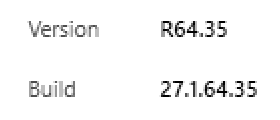
It would be helpful to know what release you are on.
The issue with the reminders including reminders with splits started with one of the recent releases (R63.x or 64.x ?) and is not resolved yet. The community is full of such reports. You have a few options:
- Search for and review the similar posts on this community to see if others have found a temporary workaround - I was under the impression that those issues were isolated to the reminders that were linked to an online bill but I may be wrong. (This would be my starting approach)
- Live with it until they are fixed in one of the future releases by reviewing the release note.
- Downgrade to an earlier version knowing that you will lose some new features and updates.
- Q Win Deluxe user since 2010, US Subscription
- I don't use Cloud Sync, Mobile & Web, Bill Pay/Mgr1 -
@Aholiab Do you have the Sync option at Edit > Preferences > Mobile and Web enabled? There have been reports that this scrambles split transactions, including paychecks.
If you don't use the mobile apps or Quicken on the Web, you can safely turn this off (slider to the left).
If you do use the mobile or web features, you can turn it off to see if that stops new occurrences of the problem, and if so decide whether you want to leave it off while Quicken fixes it.
Please let us know what you find.
QWin Premier subscription0 -
Dear BK,
Here's my build and version. I try to keep up-to-date.
Thanks for telling me that this is a known problem. That helps.
0 -
Thank you, Jim Harman.
I do use the mobile app, and even the web app, so I hesitate to turn off synchronization.
This only happens at the end of each month, so I'll put up with the problem for now.
0
Categories
- All Categories
- 56 Product Ideas
- 36 Announcements
- 224 Alerts, Online Banking & Known Product Issues
- 22 Product Alerts
- 702 Welcome to the Community!
- 671 Before you Buy
- 1.2K Product Ideas
- 53.7K Quicken Classic for Windows
- 16.3K Quicken Classic for Mac
- 1K Quicken Mobile
- 812 Quicken on the Web
- 111 Quicken LifeHub