I just converted from Q for Windows to Quicken Classic for Mac . I have accounts in Morgan Stanley and Etrade , both Ira & Non Ira. Can you run one report which will show all your stocks and current market value ?
Yes, but it is a peculiar set of steps. The Mac team will hopefully make this an ordinary report some day…
To get a report for one brokerage account, select that account in the left sidebar… and follow steps below.
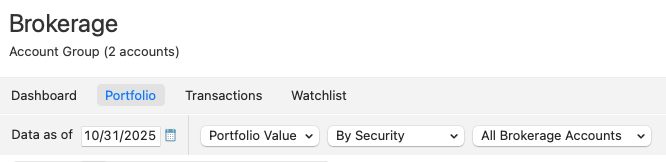
To get a report for multiple accounts, select the header - either Brokerage or Retirement … or select the main header "Investing". Note that this will not let you select specific accounts, but only all non-retirement, all retirement, or all accounts. In the view that you see, select the Portfolio tab. Set the desired date and select "Portfolio Value" to show each holding with the most recently downloaded pricing. Select how you want the information grouped… By Security, By Account, etc…. You can further customize the display (later printed as a report) by either right-clicking a column heading to adjust what columns are shown … or clicking the standard Mac column icon at the top right of the Portfolio view window.
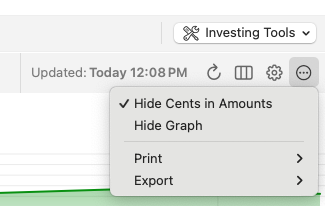
Finally, to print what you see on-screen, click the round "…" button at the far right near the top of the Portfolio window where you have the option to Print or Export the data. You can print the aggregate for each holding, or each basis lot. The graph at the top of the Portfolio view window will not print.
To get a report for multiple accounts, select the header - either Brokerage or Retirement … or select the main header "Investing". Note that this will not let you select specific accounts, but only all non-retirement, all retirement, or all accounts.
A really obscure feature is that you can, in fact, select multiple selected accounts without selecting the entire account group (e.g. Retirement). To do this:
Of course, the problem with this is you have to select the accounts manually each time you want to view or report on them; there's no way to save the selected accounts as a report you can use in the future. As @MontanaKarl indicated, the development team has indicated they will offer a way to save custom investing reports at some point in the future, but we never know whn such enhancements will appear.
Thanks, @jacobs … bizarre behavior with one check per drop-down selection, but it works! Learn something new every day :-)