Restoring a backup does not redownload transactions for Fidelity linked cash account
I've noticed that when I've restored the previous day's backup, the Fidelity account with a linked cash account does not re-download the transaction but the other accounts do redownload. Not sure why, but I also noticed that when converting from DC to EWC+, Quicken ignored the link preference to the existing investment account that has a linked cash account and created a new non-linked investment account. I had to delete the new account, unlink the existing investment account (20+ minutes), reconnect the account to Fidelity and link to the unlinked investment account. Once linked properly, I changed the investment account to have a linked cash account (another 15+ minutes). Using EWC+, it appears that Quicken does not know how to connect a Fidelity investment account that has a linked cash partner account. Is it just me having this issue?
Deluxe R64.30, Windows 11 Pro
Comments
-
No you’re not alone. I have a linked cash management account (one in investing and one in banking). I have tried unlinking them but after an hour of “updating links” and relinking I have nothing remotely related to what is in Fidelity. The only workaround is running a test file with all new data which gets me closer to reality but has only 3 years of data instead of the 20 years I have now. Very frustrating. No confidence there will be a fix.
0 -
Hello @leishirsute & @es114,
Thank you for letting us know you're seeing this issue. To clarify, is it only transactions that already downloaded prior to restoring the backup that aren't downloading, or are no transactions at all downloading for the linked cash accounts? How old are the transactions that aren't redownloading? Were the linked cash accounts working correctly prior to that?
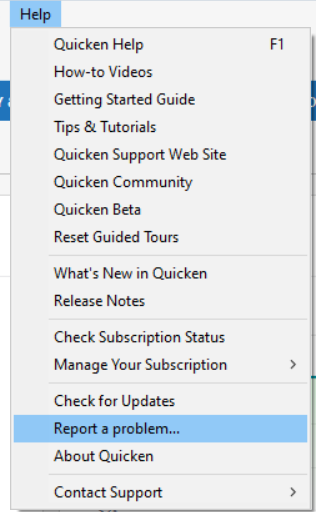
I forwarded this issue to the proper channels for further investigation and resolution. If you have not already done so, please navigate to Help>Report a Problem and send a problem report with log files attached. Please also include at least 3 samples of transactions that should have downloading into the linked cash account, but didn't, and screenshots showing those transactions posted on the financial institution side, but not in your Quicken.
Thank you!
(CBT-905)
Quicken Kristina
Make sure to sign up for the email digest to see a round up of your top posts.
0 -
To clarify, is it only transactions that already downloaded prior to restoring the backup that aren't downloading, or are no transactions at all downloading for the linked cash accounts?
It is only transactions that already downloaded prior to restoring the backup.
How old are the transactions that aren't redownloading?
The transactions that aren't downloading are one day old.
I downloaded transactions this morning. Then I restored yesterday's backup and tried to redownload transactions. Non-Fidelity accounts downloaded the transactions again. Non-linked Fidelity accounts downloaded the transactions again after several attempts dealing with the CC-501 error.Were the linked cash accounts working correctly prior to that?
The Fidelity linked cash account (my only linked cash account), worked prior to cutover to EWC+.
It seems the Fidelity EWC+ cutover doesn't handle linked cash accounts very well.
I reported a problem today when it occurred. I signed up for the email digest.
Deluxe R64.30, Windows 11 Pro
1 -
It's hard to tell if the unlink of a cash account is working, there's no progress indicator and it can take quite a long time depending on the number of transactions to unlink. I had to make manual corrections after the unlink.
Suggestion (this was going to be my alternate plan of action if I couldn't get unlink to work):
If you can restore a backup to get back your former linked cash accounts, maybe you can "retire" those accounts and keep them for history in your datafile while adding the new accounts with more recent data. Quicken now offers the ability to "Close Account…" for the retired accounts rather than delete them. However, I would probably just disconnect them from downloading so all reports show the historical data.
From Help:
"If you are at all unsure about what it means to close an account, take a look at When should I close an account? in help before proceeding. This cannot be undone."
Deluxe R64.30, Windows 11 Pro
0 -
Thank you for your reply,
Thank you for the additional information. I can see that you submitted multiple problem reports today. However, for issues with missing transactions/transactions not downloading, we do need additional information so our teams can investigate the issue. We need sample transactions (date/payee/amount), a screenshot showing those transactions posted on the financial institution website, and a screenshot showing that they are not in your Quicken file.
Thank you!
Quicken Kristina
Make sure to sign up for the email digest to see a round up of your top posts.
0 -
@Quicken Kristina That will be hard to recreate as the current download process for Fidelity is unpredictable in behavior and is generating CC-501 errors. When downloading for Fidelity stabilizes and doesn't produce CC-501 errors, I should be able provide the required information
Deluxe R64.30, Windows 11 Pro
1 -
Thank you for the follow-up,
Our teams are aware of the issue with CC-501 errors (to see the Community Alert, click here). We don't have any ETA, but hopefully it'll be resolved soon.
Please let me know when you are able to get the needed screenshots and sample transactions.
Thank you!
Quicken Kristina
Make sure to sign up for the email digest to see a round up of your top posts.
0
Categories
- All Categories
- 56 Product Ideas
- 36 Announcements
- 223 Alerts, Online Banking & Known Product Issues
- 22 Product Alerts
- 701 Welcome to the Community!
- 671 Before you Buy
- 1.2K Product Ideas
- 53.7K Quicken Classic for Windows
- 16.3K Quicken Classic for Mac
- 1K Quicken Mobile
- 813 Quicken on the Web
- 111 Quicken LifeHub