Quicken Classic keeps encountering "Unexpected error" upon start-up and shuts down.
Anyone else experiencing Quicken Deluxe Classic encountering an "unexpected error" and shutting down?
We've tried for over a week and can't get in. Today, I just did a Quicken update but after that download finished, Quicken launched and immediately displayed the "unexpected error" message and shut down again. I've filled out the survey asking for feedback a couple of times but haven't heard back.
Anyone else experiencing this? Know how to get this resolved? Know how to reach someone at Quicken?
Comments
-
Hello @MarkF,
Thank you for letting us know you're seeing this issue. To help troubleshoot, please try following these steps from our article on when you're unable to open Quicken for Windows:
Restart your computer.
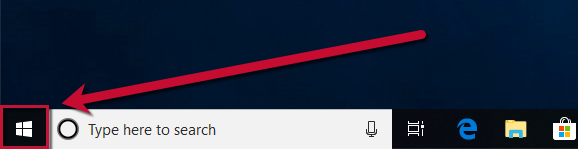
- Right-click the Start button.
- Select Shut down or sign out, then Restart.
Try opening Quicken without a data file.
- To do this, hold Ctrl + Shift on your keyboard and double-click the Quicken icon.
- Note: You will need to continue to hold Ctrl + Shift until Quicken opens with a blank screen.
- If this occurs, there may be an issue with the data file that's keeping Quicken from opening properly. Follow these steps to Restore a backup file.
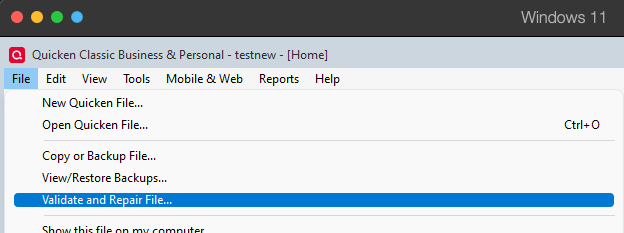
- Then, Validate the restored backup file by going to File > Validate and Repair File.
- Check Validate file and click OK.
Temporarily disable your anti-virus and firewall.
The anti-virus and/or firewall on your system could be blocking Quicken from running properly. They will need to be disabled or have the settings updated to include Quicken as a safe program.
If you do not know how to update these settings, please contact your anti-virus/firewall provider.
Remove and reinstall Quicken
- Follow the instructions in this FAQ: How do I uninstall Quicken for Windows?
- Before reinstalling Quicken, ensure your anti-virus and firewall are disabled.
- Reinstall Quicken. If you need to redownload Quicken, please use this article on downloading Quicken.
- Reactivate your anti-virus/firewall.
If none of the above troubleshooting resolves the issue, please contact Quicken Support directly for further assistance. Quicken Support's contact information can be found through this link here. Phone support is available from 5:00 am PT to 5:00 pm PT, Monday through Friday. Chat support is available from 5:00 am PT to 5:00 pm PT, 7 days a week.
I hope this helps!
Quicken Kristina
Make sure to sign up for the email digest to see a round up of your top posts.
0
Categories
- All Categories
- 56 Product Ideas
- 36 Announcements
- 223 Alerts, Online Banking & Known Product Issues
- 22 Product Alerts
- 701 Welcome to the Community!
- 671 Before you Buy
- 1.2K Product Ideas
- 53.7K Quicken Classic for Windows
- 16.3K Quicken Classic for Mac
- 1K Quicken Mobile
- 813 Quicken on the Web
- 111 Quicken LifeHub