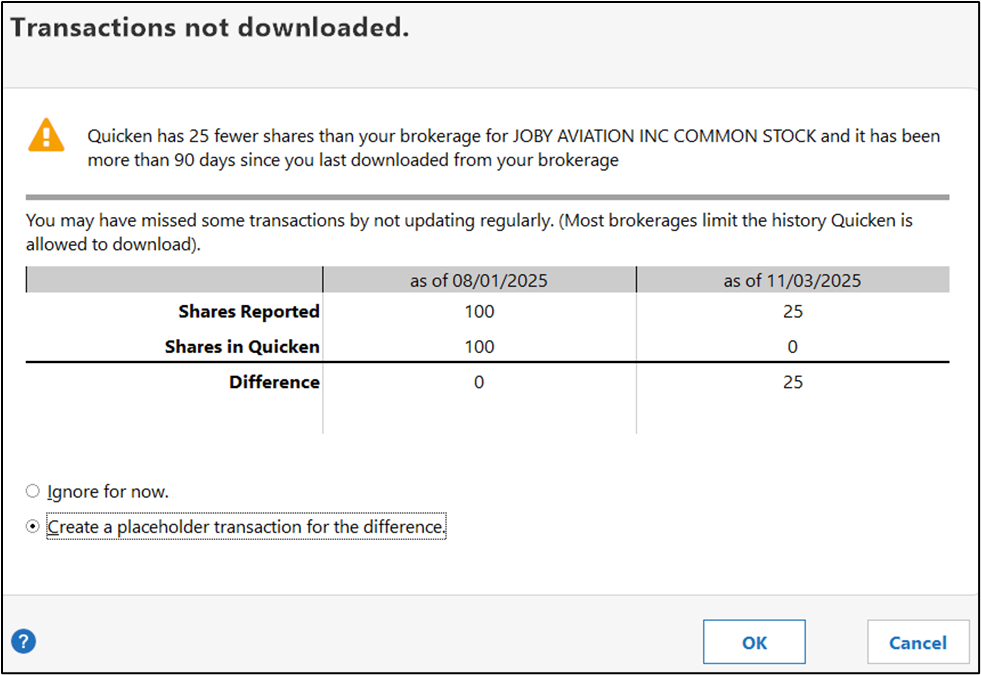
Why is it comparing the shares as of 08/01/2025 when I ran the reauthorize account on 10/31/2025? This doesn't make any sense!
I think (not sure) that the 8/1 date was used as the benchmark because the migration to EWC+ downloads transactions and data for the prior 3 months and that would place the benchmark at the front end of that window.
What I am seeing in this pop up is that there appears to be a missing Sell or Remove shares transaction (or transactions) totalling 75 shares dated somewhere between 8/1 and 10/31. Manually enter the missing transaction(s) or do an Add Shares transaction for the missing shares quantity (dated between 8/1 and 10/31) and this shares mismatch popup should no longer exist.
If it still exists, look of a Placeholder that might be causing the mismatch issue. If found, delete it.