Managed brokerage accounts
IRA accounts both managed and non-managed.
I am not getting the choice to select cash or shares for tracking.
FDRXX, FZFXX, and SPAXX are the fidelity money market accounts related to my post.
Reset Money Market securities/cash options
This is not shown as an option to change.
version R64.35 build 27.1.64.35
cut and pasted to clarify my posts.
I do not have this option.
Thank you.
Hello @rayseidlinger,
Thank you for letting us know you're seeing this issue. Since you are not seeing the option to reset money market securities/cash, please try following these steps:
Please let me know how it goes!
Thank you, I appreciate the help and will try this once I understand the following:
I am not sure with 3. Force Transactions meaning is. I do not see an option in preferences menu or under the gear menu.
sorry to bother you.
Review the prompt and make edits as needed.
Am I going to edit/delete share entries or add cash entries?
Thank you for your replies,
Sorry for the confusion. Force transactions is not a menu option or prompt. You should be able to do it by running One Step Update (OSU) on affected accounts, accepting downloaded transactions, and reviewing the prompt (which should come up) and making edits as needed.
The prompt I'm referring to should automatically come up when you accept the transactions.
I hope this helps!
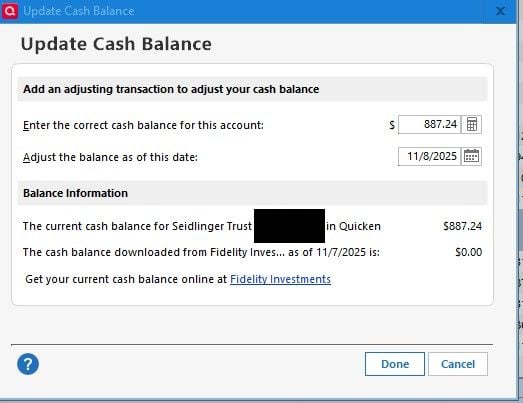
No prompt shows up after following thea bove instructions. This is what is I see on clicking cash. I see no change in quicken.
I read a comment talking about green cash button on this screen. There is no button at allow. Thank you.
The 887.24 is the cash in the money market that Fidelity shows.
Should i again disconnect and re-connect to Fidelity via web connect plus. This whole process is so very frustrating trying to get accurate data reporting.
Thank you for the follow-up,
Since the steps did not help you resolve the issue, I added you to the ticket for this known issue. Our teams are working to resolve the issue.
Unless deactivating and reconnecting your accounts is a temporary fix for the problem you're seeing, there wouldn't be any value in doing it. The problem should be fixed in a future program update.
Thank you!
(CTP-14825)