Fidelity Brokerage Account Transaction Categorization

apodsim
apodsim Member ✭✭✭
edited November 9 in Investing (Windows)

Operating System: Windows 10 64b, Quicken Classic Premier

  1. One of my Fidelity accounts is a CMA-linked Brokerage account to a Cash Account. When the Cash Account is reconciled the linked Brokerage transactions are not marked as reconciled. The only current method of marking the Brokerage Account transaction as reconciled is to manually select each transaction and then select R. Why can the option to select ALL transactions to mark them reconciled like other accounts? The better option would be to mark the Brokerage transactions as reconciled when the transactions in the Cash account are reconciled.
  2. Some Brokerage account transactions are not categorized after the change to Web Connect +. The problem transactions are marked as Deposit when they should be Dividends. The Withdraw transactions are not categorized which are generally related to Fees and Charges or Tax categories. Is there any method to associate keywords with a user created categories?


Comments

  • Quicken Kristina
    Quicken Kristina Quicken Windows Subscription Moderator mod

    Hello @apodsim,

    Thank you for reaching out. To answer your questions, when there is a linked cash account, the regular reconcile function won't work in the investment account portion because the cash balance is always zero.

    Screenshot 2025-11-09 at 5.49.53 PM.png

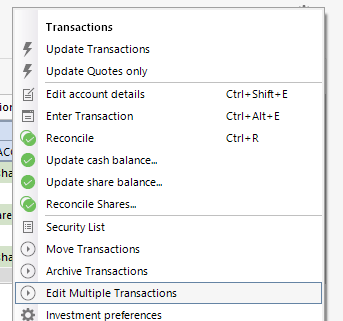
    That said, if you want to mark all transactions as reconciled, click the gear icon and choose Edit Multiple Transactions.

    Screenshot 2025-11-09 at 5.56.36 PM.png

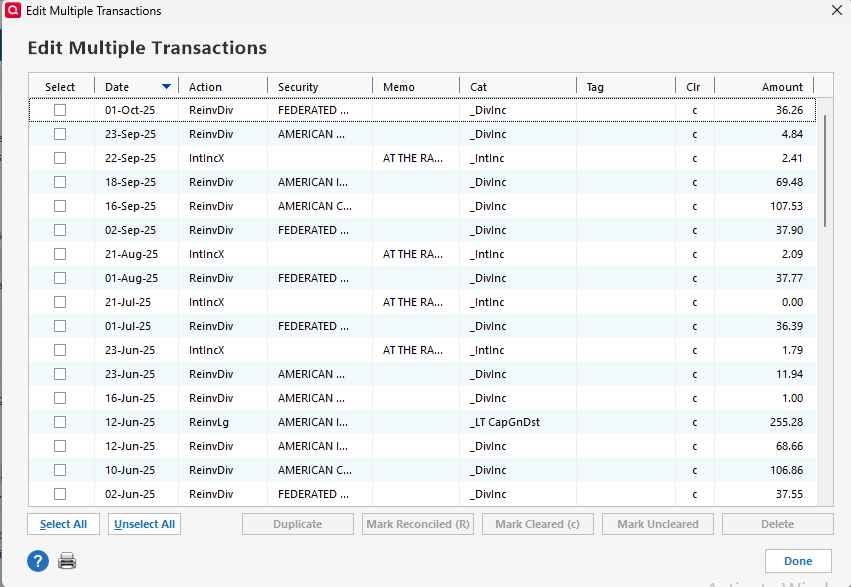
    In the window that comes up, you can use the Select All button to select everything, then the Mark Reconciled button to mark them all reconciled.

    Screenshot 2025-11-09 at 5.55.51 PM.png

    Note, it's a good idea to backup your file prior to editing transactions.

    There are some known issue with dividend transactions. See this Community Alert for more information:

    It is possible that the categorization issues you're seeing are related to the known issues.

    I hope this helps!

    Quicken Kristina

    Make sure to sign up for the email digest to see a round up of your top posts.