Purging Old Transactions Using Year End Archive Function
Hello all,
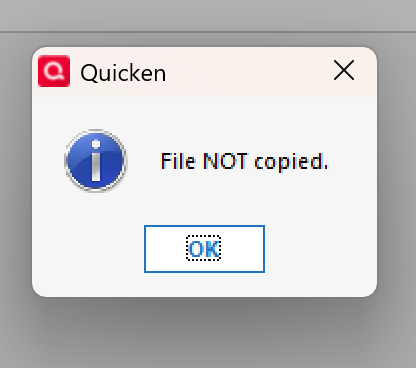
I am getting the following error when attempting to use the year end archive function. I use the subscription version of Home and Business.
I have performed multiple tests, experimenting with default quicken file names, files in same (default) folder names etc. Same result. No transactions are removed and all that happens is the original working file is renamed to "QdataBKP.QDF" and that is it. Files sizes are sizes are exactly the same. I checked individual transactions that I would expect would be removed, but they are still in the account. Nothing exotic either, just a checking account with YEARS of reconciled transactions I would like to remove.
Has anyone experienced this situation? Insight would be appreciated. Thank-you!
Answers
-
Hello @Chrisan1661,
Thank you for letting us know you're encountering this issue. There are a couple things that can cause the issue you're seeing. It could be data issues. It could also be caused by another user, program, or service trying to access the file while it's being copied.
Do you keep your Quicken file directly on your local hard drive? Is it synced with any cloud service or backup service? What anti-virus program do you use?
I look forward to your reply!
Quicken Kristina
Make sure to sign up for the email digest to see a round up of your top posts.
0 -
Hello Kristina…
To answer your questions
- Data Issues… possibly… I tried manually deleting transactions — one in particular did not delete. It is for an account that I no longer have AND it does not show up in quicken accounts any more but there is a very old, lingering transaction in my checking account.
- Regarding other users, programs or services using the file…. no. I have a single user license and only one person uses the file at a time. No other connected services that I know of.
- I use the QDF from a shared NAS folder (QNAP). However, I did try relocating the file to a local default quicken data folder AND also renaming the QDF file to the default quicken data file name. No Joy on either.
- The file is not synched with a cloud service or a Backup Service… I perform backups from the shared production folder to local hard disk after every use and also perform manual full NAS folder copy to an external HD that is stored in a separate building.
- Windows Defender is the AV program.
Thank-you, Andrea
0 -
Thank you for your reply,
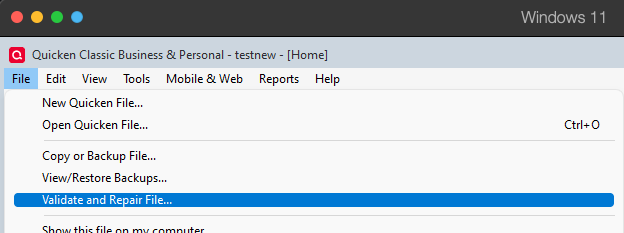
I suggest that you start troubleshooting by validating your data file. Please save a backup file prior to performing these steps.
Validate:
- File
- Validate and Repair File...
- Validate File
- Click OK
- Close the Data Log
- Close Quicken (leave it closed for at least 5 secs)
- Reopen Quicken and see if the issue persists.
Please let me know how it goes!
Quicken Kristina
Make sure to sign up for the email digest to see a round up of your top posts.
0
Categories
- All Categories
- 56 Product Ideas
- 36 Announcements
- 223 Alerts, Online Banking & Known Product Issues
- 22 Product Alerts
- 701 Welcome to the Community!
- 671 Before you Buy
- 1.2K Product Ideas
- 53.7K Quicken Classic for Windows
- 16.3K Quicken Classic for Mac
- 1K Quicken Mobile
- 813 Quicken on the Web
- 111 Quicken LifeHub