Fidelity 401K not synching after reauthorization
I have numerous Fidelity accounts that required recent reauthorization. I was able to get them all authorized and reconnected with the exception of my 401K account. When reauthorizing I see the 401K account along with the other accounts on Fidelity and select it. When I return to the Quicken screen to direct it how to deal with each account (add / ignore /etc) it is missing. I tried this cycle multiple times and no success. I then deleted the 401K account in quicken and went through the cycle of reauthorizing all accounts and Quicken still does not recognize the existence of the account although it's been authorized. Any ideas what is going on and what I can do to address?
Comments
-
Hello @bemery05,
Thank you for letting us know you're seeing this issue. To help troubleshoot, please provide more information. Is the problem account with Fidelity or Fidelity NetBenefits? Is it under the same userID/password as your other Fidelity accounts? Are you the primary account holder or using the primary account holder's credentials when attempting to connect the account in Quicken? Is the account active (transactions other than interest payments posting in the last 90 days)? Is the account completely missing from the Add/Link screen in Quicken, or is it there, but with no option to link it (for example, showing Don't add to Quicken)?
I look forward to your response!
Quicken Kristina
Make sure to sign up for the email digest to see a round up of your top posts.
0 -
Thanks - the account is my current active 401K so it is with Fidelity NetBenefits. It is the same login and password as my Fidelity account and is visible on both sites. I am the primary account holder and it is active. The account is completely missing from the add/link screen in Quicken even though it is available on Fidelity when I authorize it and my other accounts.
Hoping you have some suggestions.
0 -
Thank you for your reply,
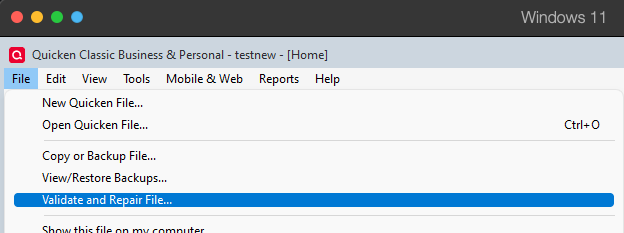
Since none of the factors that would usually cause Quicken to be unable to see an account seem to be causing this, the issue may be a file issue. I suggest that you try validating your data file. Please save a backup file prior to performing these steps.
Validate:
- File
- Validate and Repair File...
- Validate File
- Click OK
- Close the Data Log
- Close Quicken (leave it closed for at least 5 secs)
- Reopen Quicken and see if the issue persists.
Let me know how it goes!
Quicken Kristina
Make sure to sign up for the email digest to see a round up of your top posts.
0 -
Tried each of the steps you recommended.
Restarted Quicken.
Clicked on Add Account in Quicken - went to Fidelity and authorized my 401k along with other accounts - returned to quicken to add / link accounts and still NO 401k.
Very frustrating.
This worked fine prior to Reauthorization process.
Any other ideas?
0 -
Thank you for your reply,
If possible, please try restoring a backup from before the problem started, and test to see if the issue is resolved in that newly restored file.
If the issue is resolved, then I recommend using that newly restored file as your main file. If the issue is not resolved, then return to your main file. For instructions on switching between Quicken files, click here.
Thank you!
Quicken Kristina
Make sure to sign up for the email digest to see a round up of your top posts.
0 -
Really ?? Quicken's advice is start over with my accounts from months ago? How can that be your response.
0 -
Thank you for your reply,
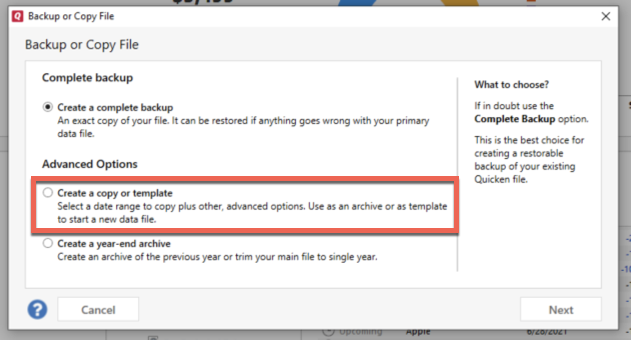
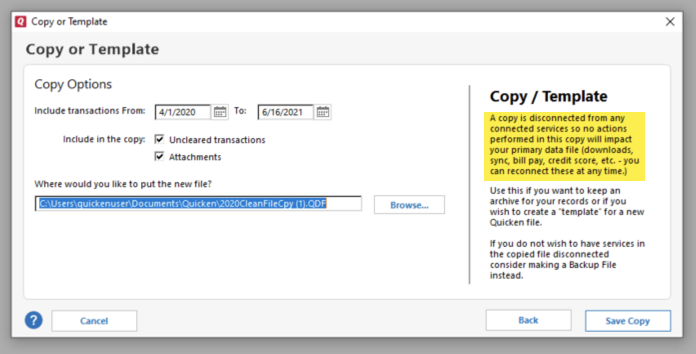
Restoring a backup is the next step when troubleshooting a file-specific issue. If that is not a viable option for you, then the next step is creating a copy of your data file. This will rebuild all of the internal lists and database tables. If successful, you would then move forward with the copied file. To create a copy, please navigate to File > Copy or Backup File... > Create a copy or template (see examples below) which will also allow you to select a date range to move forward with.
If you wish to move forward with your entire data file, please check the full date range of your entire data file before copying so you can enter the correct date range if you do not wish to "shrink" your file by eliminating certain dates. Note - The only reason you would "shrink" your file is if you believe older data is causing the problem. Otherwise, there is not benefit to "shrinking" the file.
It's important to know that all online services will be disconnected in the copied file. You will need to sign back in with your Quicken ID and reconnect all of your online accounts, online billers, Quicken Bill Manager services, etc if you plan to use that copied file going forward. The reason for this is that the new copy also creates a new and separate dataset ID.
Please start by reconnecting only what is needed to verify if the issue is resolved. If the issue is resolved in the copied file, then reconnect your accounts/online services and use the copied file as your main file going forward.
If the issue is not resolved in the copied file either, then feel free to switch back to your original file. For instructions on switching between Quicken files, click here.
Thank you!Quicken Kristina
Make sure to sign up for the email digest to see a round up of your top posts.
0 -
Copied my data file.
Connected the copied data file back to fidelity.
Authorized all my accounts - INCLUDING MY Active 401K.
And Quicken does not see my 401K on the Add / Link page.
All worked fine prior to your re-authorization process. I've made so many changes to update credit cards and other info in my quicken recently that going back to a backup a month or so ago is not the preferred option.
Anything else to try? Don't you have techs who look at my issue?
0 -
Thank you for your reply,
If you want a tech to look at your issue, then I recommend contacting Quicken Support directly for further assistance, since they have access to tools that we can't access on the Community and they're able to escalate the issue as needed. The Quicken Support phone number can be found through this link here. Phone support is available from 5:00 am PT to 5:00 pm PT, Monday through Friday.
I apologize that I could not be of more assistance!
Quicken Kristina
Make sure to sign up for the email digest to see a round up of your top posts.
0
Categories
- All Categories
- 56 Product Ideas
- 36 Announcements
- 223 Alerts, Online Banking & Known Product Issues
- 22 Product Alerts
- 701 Welcome to the Community!
- 671 Before you Buy
- 1.2K Product Ideas
- 53.7K Quicken Classic for Windows
- 16.3K Quicken Classic for Mac
- 1K Quicken Mobile
- 813 Quicken on the Web
- 111 Quicken LifeHub