Spending report displays excluded accounts

elorimer
elorimer Quicken Windows Subscription Member ✭✭
edited November 18 in Reports (Windows)

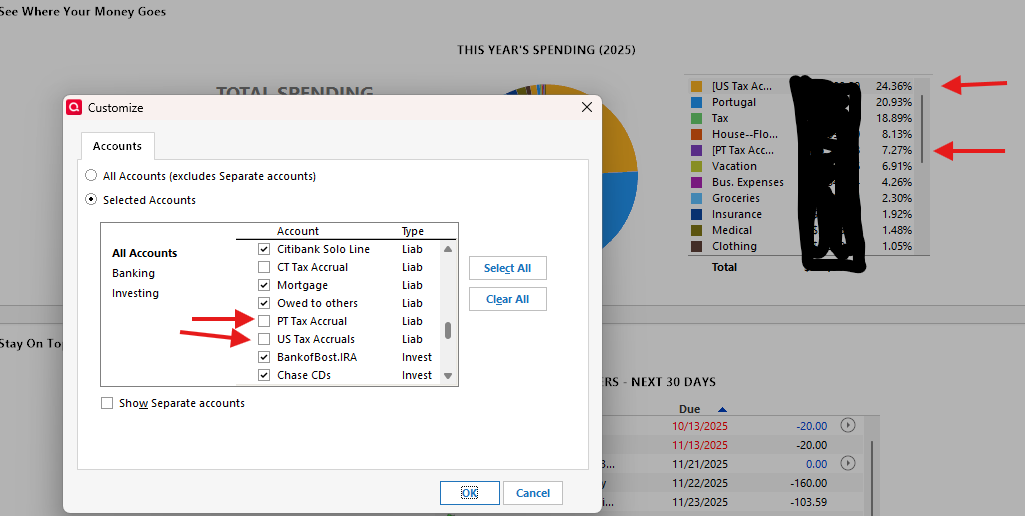
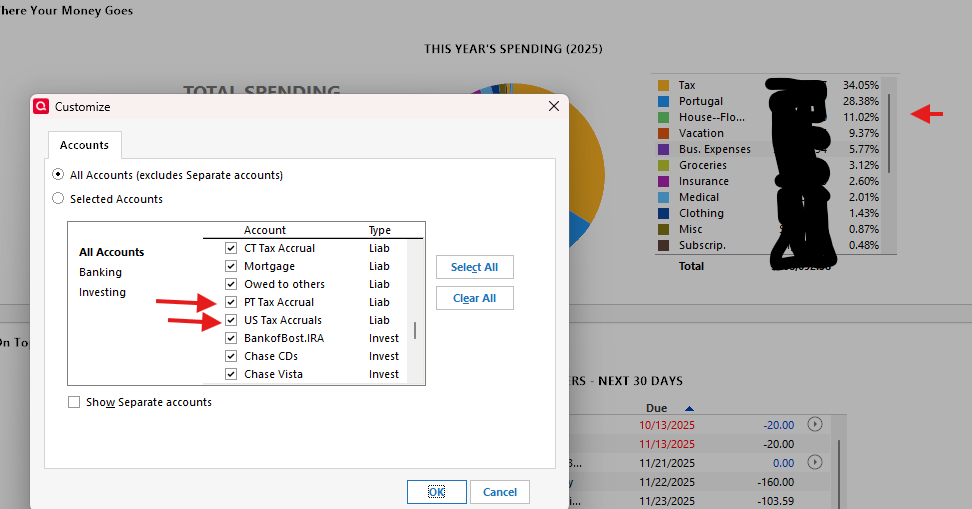
The various spending reports seem to include accounts that are supposed to be excluded. If one selects "custom", and excludes accounts, the reports nonetheless include them.

Tagged:

Comments

  • elorimer
    elorimer Quicken Windows Subscription Member ✭✭

    Actually, it looks like if you check the box to include the account, it gets excluded.

  • Tom Young
    Tom Young Quicken Windows Subscription SuperUser ✭✭✭✭✭

    That's backwards from what I'm experiencing; a checked Account gets included, unchecked Accounts are excluded.

    Can you show an example of what you're seeing?

  • elorimer
    elorimer Quicken Windows Subscription Member ✭✭

    Yes, backwards. Unchecked is included:

    image.png

    And checked is excluded

    image.png
  • Quicken Alyssa
    Quicken Alyssa Quicken Windows Subscription Moderator mod

    Hello @elorimer,

    Thank you for sharing your experience.

    I have some follow-up questions for you.

    • Are you running a report?
      • It looks like you are viewing the Home>See Where Your Money Goes.
        • In this section, the information displayed in the pie chart should be categories, not accounts. Account names [in brackets] are transfer categories. So the ones you are seeing are there because they are used in transfer transactions within the accounts you have selected.

    Hope this helps.

    Quicken Alyssa

    Make sure to sign up for the email digest to see a round up of your top posts.

  • elorimer
    elorimer Quicken Windows Subscription Member ✭✭

    Ah, I see now. Very helpful, thanks.

    To recap: a transfer from an included account to an excluded account is included as an expenditure from the included account. If the excluded account is included, then an transfer into the account is offset by transfers out of the account (and drops out), and transfers out of the formerly excluded account into spending categories are included. Makes sense.

  • Quicken Alyssa
    Quicken Alyssa Quicken Windows Subscription Moderator mod

    @elorimer,

    Happy that this explained what you were seeing.

    If you need more help, don't hesitate to reach back out!

    Thanks again!

    Quicken Alyssa

    Make sure to sign up for the email digest to see a round up of your top posts.