Fidelity Investments not Updating after all the "Fixes"
Windows 11 Pro
Quicken vR64.35, Build 27.1.64.35
None of my Fidelity Investments accounts are updating —they just stopped working. I was able to get them to work briefly after the connection type change, but only after completely deleting the accounts and re-adding them.
As of today, none of my accounts will update. Resetting the accounts does not work. Restoring from backup does not work. Deleting the cache does not work. Deleting and re-adding the accounts does not work. In fact, deleting & re-adding the accounts results in balances so far off it's absurd.
How much longer must we wait for a fix? I'm paying for software that does not work and wasting hours of my time trying to trying to find a fix. I'm always spending time restoring, resetting or tweaking some setting in Quicken to get it to work —not just with Fidelity.
[Removed - Rant]
Comments
-
Hello @nullsetzero,
Thank you for letting us know you're encountering this issue. To clarify, when you say the accounts aren't updating, do you mean transactions aren't downloading? When you said you have been deleting and re-adding the accounts, do you mean you completely deleted the accounts (including all transaction history) and re-added them as new accounts?
I look forward to your response!
Quicken Kristina
Make sure to sign up for the email digest to see a round up of your top posts.
0 -
Approximately a week ago, all three of my Fidelity accounts stopped receiving correct balance and transaction updates in Quicken for Windows.
What happens now:
Quicken appears to connect successfully to Fidelity (no error messages).
The update process completes, but balances and transactions remain stale/outdated.
This began immediately after I was required to re-authorize the accounts using the new Fidelity connection method.What I’ve already tried (multiple times, on copies of my data file):
Deactivate + Reactivate accounts → no change
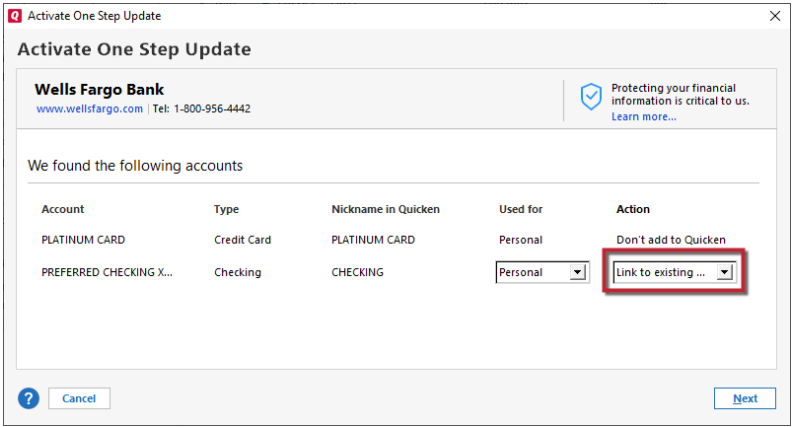
Reset accounts and choose “Link to existing” → updates still fail afterward
Completely delete the accounts (including all transaction history) and re-add them → initial download pulls wildly incorrect balances and incomplete dataAll my other financial institutions (Wells Fargo, Chase, Ameriprise, etc.) continue to update perfectly using the same connection method (Express Web Connect or Direct Connect).
This is a widely reported issue between Quicken and Fidelity that many users are experiencing right now.
Could you please let me know whether Quicken is actively working on a fix with Fidelity, and
an estimated timeframe for resolution?0 -
Thank you for your reply,
When I check our internal tools, I'm not seeing any attempts to connect to Fidelity Investments since the 14th of November. Have you attempted to connect/update your accounts since then? If you have, then I recommend following this step from our article on missing transactions/transactions not downloading:
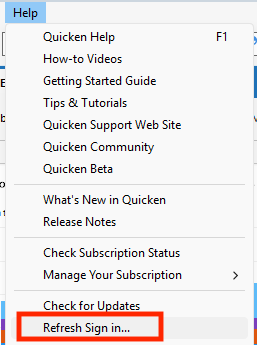
Try refreshing your login session: To do this, go to Help > Refresh Sign in. After completing the log-in process, trying running a One Step Update again.
Please let me know how it goes!
Quicken Kristina
Make sure to sign up for the email digest to see a round up of your top posts.
0 -
Still not updating my Quicken info. Cash balance incorrect. Current stock prices incorrect. Quantity of shares appears to be correct
0 -
Hello @Tonycarom,
Thank you for letting us know you're seeing issues. To help troubleshoot, please provide more information. Is this happening with regular Fidelity accounts, Fidelity NetBenefits accounts, and/or Fidelity HSA accounts? Are you seeing any error messages/codes when you try to update your accounts? Are transactions downloading? Are you able to see what is throwing off your cash balance (for example, holdings being counted as both cash and a holding)? Are the stock prices incorrect for everything, or only certain holdings? If only certain holdings are affected, are they public or non-public holdings?
I look forward to your response!
Quicken Kristina
Make sure to sign up for the email digest to see a round up of your top posts.
0 -
As expected, Refresh Sign In… did not work. If that was the case, none of my other accounts would update/work.
Quicken connects, "processes data" and successfully completes with no error… yet account balances and transactions remain the same -stale. This is clearly a problem with Quicken + Fidelity. I'm not understanding why someone can't simply step through the code and figure out exactly where the error is and fix it. This is so tiresome.0 -
Thank you for your reply,
If you haven't already done so, please try making a backup of your file, deactivating the problem accounts, then before reconnecting them, go to the financial institution's website and revoke Quicken's permission to connect. Once that is done, in your Quicken, navigate to Tools>Add Account and follow the prompts to reconnect your accounts, making sure to carefully link them to the correct nickname in Quicken.
Following that process should ensure that Fidelity issues a new authentication token to Quicken.
Let me know how it goes!
Quicken Kristina
Make sure to sign up for the email digest to see a round up of your top posts.
0 -
I've done this process multiple times as mentioned in my initial post. When you reactivate/relink, the accounts still do not update although the process of relinking them appears to work. I have also completely deleted all Fidelity accounts and readded them. When that is done, the balances are off and don't align with Fidelity. One of my accounts was off >$200k. Madness.
0 -
Thank you for your reply,
You said you've deactivated and reconnected multiple times. The steps I posted included an additional step: revoking authorization through the financial institution website prior to reconnecting your accounts.
Have you done that? If you have not, please try it.
If you have done that, and the issue persists, then I recommend you contact Quicken Support directly for further assistance, as they have access to tools we can't access on the Community and they're able to escalate the issue as needed. Quicken Support's contact information can be found through this link here. Phone support is available from 5:00 am PT to 5:00 pm PT, Monday through Friday. Chat support is available from 5:00 am PT to 5:00 pm PT, 7 days a week.
Thank you!
Quicken Kristina
Make sure to sign up for the email digest to see a round up of your top posts.
0 -
Revoking authorization via Fidelity did not work.
0 -
Thank you for confirming,
I recommend you contact Quicken Support directly for further assistance, as they have access to tools we can't access on the Community and they're able to escalate the issue as needed. Quicken Support's contact information can be found through this link here. Phone support is available from 5:00 am PT to 5:00 pm PT, Monday through Friday. Chat support is available from 5:00 am PT to 5:00 pm PT, 7 days a week.
I apologize that I could not be of more assistance!
Quicken Kristina
Make sure to sign up for the email digest to see a round up of your top posts.
0
Categories
- All Categories
- 56 Product Ideas
- 36 Announcements
- 223 Alerts, Online Banking & Known Product Issues
- 22 Product Alerts
- 701 Welcome to the Community!
- 671 Before you Buy
- 1.2K Product Ideas
- 53.7K Quicken Classic for Windows
- 16.3K Quicken Classic for Mac
- 1K Quicken Mobile
- 813 Quicken on the Web
- 111 Quicken LifeHub