Rollover budget for certain categories each month?
How do I rollover the budget for certain categories each month. If I don't spend the full amount on Alcohol on a given month, I want to roll that remaining balance into the next month. Can't figure this out.
Best Answers
-
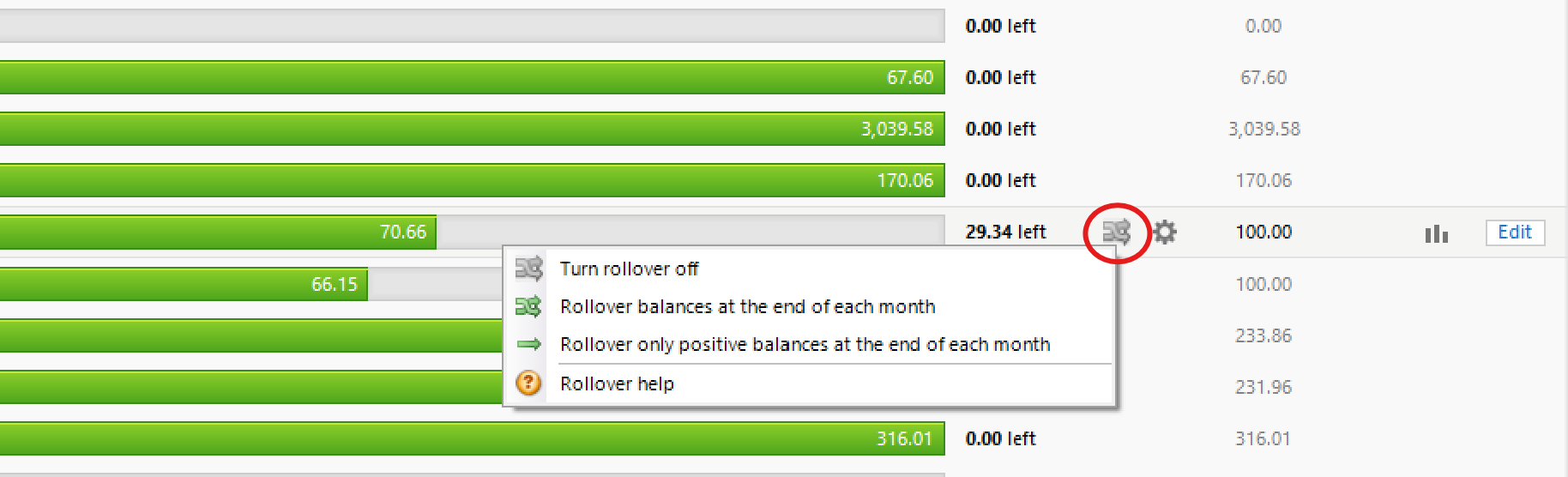
In the monthly planning view, select the category you want to turn rollover budget on. Once selected you will see the options for rollover on the icon.
1 -
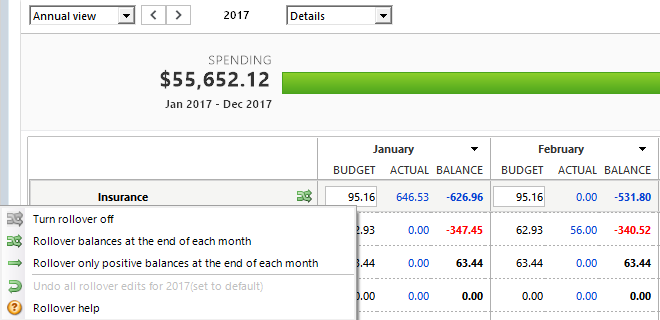
And, if I may add, if you are working with the Annual View of the Budgets view, the same applies:
To turn rollover on or off for a single category click the Category name field, then click the green or gray double-arrow icon and select your action from the popup.
0
Answers
-
In the monthly planning view, select the category you want to turn rollover budget on. Once selected you will see the options for rollover on the icon.
1 -
And, if I may add, if you are working with the Annual View of the Budgets view, the same applies:
To turn rollover on or off for a single category click the Category name field, then click the green or gray double-arrow icon and select your action from the popup.
0 -
Thank you so much!! That is EXACTLY what I was looking for! Quicken is so involved I'm sure I'm not utilizing half of what I could!
0
Categories
- All Categories
- 56 Product Ideas
- 36 Announcements
- 223 Alerts, Online Banking & Known Product Issues
- 22 Product Alerts
- 701 Welcome to the Community!
- 671 Before you Buy
- 1.2K Product Ideas
- 53.7K Quicken Classic for Windows
- 16.3K Quicken Classic for Mac
- 1K Quicken Mobile
- 813 Quicken on the Web
- 111 Quicken LifeHub