One Step update caused balance to be off.
I have Quicken Classic. I just ran a one step update, and now my balance is off by 7963.90. My balance matched before the update. All the transactions since the last download match. In fact, I went back to the opening balance as of Jan 1/2025, and the balance is off by that amount. How can I determine where the missing 7963.90 deposit went? I had to start doing the 1 step update ever since BOA dropped support for downloading Web Connect to Quicken. Also, whenever I do the update, I always get an error. I contacted Quicken support, and they said there is a bug and they are working on it. Any help is appreciated.
[Edited-Readability]
Comments
-
Hello @entrack,
Thank you for sharing your experience, and I am happy to help.
To determine what is causing your balance to be off, you will need to compare your account register in Quicken to a bank statement. Here is a Support Article that goes over reconciling an account. This should help. You will want to look for anything that doesn't match up with the bank, like missing transactions or duplicates.
When you said, "I went back to the opening balance as of Jan 1/2025, and the balance is off by that amount", do you mean that is your actual opening balance transaction that is off by that amount? Or are you just referring to the balance on that date?
If it is the actual opening balance transaction, you can adjust the amount. When seeing a discrepancy like this, the opening balance transaction is a good place to start. I have seen in the past where this transaction amount has changed, causing the account balance to be off.
Let me know what you find.
Quicken Alyssa
Make sure to sign up for the email digest to see a round up of your top posts.
0 -
The opening balance is off everywhere now. Even from a year ago. It seems like the update added and extra 7020 payment somewhere or removed a 7000 deposit somewhere. I was in balance before I download the 5 transactions today.
0 -
Thank you for following up.
Since everything was fine yesterday, let's try restoring a backup from before this issue happened. Once you have it restored, try the One Step Update again and let me know if the discrepancy returns.
Hope this helps!
Quicken Alyssa
Make sure to sign up for the email digest to see a round up of your top posts.
0 -
I have never done this before. When I select Restore from backups, it shows several files under Restore from Automatic backups. The latest is 11/5/2025. Should I just select that and click restore backup?
0 -
Thank you for following up.
If that is your most recent backup, then yes, I would say it's the best choice.
Let me know how it goes!
Quicken Alyssa
Make sure to sign up for the email digest to see a round up of your top posts.
0 -
OK I restored the 11/5 backup and everything was back in sync. I tried the Update again by this time going to Tools > Online Center. I connected but it did not download any new transactions. I didn't want to use one step update because of all the problems I had. Last time I talked to support, they said there was a bug and use Online Center. Any idea how I can get all of the transactions since 11/5 downloaded?
0 -
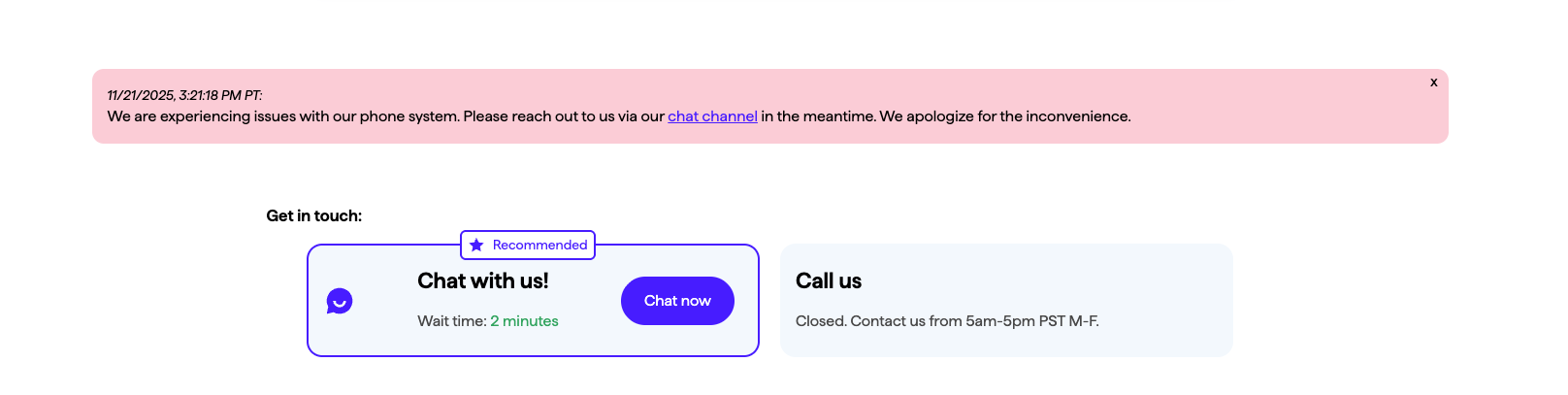
Trying to call support at 650-250-1900. When it tries to transfer me to a representative it disconnects me. I tried several times.
0 -
Hello @entrack,
I'm sorry to hear you're encountering that difficulty contacting Support. When I check our website, I can see it's showing there are currently issues with support by phone:
You should still be able to reach out via chat support though. You can find Quicken's contact information at this link. Chat support is available 5am - 5pm PT, 7 days a week.
I hope this helps!
Quicken Kristina
Make sure to sign up for the email digest to see a round up of your top posts.
0 -
Chat is not able to help me.
0 -
Thank you for your reply,
I'm sorry to hear that chat wasn't able to help.
To make sure I understand the issue correctly, you were previously updating Bank of America accounts using Web Connect/QFX, but since they stopped supporting it, you tried connecting via Express Web Connect+, and your opening balance became incorrect. Is that correct?
If that is what happened, then you may be impacted by the known issue described in this article:
What you can do to correct it is manually correct the beginning balance. If you're not certain what it should be, you can restore a backup from before the issue started and get the correct beginning balance from there. Then, you would switch back to your main file to input the correct beginning balance. For instructions on switching between files, please click here.
If you prefer to import transactions rather than use Express Web Connect +, then you may find this post from one of our Super Users useful:
I hope this helps!
Quicken Kristina
Make sure to sign up for the email digest to see a round up of your top posts.
0 -
Hi Kristina. Yes I was using Connect/QFX and BOA stopped supporting it. Then I ran One Step Update, and it wouldn't work until Support had me deactivate all the accounts and reactivate them. One Step Update still didn't work, so Support had me use the Online Center instead. It downloaded everything, but the balance was off. After a couple hours troubleshooting, I had to fix dates and delete some duplicate transactions. Then everything was working fine for a couple weeks, until I ran One Step Update last week. It made all of my opening balances off, no matter how far I went back, even though it only was supposed to download 5 new transactions. I ended up doing a restore, and then everything was in balance. But then the Online Center download wouldn't work anymore. I got hold of Support yesterday, and they had me deactivate and reactivate everything AGAIN. Now it is all working and everything is in balance, at least until the next time I try to download.
[Edited - Readability]
0 -
Thank you for your reply,
I'm glad to hear that it's currently working.
If it does give you more trouble, please feel free to reach back out!
Quicken Kristina
Make sure to sign up for the email digest to see a round up of your top posts.
0
Categories
- All Categories
- 56 Product Ideas
- 36 Announcements
- 223 Alerts, Online Banking & Known Product Issues
- 22 Product Alerts
- 701 Welcome to the Community!
- 671 Before you Buy
- 1.2K Product Ideas
- 53.7K Quicken Classic for Windows
- 16.3K Quicken Classic for Mac
- 1K Quicken Mobile
- 813 Quicken on the Web
- 111 Quicken LifeHub