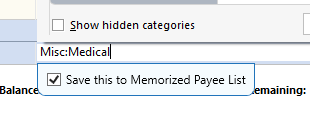
Memorized Payee List

mvwabc
mvwabc Quicken Windows Subscription Member ✭✭✭

How can I change the default for the Memorized Payee List, so that it is not checked?

image.png

Best Answer

  • Chris_QPW
    Chris_QPW Quicken Windows Subscription Member ✭✭✭✭
    Answer ✓

    I just noticed something, hopefully it will work for you.

    Deselect Edit→ Preferences → Data entry and QuickFill → Automatically memorize payees

    Signature:
    This is my website (ImportQIF is free to use):

    http://www.quicknperlwiz.com/

Answers

  • Chris_QPW
    Chris_QPW Quicken Windows Subscription Member ✭✭✭✭

    I deselected the "Save this to Memorized Payee List" and it stayed deselected for me. Have you tried that?

    Note that it is "Under Consideration" to get rid of this or at least have an option to turn off this popup.

    Signature:
    This is my website (ImportQIF is free to use):

    http://www.quicknperlwiz.com/

  • mvwabc
    mvwabc Quicken Windows Subscription Member ✭✭✭

    I have unchecked it several times. I comes up checked always. Assume it is the default. I want default unchecked and I will check if I want memorized.

  • Chris_QPW
    Chris_QPW Quicken Windows Subscription Member ✭✭✭✭

    Well then, I don't know how to fix it. Personally, I just want to whole thing to go away. It just gets in the way. If I want to memorize a payee and just select Ctrl+M (you can also right click and select it from the context menu). I don't know whose idea it was to put it in, but I haven't seen anyone that seems to want it.

    Signature:
    This is my website (ImportQIF is free to use):

    http://www.quicknperlwiz.com/

  • mvwabc
    mvwabc Quicken Windows Subscription Member ✭✭✭

    So, basically you have the same problem. Maybe someone else will tell us how to fix or let us know if they have same problem.

  • Chris_QPW
    Chris_QPW Quicken Windows Subscription Member ✭✭✭✭

    Well, my check box does stay off, so I don't have the exact same problem, but that popup definitely gets in the way no matter what.

    The best solution in my opinion would just to get rid of it since no one seems to want it in the first place.

    Signature:
    This is my website (ImportQIF is free to use):

    http://www.quicknperlwiz.com/

  • mvwabc
    mvwabc Quicken Windows Subscription Member ✭✭✭

    Ok, different problem. I do not get the popup. Just always checked.

    I just think there should be a way to change default.

  • Chris_QPW
    Chris_QPW Quicken Windows Subscription Member ✭✭✭✭

    Yes, I agree. Hopefully they will get it fixed now that it is at least submitted for consideration.

    Signature:
    This is my website (ImportQIF is free to use):

    http://www.quicknperlwiz.com/

  • Chris_QPW
    Chris_QPW Quicken Windows Subscription Member ✭✭✭✭
    Answer ✓

    I just noticed something, hopefully it will work for you.

    Deselect Edit→ Preferences → Data entry and QuickFill → Automatically memorize payees

    Signature:
    This is my website (ImportQIF is free to use):

    http://www.quicknperlwiz.com/

  • mvwabc
    mvwabc Quicken Windows Subscription Member ✭✭✭

    Chris_QPW

    Thank you that worked.