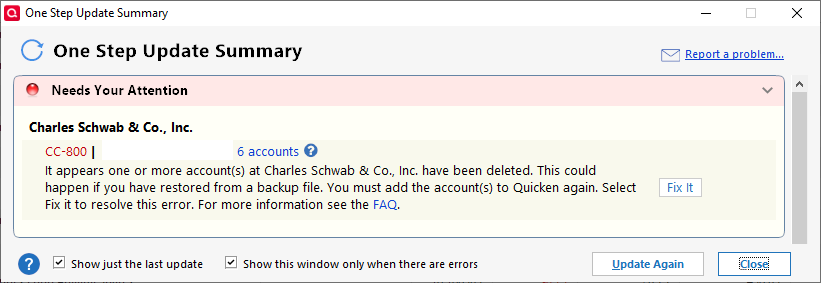
CC-800 Error Message Updating Accounts from Charles Schwab

I have been receiving a CC-800 error after uploading for ~6 months. Until it began, I never received this message. I have made no changes to any of the accounts at Schwab. Not renaming them, not adding accounts, not changing credentials - NOTHING. No accounts were deleted at Schway, nor have I restored from a backup file.
I have repeatedly clicked on the "Fix It" prompt and followed the instructions. Quicken then says the issue is "fixed". Then the next time I update, it occurs again.
This is not preventing my ability to download transactions, which I do daily. All transactions download fine. But it's annoying as h*ll to have to repeatedly see and acknowledge this false error message after every update. I made the mistake of assuming I could trust what Quicken was telling me, thinking there really was a problem, and then go to the trouble of needlessly following your "Fix It" instructions probably a half dozen times before I realized there IS NO problem, so now I just have to acknowledge it after EVERY SINGLE UPDATE.
I have reported this problem to Quicken from within the app (Help / Report a problem…) probably two DOZEN times, yet I never hear a peep from Quicken in response, and nobody ever just FIXES this problem in your updates. You just keep adding new features without fixing existing broken functionality like this first.
Without having to call and endure your customer "support", is there a SOLUTION to this problem?
Categories
- All Categories
- 46 Product Ideas
- 34 Announcements
- 248 Alerts, Online Banking & Known Product Issues
- 22 Product Alerts
- 513 Welcome to the Community!
- 679 Before you Buy
- 1.4K Product Ideas
- 55.4K Quicken Classic for Windows
- 16.8K Quicken Classic for Mac
- 1K Quicken Mobile
- 829 Quicken on the Web
- 123 Quicken LifeHub