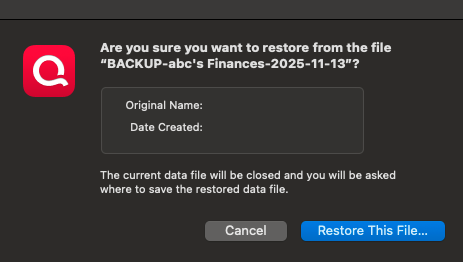
Compounding backup errors. any wisdom welcomed
Just recently switch to new Mac Mini M4, from old intel Macbook pro.
Macbook died the same day I was setting up new Mac. Unreal timing, but I had recently backed it up. Unfortunately Quicken cannot load most recent backup. The data file doesn't show an "original name" or "date created". It then says no file exists. The backup before this one does work, but its two months old representing a lot of data.
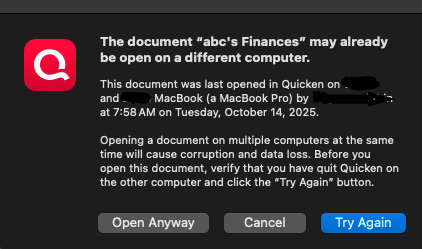
I used time machine to bring over old files, but Quicken will not let me open the old one. It says this file "may be open on a different computer". When clicking "open anyway" or "try again" it doesn't work.
Is there a way to open up my old files from the previous mac? Thanks for any help.
[Edited - Readability]
Comments
-
Hello @wbdcc,
Thank you for letting us know you're encountering this issue. Was the most recent backup stored locally, on the computer that died, or was it stored elsewhere?
You mentioned you brought over an old file from time machine. Do you have that file located directly on your local hard drive? Is the file synced with any cloud service, such as iCloud, OneDrive, or Dropbox? Do you have any antivirus program which may be trying to scan the file as you're trying to open it?
I look forward to your response!
Quicken Kristina
Make sure to sign up for the email digest to see a round up of your top posts.
0
Categories
- All Categories
- 56 Product Ideas
- 36 Announcements
- 223 Alerts, Online Banking & Known Product Issues
- 22 Product Alerts
- 701 Welcome to the Community!
- 671 Before you Buy
- 1.2K Product Ideas
- 53.7K Quicken Classic for Windows
- 16.3K Quicken Classic for Mac
- 1K Quicken Mobile
- 813 Quicken on the Web
- 111 Quicken LifeHub