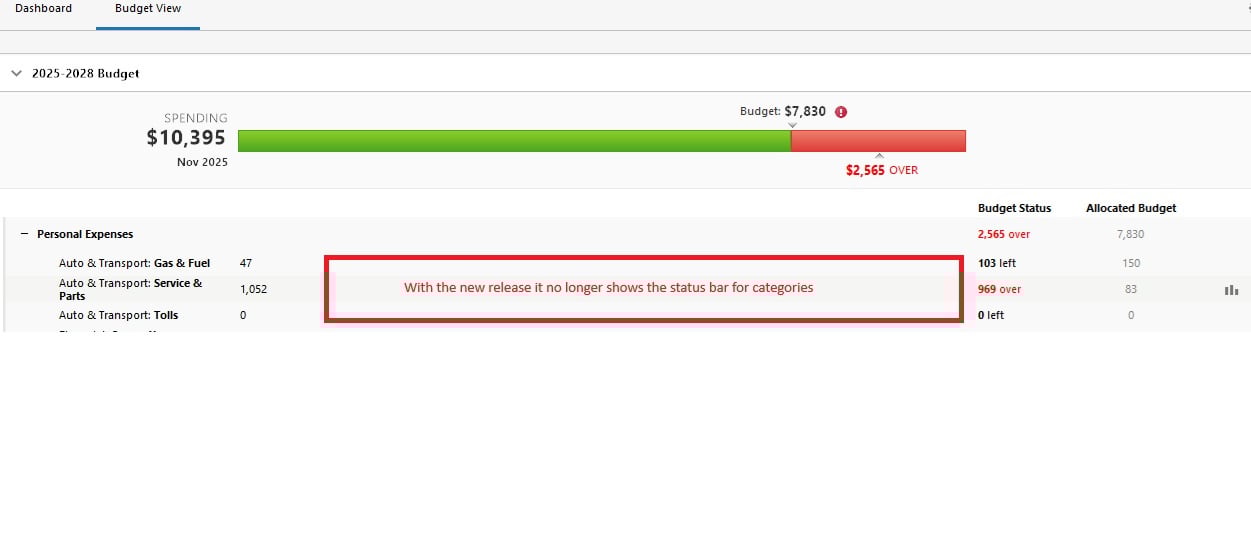
updated to R65.17 and it has removed the status bar for categories but does show it for the total. Please fix…..
Can't confirm if older versions did indeed show status bar for each individual category, because I have never used the Home tab Classical View / Budgets view panel. But, you are right. There are no status bar graph lines on this view. The "full budget" view under the Planning Tab / Budgets / Graph View still shows the graph lines for each category.
Someone from Quicken will have to check and confirm.
Discovered a quick fix….Go to Planning Tab and then go back home and the bars are back!!!
Hey @RichardSchreyer did this work around 'stick' for you? I can confirm prior to my post that @UKR was right about how the planning→ budgets tab with 'Graph view' always showed them but I use my own dashboard page off of 'Home' and selected the budgets I wanted to view that is the one that went missing so I am curious if this is your use case and if you have noticed them to continue to be present after multiple days/iterations because I am pretty sure working with the tech one of the things I tried made them show but not permanently implying some sort of non-deterministic behavior.
Hello All,
Thank you all for taking the time to report this issue. We understand how disruptive it is to lose the budget progress bars on the Home tab, especially when this functionality is something many of you rely on daily.
This behavior has been confirmed as a bug introduced in the recent update, and it is currently being actively worked on by our development team. The issue is being tracked internally, and a fix is in progress. At this time, however, we don’t have an ETA for when the fix will be released.
Once a fix is available, it will be included in a future update.
Thank you for your patience! (CTP-15435)
I've found that if I switch the Budget View in the Planning Tab to the graph (rather than Annual) view and go back to the Home Tab the problem will resolve. When it doesn't, I click on Settings/Select Budget and choose a previous budget. Most often that will populate the progress bars. Switching back to the current budget does not make them go away. Certainly not a fix, but maybe some good symptoms for the troubleshooters.
Hello @Kamikaze,
Thank you for sharing those steps—this is very helpful information.
I’ll pass your observations along to our team to assist with their investigation (CTP-15435).
As mentioned previously, a fix is still in progress, though we do not have an ETA available. In the meantime, thank you for helping identify workable temporary workarounds that may help other users.
Thank you!