Quicken Classic Premier is not importing all transactions in the .QFX file

lhtetrick
lhtetrick Quicken Windows Subscription Member

Windows 11 Quicken Classic Premier Version R65.17 Build 27.1.65.17

I started having issues importing my banking transaction downloads a few weeks ago, but I have been using Quicken and importing my banking transaction downloads successfully for years. The file I downloaded today has the missing transactions (one on 11/26/2025 for 500.00, and another on 11/27/2025 for 300.00) that Quicken did not import. The financial institution is Randolph Brooks Federal Credit Union (RBFCU).
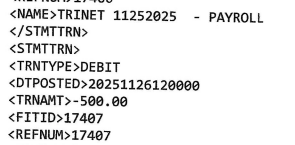
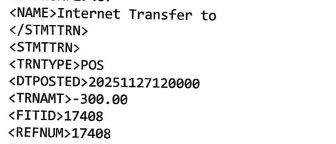
Screenshot 2025-11-30 at 4.24.44 PM.png Screenshot 2025-11-30 at 4.25.02 PM.png

[Edit - Removed partial account numbers]

Comments

  • Quicken Kristina
    Quicken Kristina Quicken Windows Subscription Moderator mod

    Hello @lhtetrick,

    Thank you for letting us know you're encountering this issue. To help troubleshoot, please provide more information. I can see in the problem report you submitted that this has been going on for 3-4 weeks. Is there any pattern to the transactions that aren't importing (such as always being the same type of transaction or same amount)? If you update more than one account using QFX files, is this issue happening in just one account, or in multiple accounts? Do you have any manually entered transactions or reminders in your register, or just the imported transactions?

    Typically, if specific transactions are failing to import, it's because Quicken either thinks those transactions already were imported or because they are being matched to transactions already in the account register. Are there any similar (same payee & amount) transactions they may be incorrectly matching to?

    I look forward to your response!

    Quicken Kristina

    Make sure to sign up for the email digest to see a round up of your top posts.
