Fidelity Securities Mismatch FZFXX Treasury MMF

DaveQN
DaveQN Quicken Windows Subscription Member ✭✭

I'm on Quicken R65.17 which is current. I have 2 Fidelity brokerage account that have Treasury Money Market Fund FZFXX as their core checking accounts. When comparing holdings in the Online Center both show a securities mismatch. My main brokerage account just recently correctly posted a dividend reinvested in my core checking account but it does not show in my core checking account although it shows a transfer to checking. And, the Shares Reported shows 251,000 shares and in Quicken 726 shares. This brokerage account does not show a cash position which is correct.

And in my other Fidelity account with FZFXX as it's core, comparing holding shows 0 shares in Quicken and 101,000 reported by Fidelity. This brokerage account correctly shows the cash position.

Is Quicken and Fidelity still having a problem with FZFXX as a core checking account? Is there something I can do to fix this or just have to wait until these problems are sorted out? My checking account in Quicken is becoming so messed up that I can't use it in Quicken anymore. Thanks.


Comments

  • DaveQN
    DaveQN Quicken Windows Subscription Member ✭✭

    @Quicken Kristina ,

    Can you please take a look at my post regarding securities mismatch with Fidelity FZFXX ever since the required Fidelity reauthorization? After deactivating and re-activating my Fidelity account today Quicken holdings comparison still shows a securities mismatch of 0 shares in Quicken and 56000 shares reported. I have a separate Fidelity account for my cash checking with the $56000 balance.

    The same thing continues to occur with my other Fidelity account with FZFXX as its core cash account as well. Quicken shows 0 shares and Fidelity something else that correctly reflect the account's cash balance.

    Thank you.

  • Quicken Kristina
    Quicken Kristina Quicken Windows Subscription Moderator mod

    Hello @DaveQN,

    Thank you for letting us know you're seeing this issue. Based on your description, it sounds like the account that is seeing 0 shares in Quicken is probably tracking that security as cash. You mentioned the brokerage account is correctly seeing the cash position. To clarify, do you mean Fidelity is reporting correctly, or that what Quicken shows is correct?

    I look forward to your response!

    Quicken Kristina

    Make sure to sign up for the email digest to see a round up of your top posts.

  • DaveQN
    DaveQN Quicken Windows Subscription Member ✭✭
    edited December 3

    Thanks @Quicken Kristina.

    When doing a Compare to Portfolio in the Online Center, Fidelity correctly reports the 56,000 shares. Quicken incorrectly shows 0 shares. My Fidelity checking account in Quicken correctly shows the 56,000 shares. My Fidelity Brokerage account in Quicken does not display a cash balance, only a securities value balance.

    When I look at Account Details in Quicken for the Fidelity Brokerage account, the Show Cash in a Checking Account button is selected as Yes.

    Thanks again!

  • DaveQN
    DaveQN Quicken Windows Subscription Member ✭✭

    @Quicken Kristina, just checking with you regarding your thoughts on my Quicken EWC+ problem.

  • DaveQN
    DaveQN Quicken Windows Subscription Member ✭✭

    @Quicken Kristina, the discrepency between shares reported by Fidelity vs. what's shown in Quicken continues. Is this problem specific to having Fidelity FZFXZX as my core checking account? I also verified my file which didn't help.

  • Quicken Kristina
    Quicken Kristina Quicken Windows Subscription Moderator mod

    Thank you for your replies,

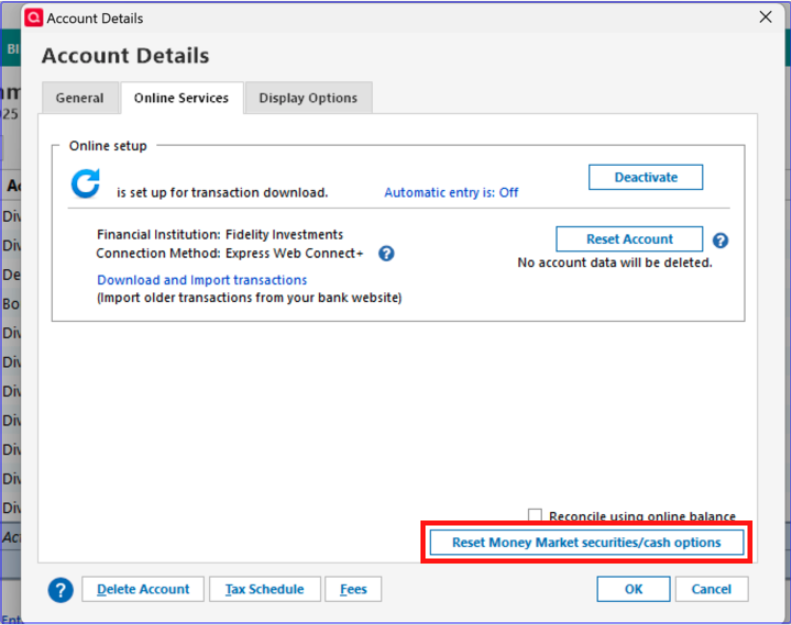
    I suspect that the reason for the discrepancy is because Quicken is seeing FZFXX as cash, while Fidelity is reporting it as shares. If Fidelity is correct, and it should be represented as shares, then you may need to reset your cash representation. You can do that by navigating to Tools>Account List, clicking the Edit button next to the problem account, clicking on the Online Services tab, then clicking on the Reset Money Market securities/cash options button.

    reset money market option.png

    I hope this helps!

    Quicken Kristina

    Make sure to sign up for the email digest to see a round up of your top posts.

  • DaveQN
    DaveQN Quicken Windows Subscription Member ✭✭

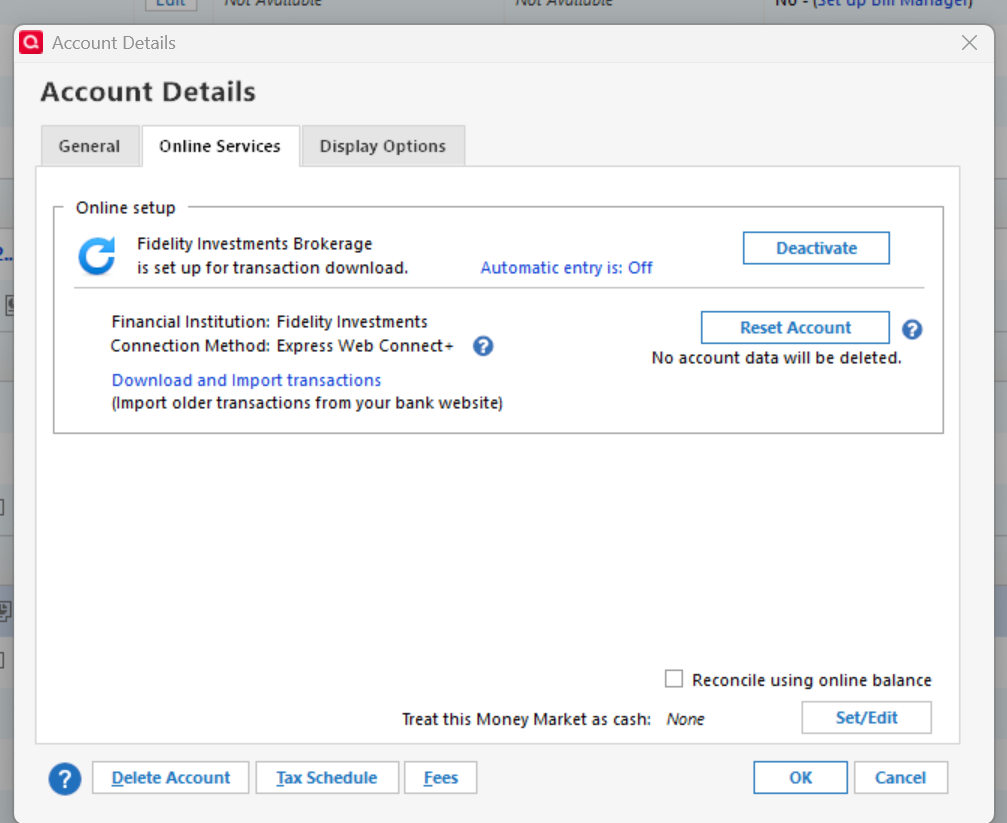
    Thanks @Quicken Kristina, my screen options are a little different for Treating Money Market as cash., This is what I have:

    image.png

    image.png

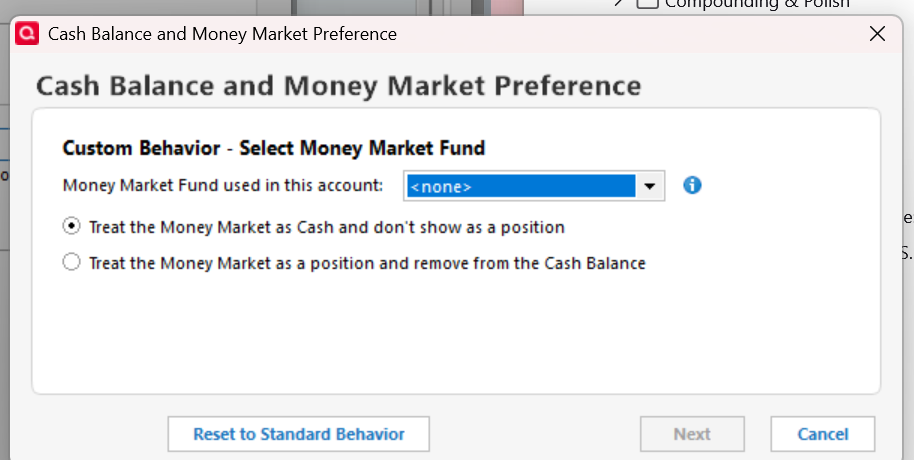
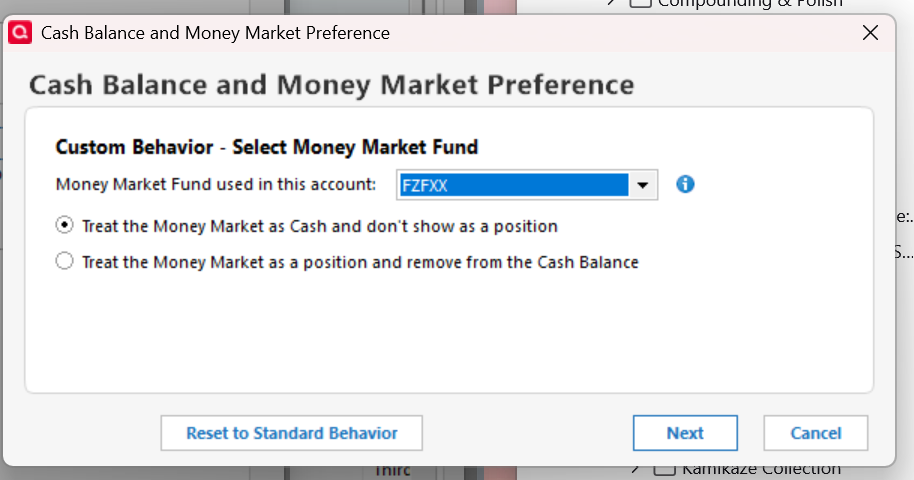
    And I can change the Money Market Fund to my FZFXX as shown here:

    image.png

    So are you suggesting I change this to Treat Money Market as a position and remove from the Cash Balance? Will this change some transactions in my checking or brokerage account registers? And if I choose Reset to Standard Behavior, what behavior is that? Thanks!

  • DaveQN
    DaveQN Quicken Windows Subscription Member ✭✭

    @Quicken Kristina, here's a little more info. We have 3 Fidelity accounts. One account has SPAXX as its core cash. The investment register shows a cash balance and it's correct. Compare to Portfolio shows Quicken and Fidelity are in agreement on the cash. So no problem with that account.

    The other 2 accounts have FZFXX as it's core cash and both have the exact same problem with a securities mismatch for FZFXX. One brokerage account does not have a linked checking account and its investment register properly shows the correct cash balance. The other account is what we've been discussing.

  • DaveQN
    DaveQN Quicken Windows Subscription Member ✭✭

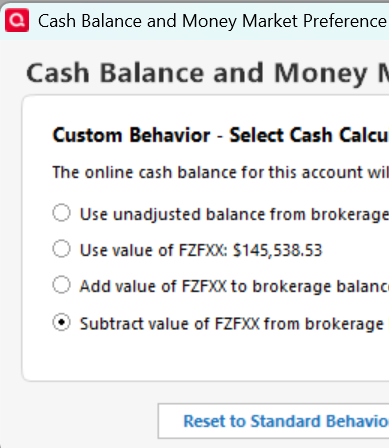
    @Quicken Kristina, can you please suggest which of these options I should choose to resolve my problem? This is after I choose the option to treat the Money Market as a position and remove from the cash balance.

    image.png
  • Quicken Kristina
    Quicken Kristina Quicken Windows Subscription Moderator mod

    Thank you for your replies,

    Before changing the setting, it's a good idea to backup your Quicken file. Then, you would want to select the option that best fits the issue. Your earlier posts indicated that the cash balance in the problem account is incorrect. If it's reading too low (by the value of FZFXX), then you would want to add the value of FZFXX. If it's too high (by the value of FZFXX), you would want to subtract the value of FZFXX. If it should match FZFXX's value, but doesn't, you would want to select "Use value of FZFXX". If the cash value is currently correct, then you would opt for the unadjusted balance.

    Thank you!

    Quicken Kristina

    Make sure to sign up for the email digest to see a round up of your top posts.

  • DaveQN
    DaveQN Quicken Windows Subscription Member ✭✭

    @Quicken Kristina ,

    After trial and error and about 6 restores I finally found the right combination of options for dealing with FZFXX as my core cash account. I had to treat Money Market as Cash Don't show as a Position and Use Value of FZFXX. This worked and Holdings Compare to Portfolio are in agreement and brokerage & checking accounts are correct. Thanks for your help!

  • Quicken Kristina
    Quicken Kristina Quicken Windows Subscription Moderator mod

    Thank you for the follow-up,

    I'm glad to hear you were able to find the right combination of options to correct the issue!

    If you need further assistance, please feel free to reach out!

    Quicken Kristina

    Make sure to sign up for the email digest to see a round up of your top posts.