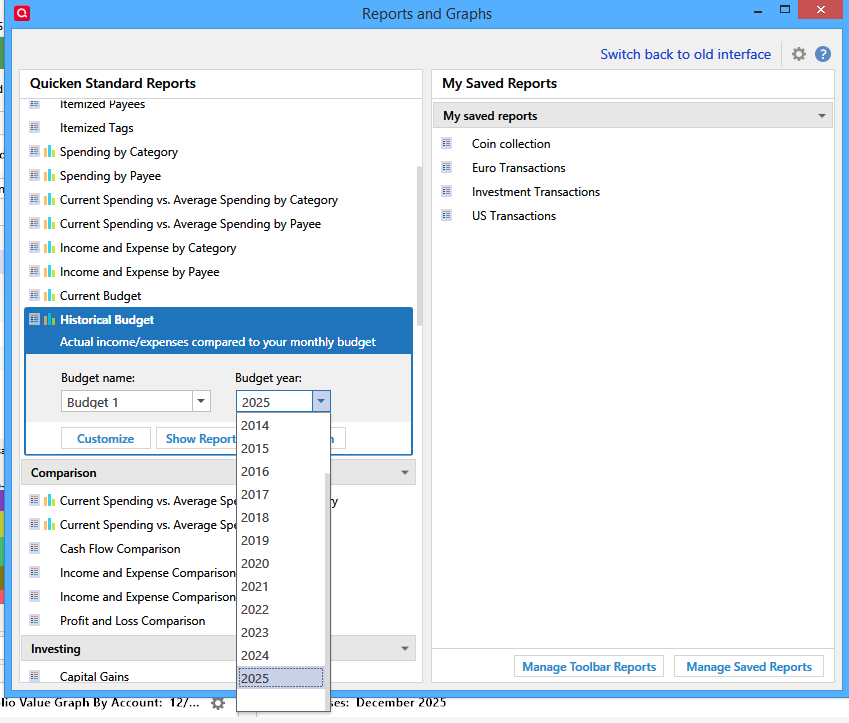
Budget Year Drop Down Menu

Elkridge57
Elkridge57 Quicken Windows Subscription Member

When looking at a budget, Quicken Premier Classic requires you first to input a budget year and you're forced to do this in a drop-down menu that shows the oldest year first. This is a bit of a pain if you have been using quicken for a long time and you look at your budget allot. I've had this "issue" for years, but just now making the suggestion. It would help a ton if the program could (1) initially default to the current year with no input needed (instead of making me scroll down from 2012 to 2025) and (2) list the years from most recent to oldest. Thanks for taking this into consideration. Not a huge deal, but a great, easy, no-brainer change to make things faster.


1
1 votes

New · Last Updated

Comments

  • UKR
    UKR Quicken Windows Subscription SuperUser ✭✭✭✭✭

    Which report view are you selecting? Current Budget or Historical Budget?

    Is this the view you are talking about? My Historical Budget report seems to default to the current budget year every time I select it from the Reports & Graphs Center

    Screenshot (114).png

    BTW, what version, edition level (Starter, Deluxe, etc.) and release (R xx.xx) of Quicken are you using?
    US, Canadian or other country version?
    Is your subscription expired or still active?
    Click Help / About Quicken to get this information.