Quicken Classic for Mac date and time error
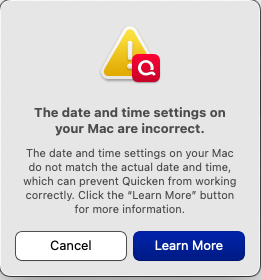
The date and time on my Mac OS Monterey 12.7.6 is set automatically, and shows the correct time and location. However Quicken Classic Deluxe Version 8.3.3 chronically posts this error. Quitting and restarting Quicken, rebooting the Mac - nothing stops this wrong message from appearing many times each work session. I'm tired of pressing Cancel to continue my work. Is there a fix or work-around?
Answers
-
Is your Settings > Region set to United States? Can you post a screenshot of your Mac's Settings > Date & Time settings?
I haven't seen anyone else reporting this, so I think it's pretty likely to be something in your macOS settings that's setting off the error in Quicken.
Is it possible for your Mac to be upgraded to a newer operating system than Monterey? Even one step forward to Ventura (macOS 13)? I wonder if that might fix the issue.
As a side note about operating systems: Officially, Quicken supports the current macOS (Tahoe) and two prior versions (Sequoia, Sonoma). Unofficially, Quicken Mac also currently support the two operating systems older than Sonoma (Ventura, Monterey). Quicken Mac dropped support for the next oldest version of(Big Sur) in January 2025, so it's quite likely that support for Monterey could be dropped in the first half of 2026.
Quicken Mac Subscription • Quicken user since 19930 -
I’m now on a trip and can’t post more screenshots. The System Prefs are set for US, Automatic time, and the upper right desktop showed correct date and time. My 2014 computer is running the lastest OS it can support. Here is the last person who complained about the same problem:
0
Categories
- All Categories
- 56 Product Ideas
- 36 Announcements
- 225 Alerts, Online Banking & Known Product Issues
- 22 Product Alerts
- 703 Welcome to the Community!
- 671 Before you Buy
- 1.2K Product Ideas
- 53.7K Quicken Classic for Windows
- 16.3K Quicken Classic for Mac
- 1K Quicken Mobile
- 812 Quicken on the Web
- 111 Quicken LifeHub

