Account name changed to N/A and won't accept renaming

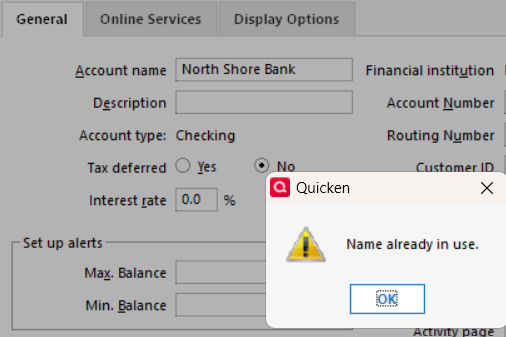
I added a checking account with the correct account name and it was seemingly deleted, and replaced with N/A. I try to rename it in the edit account window, but get an error that that account name is already in use (by this account, duh). Other than deleting the account and recreating, which I'm not averse to, since it is a new account and there aren't many entries, what can I do. And why is this happening?
BTW this is coincident with another problem I'm having with entries in checking accounts seemingly disappearing, but seemingly still there since the entry lines are there.

Answers
-
Sounds like a File Validation, both Validate and Supervalidate, might be in order to repair this damage.
If that doesn't work, restore your Quicken data file from a backup taken before this issue first occurred.
Validate and Supervalidate instructions
Validate:
• Click File
• Select Validate and Repair File...
• Select Validate File
• If the data file contains investment accounts also select "Rebuild investing lots".
• If you suspect that a damaged Quotes Price History causes your problems, also select "Correct investing price history" functions "Delete" or "Repair and Rebuild".
• Click OK
• Review the Data Log. Anything interesting in there, worthwhile posting here?
• Close Quicken, leave it closed for about 30 secs
• Reopen Quicken and see if the issue persists.Super Validate:
• Click File
• Press and hold both CTRL and Shift keys while you click Validate and Repair File...
• Select Supervalidate File
• Click OK
• Review the Data Log. Anything interesting in there, worthwhile posting here?
• Close Quicken, leave it closed for about 30 secs
• Reopen Quicken and see if the issue persists.0 -
So, I have performed a validate before, but did so again. There were many damaged Data Blocks and Data Records. Surprisingly, after doing the validate, when I subsequently performed a Super Validate on the file just Validated, I still got a number of damaged Data Blocks and Data Records. The Validate did remove the blank lines, but many entries that I had accepted and reconciled just yesterday were removed.
After performing a Super Validate, I still am not able to successfully rename an account (says the file name is already in use). If I try to change to an alternate name and close the file, the next time I open it, the name is again N/A.
I don't see anything that seems out of the ordinary in the log file (attaching as I'm no expert). I removed most of the damaged Data Blocks/Records entries as they don't show any distinct information. I also removed any seemingly irrelevant/personal info.
0 -
Also, when I do an Account List and show hidden accounts, the N/A account is listed, but not the name of this account (or any variation) that I try to change it to.
0

Categories
- All Categories
- 18 Product Ideas
- 34 Announcements
- 247 Alerts, Online Banking & Known Product Issues
- 19 Product Alerts
- 518 Welcome to the Community!
- 682 Before you Buy
- 1.5K Product Ideas
- 55.7K Quicken Classic for Windows
- 16.8K Quicken Classic for Mac
- 1K Quicken Mobile
- 834 Quicken on the Web
- 128 Quicken LifeHub