QDF file triggers Windows Installation attempt

Bob@45
Bob@45 Member ✭✭✭✭

Starting today, after applying recent update.

I frequently launch Quicken by double-clicking on my QDF file. I have two of them, and I choose which one I want to work on.

When I do, the Windows Installer launches, and then fails trying to install what looks like one of last month's updates.
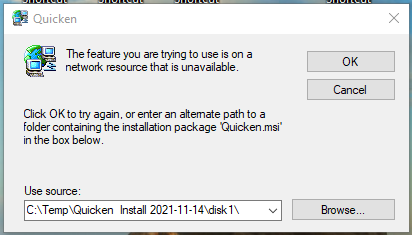
image.png

If I launch Quicken itself from my task bar, it works fine, and I'm able to select any QDF file I want. It's a minor irritation to have to do that, rather than select my file in Windows and go.

I'm guessing this is related to the qfx-file-triggers-windows-installer-applications issue.

Bob M

Comments

  • Quicken Anja
    Quicken Anja Moderator mod

    Hello @Bob@45,

    Thank you for reaching out to the Community and telling us about your issue!

    Have you tried uninstalling/reinstalling Quicken? Please refer to the following support articles for instructions on uninstalling here and reinstalling here.

    However, after you have uninstalled and before you proceed with reinstalling, please open your Windows File Explorer and navigate to This PC > C: Drive > Program Files (x86) and delete the folder titled "Quicken" (doing so does not affect your data files).

    image.png

    After you have deleted this folder, go ahead and try reinstalling.

    Let us know how it goes!

    -Quicken Anja
    Make sure to sign up for the email digest to see a round up of your top posts.

  • Bob@45
    Bob@45 Member ✭✭✭✭

    Thanks. No, I have not tried uninstalling and reinstalling, because per the note by Dyeatman to the related QFX problem in

    it loses the settings, and I haven't yet taken the time to record which settings I use. I've modified enough of them that I don't want to just wipe them out.

    I see DavdM later reported that he fixed the problem by simply re-installing, I assume from the comprehensive full-patch system. I may try that first, but not until after I've completed my EoM financial updates and reconciliations.
