Duplicate register entries from scheduled bills

Rick56
Rick56 Member ✭✭✭

Hello, I am seeing duplicate entries in my checking register from scheduled transaction in Bills and Income. I can tell which one are the bogus entries from the setup. The duplicates do not have the categories or the transaction type in the register. I have been deleting the duplicates, but it is getting annoying. I am attaching a couple of screenshots for review. Thanks.

The screenshot of the Bills and Income are from Jan since the Dec bills have already posted in the register.


Comments

  • Quicken Kristina
    Quicken Kristina Quicken Windows Subscription Moderator mod

    Hello @Rick56,

    Thank you for letting us know you're encountering this issue. To help troubleshoot, please provide more information. When did you first notice this issue? Do you keep your Quicken file directly on your local hard drive? Is it synced with any cloud service, such as OneDrive, iCloud, or Dropbox?

    If you haven't already done so, I suggest that you try validating your data file.  Please save a backup file prior to performing these steps. 

    Validate: 

    1. File
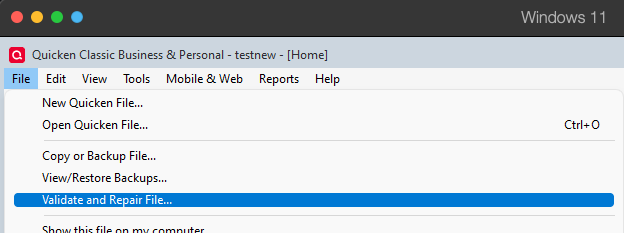
    2. Validate and Repair File... Validate and repair.png
    3. Validate File
    4. Click OK
    5. Close the Data Log
    6. Close Quicken (leave it closed for at least 5 secs)
    7. Reopen Quicken and see if the issue persists.

    I look forward to your response!

    Quicken Kristina

    Make sure to sign up for the email digest to see a round up of your top posts.

  • Rick56
    Rick56 Member ✭✭✭

    Quicken Kristina,

    I started noticing this about a month ago. At first, I thought it was just an anomaly, so I deleted and re-entered the reminders to make sure I had no duplications. My Quicken installation and datafile are on my data drive (D:/). The only online copy of my datafile is with Quicken online backup. I have that set to make a backup every 10 times I open my Quicken. I also keep it cleaned up to backups no older than 4 to 6 weeks. The lone exception is the logfile for operations. That is set for the default location (C:/Users>"username">AppData>Roaming>Quicken>Log).

    I ran the Validate and Repair. I am attaching a screenshot of the logfile and what it did to my reminders.

    I was able to restore my data file from this morning's online backup.

    One more thing, I noticed that I mentioned this was happening in my checking register. It also happened in the register for one of my credit cards that has bill reminders. Not sure what to do next.

    Thanks

    Rick Peno

  • Quicken Kristina
    Quicken Kristina Quicken Windows Subscription Moderator mod

    Thank you for your reply,

    Please try restoring a backup from before the issue started happening, then test to see if the issue happens in that newly restored file.

    Thank you!

    Quicken Kristina

    Make sure to sign up for the email digest to see a round up of your top posts.

  • Rick56
    Rick56 Member ✭✭✭
    edited December 9

    I can try if I can figure out about the time it started happening. That could be as far back as 2 months ago.

    One question, is there a way I can see when the last version update was? A logfile, an update marker of some kind?

    Thanks

    Rick Peno

  • Quicken Kristina
    Quicken Kristina Quicken Windows Subscription Moderator mod

    Thank you for your reply,

    I'm not aware of a way to see exactly when the Quicken program on your device updated, but you can check the article linked below to see when each patch was officially released. That should give you a general idea of the timeframe.

    I hope this helps!

    Quicken Kristina

    Make sure to sign up for the email digest to see a round up of your top posts.

  • Rick56
    Rick56 Member ✭✭✭

    Kristina,

    I did a small test this evening. I restored a database from 11/19/25. This is before the 2 releases in November.

    Of course, it really looked wild since there were so many transactions on all accounts that were not entered and all sorts of bills/incomes past due. I ran a Validate and Repair and it DID NOT whack my database out as it had before. That is a promising start to my testing but I have so far to go. I will do much more in depth testing and let you know what I find.

    Reminds me of my days when I was a consultant on an Oracle application helpdesk before I retired. 😎

    Thanks

    Rick Peno

  • Quicken Kristina
    Quicken Kristina Quicken Windows Subscription Moderator mod

    Thank you for the update,

    I'm glad to hear that things are behaving better in the restored file.

    Please let me know how your additional testing goes!

    Quicken Kristina

    Make sure to sign up for the email digest to see a round up of your top posts.