How do I stop new accounts and categories from being added to existing reports
I have made profit and loss reports for several rental properties and am having difficulty keeping them valid. Every time I add a new account or new income/spending category those new items are automatically added to every report. I do get a "Saved Report Alert" when opening, but even though I select "view report as I saved it" the system seems to still add the new categories and accounts. I have to notice the statements are incorrect, then manually go through every report to identify and then remove the accounts and categories that were automatically added.
Is there a way to setup the reports so new accounts and categories need to be manually added to reports?
Answers
-
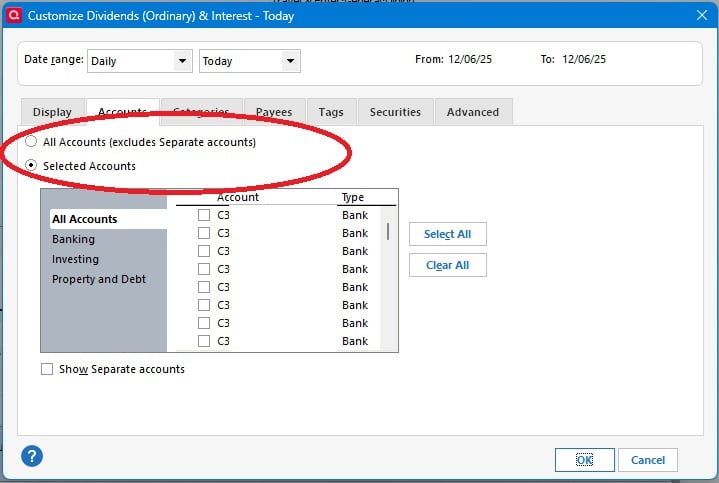
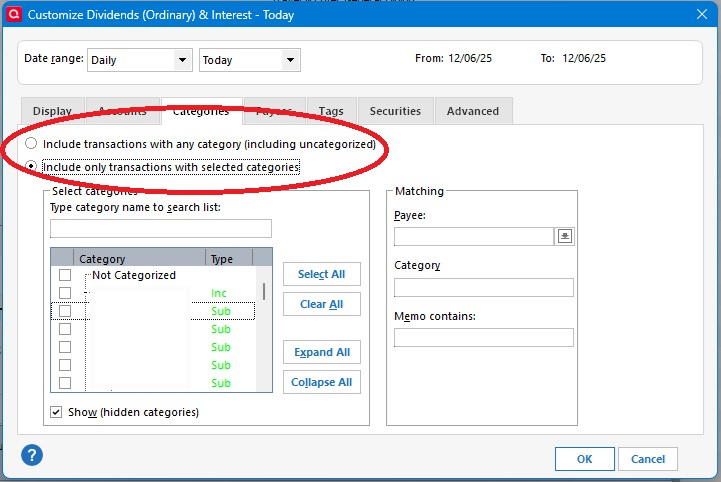
The first thing I would check is to see is when the report were originally saved, what options were selected as noted in the following screenshots. I'm pretty sure that if the "Selected Accounts" & "Selected Categories" options weren't chosen when the reports were saved, you're going to get new accounts and categories added to the report even if you tell Quicken to "View report as saved" when prompted.
- Quicken user since 1992 (back in the good old DOS Version days)
- I don't use Cloud Sync, Mobile & Web, Bill Pay/Mgr, Budgeting, Tax Planner
0 -
I also have the same issue. I have those settings, but Quicken seems to randomly add new accounts. I am always checking the reports.
0
Categories
- All Categories
- 60 Product Ideas
- 36 Announcements
- 219 Alerts, Online Banking & Known Product Issues
- 21 Product Alerts
- 704 Welcome to the Community!
- 671 Before you Buy
- 1.2K Product Ideas
- 53.9K Quicken Classic for Windows
- 16.4K Quicken Classic for Mac
- 1K Quicken Mobile
- 812 Quicken on the Web
- 115 Quicken LifeHub